 Dedupely Intelligence

Single Sign-On and Provisioning
Let your team sign in with your identity provider, and add and remove people automatically.


With single sign-on (SSO), your team signs in to Dedupely with your company's identity provider, like Microsoft Entra, Google Workspace or Okta. With user provisioning (SCIM) or Google Workspace sync, your identity provider adds, updates, deactivates and removes people in Dedupely as they join, change roles or leave. Single sign-on and SCIM are included in every paid plan.
How to open Sign-in & Provisioning
- Click your profile icon at the top right and select Company Settings.
- Select Sign-in & Provisioning.
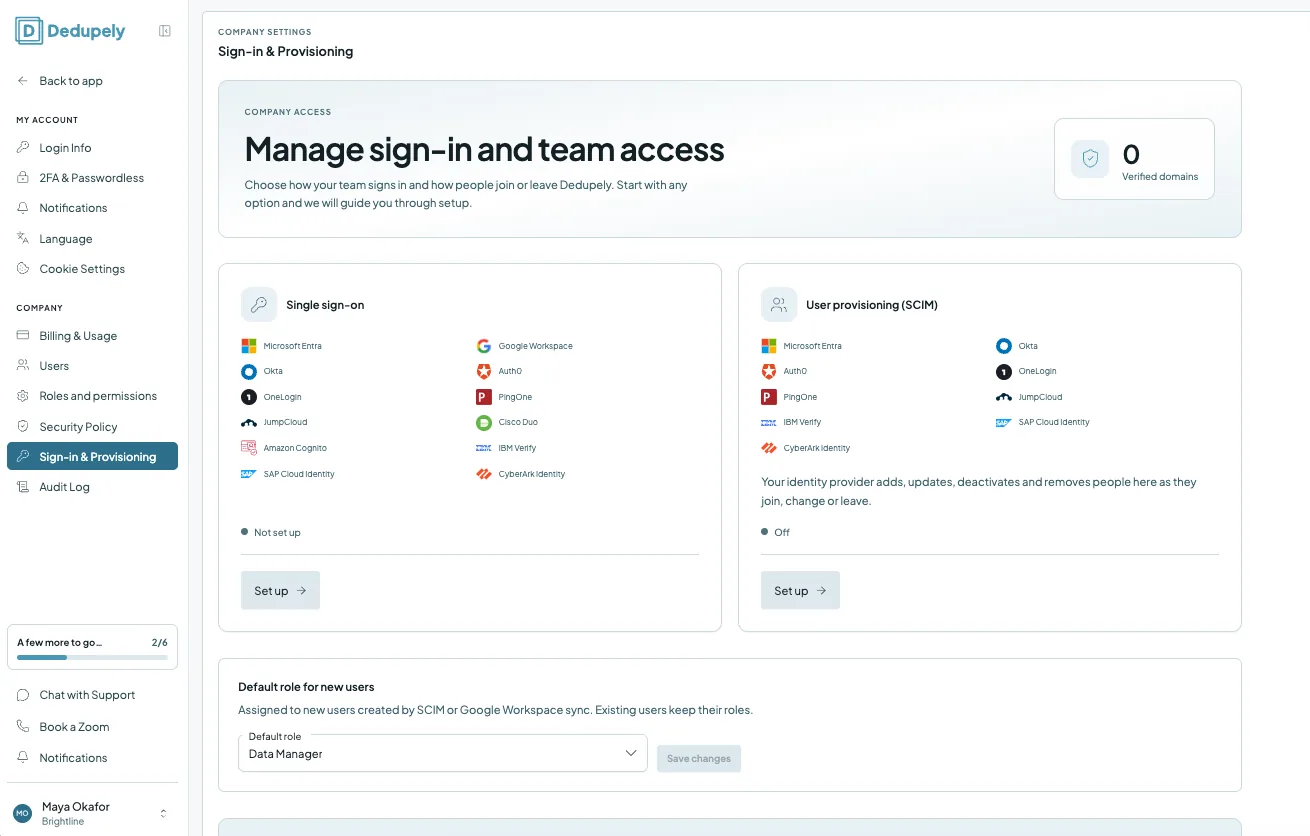
The page shows how many domains you've verified, and the status of single sign-on and user provisioning.
Supported identity providers
| Providers | |
|---|---|
| Single sign-on | Microsoft Entra, Google Workspace, Okta, Auth0, OneLogin, PingOne, JumpCloud, Cisco Duo, Amazon Cognito, IBM Verify, SAP Cloud Identity, CyberArk Identity |
| User provisioning (SCIM) | Microsoft Entra, Okta, Auth0, OneLogin, PingOne, JumpCloud, IBM Verify, SAP Cloud Identity, CyberArk Identity |
How to set up single sign-on
Added
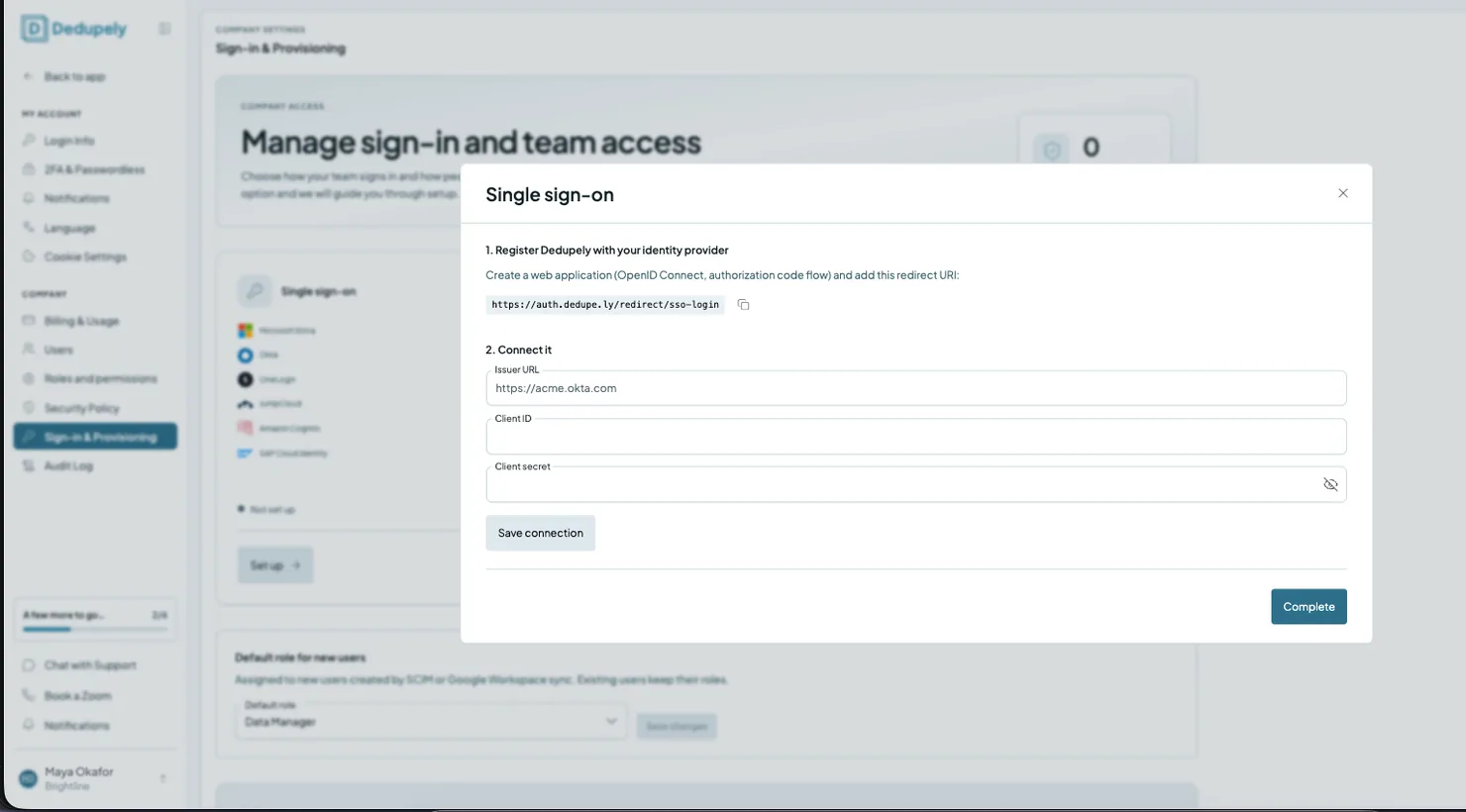
Setup has three steps:
- Connect your provider.
- On the Single sign-on card, click Set up.
- Register Dedupely with your identity provider: create a web application (OpenID Connect, authorization code flow) and add this redirect URI: https://auth.dedupe.ly/redirect/sso-login. Use the copy button next to it.
- Connect it: enter the Issuer URL (for example, https://acme.okta.com), the Client ID and the Client secret from your identity provider, and click Save connection.
- Click Complete.
- Verify your domains. Confirm your company domains with a DNS record.
- Choose how members stay in sync. Use SCIM or Google Workspace sync to keep your team list up to date, or keep adding people by hand in Users.
How to set up user provisioning (SCIM)
- On the User provisioning (SCIM) card, click Set up.
- Follow the steps to connect your identity provider.
Once it's on, your identity provider adds, updates, deactivates and removes people in Dedupely as they join, change or leave. If you use Google Workspace, you can sync your members from Directory Sync & Provisioning on the Users page instead.
Default role for new users
Choose the role people get when SCIM or Google Workspace sync creates them in Dedupely. Select a Default role and click Save changes. Existing users keep their roles. You can change anyone's roles later in Users.
What happens next
- Your team signs in through your identity provider once single sign-on is set up.
- People who join or leave your company are added to or removed from Dedupely automatically, if you use SCIM or Google Workspace sync.
- New users get the default role. Give them other roles any time. See Roles and Permissions.
Troubleshooting
I don't see Sign-in & Provisioning. You need access to Security policy and sign-in. Ask someone who manages roles in your account.
My domain isn't verified yet. DNS changes can take a while to spread. Check that the DNS record matches exactly, then try again later.
A new teammate got the wrong access. Check the Default role for new users, and change their roles in Users.
FAQs about single sign-on and provisioning
- Which plans include single sign-on and SCIM? Every paid plan, monthly or yearly.
- Which identity providers can I use? See the table above. Microsoft Entra, Google Workspace and Okta are among them.
- What do I need from my identity provider? A web application set up for OpenID Connect with the authorization code flow, using Dedupely's redirect URI, and its Issuer URL, Client ID and Client secret.
- Can I require single sign-on? Yes. Once it's set up, you can require your team to sign in through your identity provider.
- Why do I need to verify my domain? It proves your company owns the email domain your team signs in with.
- What role do people added by SCIM get? The default role you choose. Existing users keep their roles.
- Does SCIM remove people who leave? Yes. Your identity provider deactivates and removes them in Dedupely when they leave.
Next up
Changelog
-
Single sign-on and user provisioning
Your team can sign in with your identity provider through OpenID Connect, and SCIM or Google Workspace sync adds, updates and removes people in Dedupely as they join or leave.
Still stuck?
Our team helps on every plan and during the free trial, by chat, email or Zoom.
- Need help? Talk to support
- Questions about plans? Book a Zoom with sales
- Reading this with a model? Read this page as Markdown
- Feeding it the whole site? Read llms.txt




 Or sign up with Google

 HubSpot Marketplace