 ★ 4.73/5 average rating
Find & merge duplicates in Salesforce
Dedupe Salesforce Leads, Contacts, Accounts, Opportunities and custom objects in bulk.
No credit card needed
What Dedupely merges in Salesforce


Trusted by 20,000+ companies around the globe











How do I dedupe Salesforce?
Matching rules and duplicate rules flag a possible duplicate when someone saves a record. They alert or block, and never merge.
Merging is manual, up to three records of the same type at a time. Duplicate Jobs scan the records already in your org on Performance and Unlimited Editions, and you still merge each set by hand.
Dedupely mass merges Leads, Contacts, Accounts, Opportunities and custom objects across your whole org.
Total control over your Salesforce duplicates
Dedupely merges the duplicates in your org, then keeps them from coming back.
You built your org your way. Every field, object and workflow has to keep working exactly as it does now.
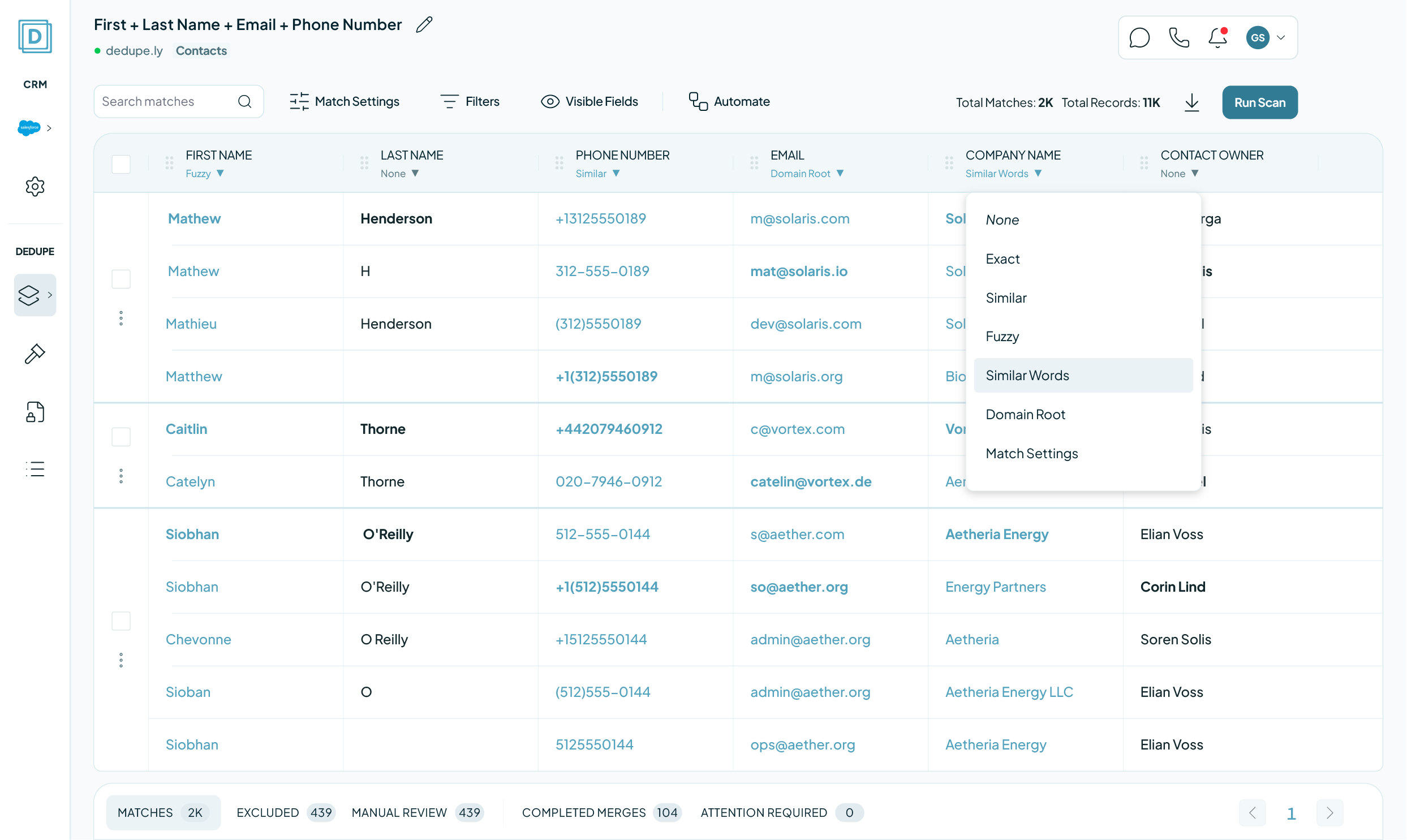
Dedupely matches and merges without touching that structure, across standard and custom objects alike.
And there is no per-user fee.

An AppExchange must-have
“My absolute favorite de-duping tool!” Dedupely is a must-have for any admin. The setup was straightforward, and within minutes, we were ready to start deduplicating our records.

An org with Flows, Apex triggers and sharing rules cannot be cleaned by guesswork. Every merge goes through the Salesforce API exactly as a manual one would, so your automation behaves the way it already does. Match on any standard or custom field, and Merge Rules decide which value survives each one.
Filter a search to one owner, one import or one record type and read it before anything runs. On a large org we walk through your first Match Options with you.

Duplicate Leads and Accounts split pipeline across two records, so forecasts understate and two reps call the same person in the same week. Dedupely merges them inside Salesforce through the API, on rules you set, and records every merge.
Pipeline sits on one Account instead of three, so the roll-up your board sees is the real number.
Reps stop working from half a history, and territory rules stop firing on the wrong copy.
What Salesforce deduplication involves

Access it asks for
A full Salesforce admin, with the REST API enabled on the org.

Your first sync
50,000 to 300,000 records takes 15 to 90 minutes. 300,000 to 600,000 takes one to three hours. After that, new duplicates surface within about three minutes.

What a merge changes
It runs inside Salesforce through the API. The surviving record keeps its Id, its associations and its history, and Dedupely stops a merge rather than finish one that would break a validation rule.

What stays untouched
Person Accounts, because Salesforce will not merge one with a business account, and Leads once they convert. Everything else in the objects you sync is fair game.

No merge can be undone
Not in Salesforce, and not by any tool that merges through it. What stands in for undo: Manual Review holds every match until you approve it, Merge History records what each merge kept, and Dedupely refuses any merge that would lose data rather than completing half of it.
Salesforce deduplication tools, compared
| NativeDuplicate Management | Third partyOther dedupe tools | Our SolutionDedupely | |
|---|---|---|---|
| Finds duplicates already in your org | Duplicate Jobs, on higher editions | Yes | Yes, on any standard or custom field |
| Records per merge | Three | Varies | Every record in the group |
| Bulk merge | No: by hand, group by group | Usually | Whole result sets in one pass |
| Control over which value survives | No | Varies | A Merge Rule on every field |
| Runs on a schedule | No | Often a higher tier | Auto Merge, on every plan |
| Chatter re-parenting | No | Varies | Yes |
| What you pay for | Included | Often per user or per seat | Records synced. No per-user fee |
Why Dedupely?
Dedupely offers something others don't.
The big Salesforce dedupe names are built for certified admins. Teams tell us the rules take training to write and the pricing takes a committee to approve. Some vendors now turn away smaller orgs altogether.
Dedupely keeps it simple. Every feature is on every plan, custom objects included, and the price follows the records you sync rather than seats or tiers.
Nothing installs inside your org and your rules and workflows stay untouched. Support is unlimited, and on a large org we go through your Match Options with you before anything merges.

"I was really pleased with Dedupely. It's highly configurable and works well when used manually or for automated deduping. And the customer service is incredible. Responsive and incredibly helpful."
 Salesforce AppExchange
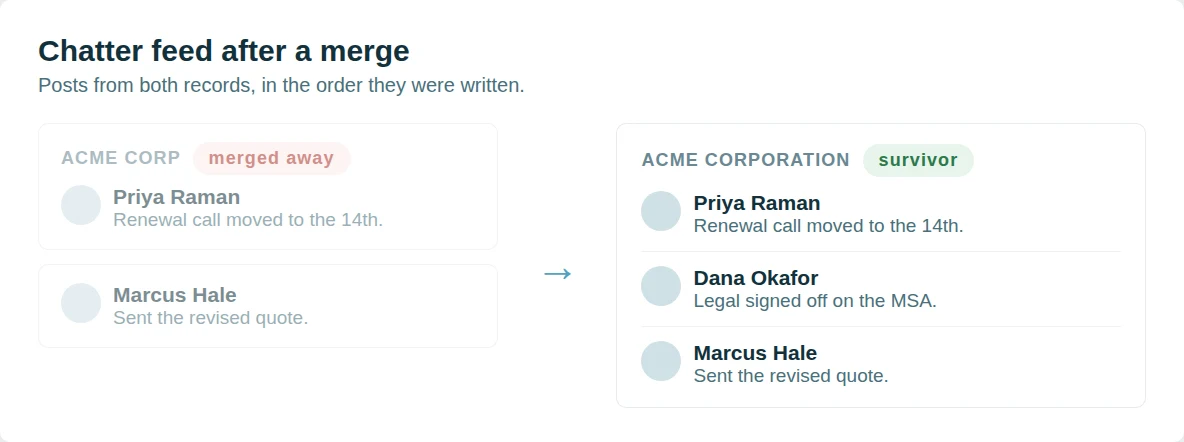
 Chatter posts move with the record
A Salesforce merge keeps the feed of the record that survives and drops the rest.
Dedupely re-parents the Chatter feed instead. Posts, comments and @mentions from every record in the group are attached to the survivor, in the order they were written, so the conversation about an account reads as one thread rather than the part that happened to be on the winning record. Nothing is written to your org beyond the merge itself.
Followers come across as well.
Anyone following a record that merged away follows the survivor, so a rep does not silently stop receiving updates on an account they were watching. Merge History records the feed that moved with every other value the merge kept.

Test in a Salesforce sandbox first
Connect opens a Production or Sandbox picker. Point Dedupely at a sandbox and it authenticates against test.salesforce.com, syncs that org, and behaves exactly as it does against production: same Duplicate Searches, same Merge Rules, same bulk merge.
That is where the questions worth settling get settled. Which Match Options are tight enough that nothing false slips through, which Merge Rules keep the value you actually want, and what a mass merge does to a few thousand Leads before it does it to all of them.
Syncing an org merges nothing, in a sandbox or in production. Manual Review holds every match until you approve it, a rejected match stays out of later searches, and Merge History records what each merge kept. Dedupely reads and writes only the objects you switch on, and never changes how your org is configured.
Merge duplicates by object in Salesforce

Start merging in 5 minutes
Three steps from org to first merge
-
Connect your org
OAuth, with the REST API enabled.
-
Match any field
Standard or custom, exact or similar.
-
Merge through the API
In bulk, one by one, or scheduled.
We love customer service
That's why we offer unlimited support.

Submit a ticket
You can submit a support ticket by emailing us. Our team will respond as soon as possible.


Zoom Support
We offer unlimited video call support. Whether you’re getting started or getting intense.
Salesforce customer stories
How other teams cleaned up their duplicates
- 6,000+ duplicate records merged How a Personal Injury Law Firm Merged 6,000+ Duplicate Salesforce Records of Providers, Firms and Insurers with Dedupely Read the story
- 140,000+ duplicate records merged How a Healthcare Software Company Stopped Cleaning the Same Duplicates Twice in HubSpot and Salesforce with Dedupely Read the story
- 200+ account matches merged a month, on average How a Retailer Stopped Its Sales Team Guessing Which Account to Use in Salesforce with Dedupely Read the story
20,000+ businesses
feel the magic
"The application works great and when I was having difficulty setting up the matching rules their customer support was responsive and helped me get on the right track!"

"I was really pleased with Dedupely. It's highly configurable and works well when used manually or for automated deduping. And the customer service is incredible. Responsive and incredibly helpful."
FAQs

Dedupely syncs your Leads, Contacts, Accounts, Opportunities and custom objects, then matches on the fields you pick (Email, Company, any custom field) exact or similar. Each object arrives with default Duplicate Searches, and every one shows the record owner next to each match.
Contacts, Accounts, Leads, Opportunities, Individuals and your custom objects. Dedupely syncs a whole object at a time, so switch off the record types you don’t need in CRM Settings.
Person Accounts stay out, because Salesforce will not merge one with a business account. Leads drop out of the sync the moment they convert.
They run when someone saves a record, and they flag Potential Duplicates. Duplicate Jobs scan the records already in your org and report duplicate record sets.
None of them merges anything. Dedupely matches across the whole org and merges in bulk, so what your rules flagged actually gets merged.
No. Dedupely writes with the Salesforce Duplicate Rule header set to allow the save, so a rule that alerts or blocks on save cannot stop a merge you approved. The rules stay in force for everyone entering records by hand.
The merge runs inside Salesforce through its API the moment you confirm: nothing is exported and nothing is re-imported. Record associations move to the Primary, Merge Rules decide field by field which value survives, and Merge History keeps every merge.
Whenever finishing it would lose data. A value that breaks a field’s validation rule, two Accounts in the same parent-child hierarchy, a Contact whose Report To points at the Primary, more than one portal user across the group, or an org that blocks reparenting: each one stops the merge and tells you why.
Unique fields take the Primary’s value and take no Merge Rule. Encrypted and masked fields are left alone.
Yes. Manual Review holds every match until you approve it, and a match you reject stays out of later searches. Syncing your org merges nothing on its own.
Auto Match finds new duplicates as records arrive. Auto Merge merges the ones that meet your rules, on the schedule you set. Both write to Merge History like any other merge.
Dedupely reads the API usage Salesforce returns on every call and backs off at your org’s daily limit, then picks up where it stopped once the limit resets.
Connect opens a Production or Sandbox picker, so you can rehearse in a sandbox before touching the live org. Either way Dedupely needs the REST API enabled and full admin permissions.
Yes. The 7-day trial connects your org, syncs your records and runs searches, with unlimited support while you set it up. Nothing merges until you merge it.
Get started for free
20 free trial merges and as much free support as you need to get your duplicates under control.

 Or sign up with Google

A Team
HubSpot User
 HubSpot Marketplace
 Running CRM cleanup for clients? See the Partner Program












