Dedupely Intelligence
Find complex duplicates automatically, without building match settings.


Dedupely Intelligence is an AI-built matching engine that finds complex duplicate patterns and the best field combinations for you, with no match settings to configure. It's turned on by default in every account, and runs on Contacts, Companies and Leads. Your CRM records are never sent to an AI model.
Your data stays private
Dedupely Intelligence runs as regular, predictable code inside Dedupely:
- No external AI. Your CRM records are never sent to, processed by, or used to train third-party AI models or LLMs. All processing stays inside Dedupely's secure, ISO-certified infrastructure.
- Predictable results. AI is only used during development to design the matching logic. In the app, that logic runs as standard code, so results are consistent and reliable.
How Dedupely Intelligence works
Added
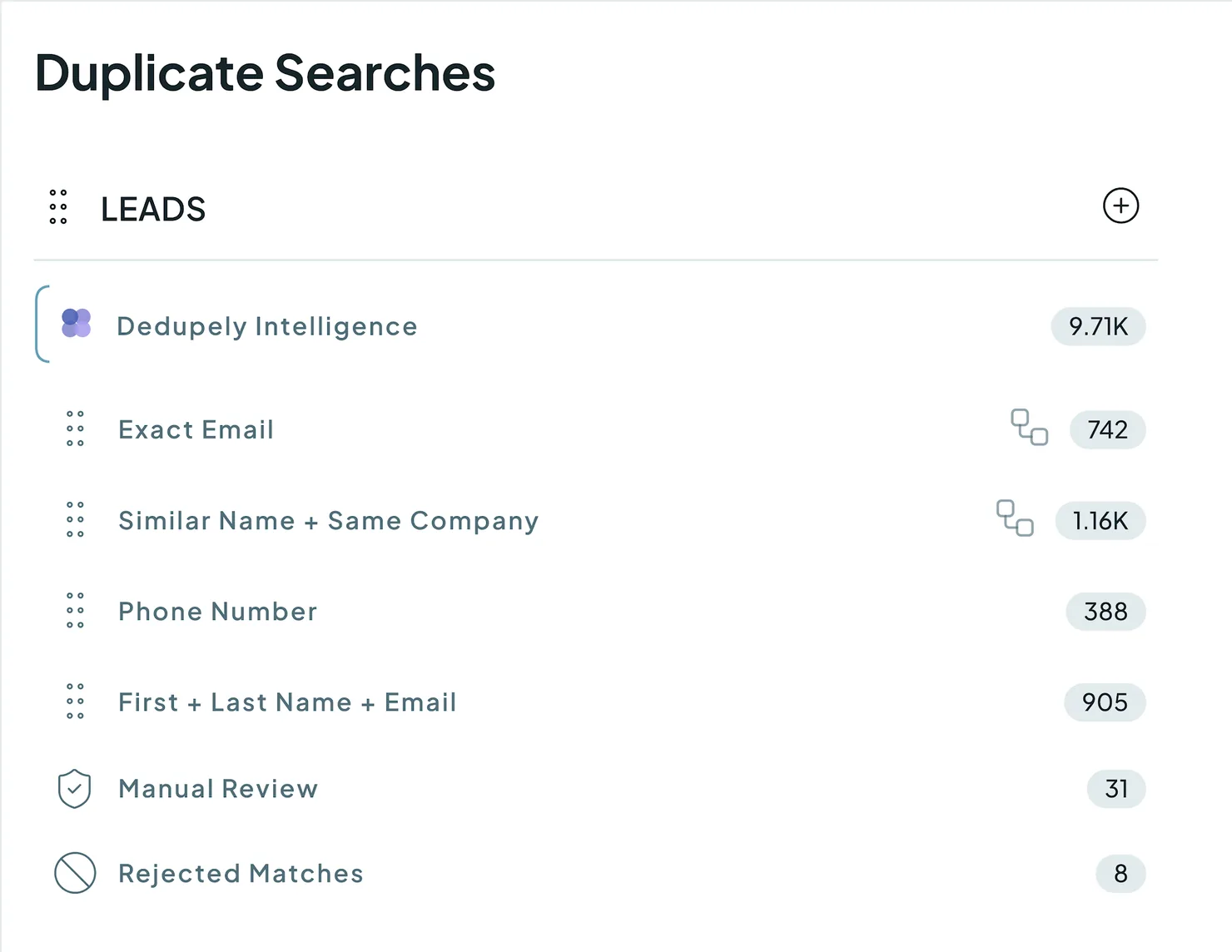
Instead of match settings you build, Dedupely Intelligence uses AI-built algorithms to recognize complex duplicate patterns across your database, and groups the matches into a dedicated Duplicate Search for you to review.
- Background scans. It scans automatically: every hour on yearly plans, and once a week on monthly plans and the free trial. There's no Scan button. The date and time of the last scan show at the top of the search.
- Supported objects. Contacts, Companies and Leads, with more to come.
- Merge logic. Merges follow your account's Primary Record and field-level Merge Rules, unless you create rules just for Dedupely Intelligence.
- No manual settings. Because it chooses the matching logic itself, Match Settings, Filters, Auto Merge and Auto Match are turned off in this search.
What's included in each plan
Added
Every plan and the free trial can see Dedupely Intelligence. What you can do with it depends on your plan:
- Yearly plans: unlimited merging, unlimited pages of results, selection across pages, bulk merges, Custom Merge, Reject, Send to Manual Review and export.
- Monthly plans and the free trial: the first two pages of results (or any record you look up with the search bar), merged one match at a time with your available free merges. Bulk merges, Custom Merge, Reject, Send to Manual Review and export need a yearly plan.
"Select all" across your whole database is turned off in every plan, for merge safety. You can still select individual matches, or matches across several pages.
How to use Dedupely Intelligence
There's nothing to set up.
- Go to Duplicate Searches in the left menu.
- Find Dedupely Intelligence, pinned at the top under Contacts, Companies or Leads.

- Open it to see your matches.
- (Optional) Adjust Visible Fields to show more details for review.
- (Optional) Use the search bar at the top to look up a record by name, email or domain.
- Select the matches you want to resolve and click Merge.
What happens next
- The matches you merge follow your Merge Rules, and every merge is logged in Merge History.
- Matches you reject are saved in memory, so they never show up again in any search for that object.
- New matches appear after the next background scan.
Treat every merge as permanent. Most merges can be undone within 30 days from Merge History (see Undo a Merge). For older merges, download your Merge History and use it to restore the original values in your CRM.
Troubleshooting
It matched records that aren't duplicates. Select the match and click Reject (on a yearly plan). Rejected matches are saved in memory, so they never show up again.
I rejected a match by mistake. Go to your Duplicate Searches list, open the Rejected Matches tab at the top of the search, select the matches and click Remove from Rejected. See Rejected Matches.
A match I expected is missing. Dedupely Intelligence follows your Safety Settings, so the match is probably in the Excluded tab. See Excluded Matches.
I can only see two pages of results, or can't bulk merge or reject. Monthly plans and the free trial are limited to the first two pages, one match at a time, and their free merges. Upgrade to a yearly plan for full use of Dedupely Intelligence.
FAQs about Dedupely Intelligence
- How does it know what to match without settings? It evaluates many field combinations at once, starting from a default baseline, using matching logic we keep improving with AI and test data. Your CRM records are never sent to or processed by an AI model.
- Is my CRM data sent to an AI model? No. Everything runs as standard code inside Dedupely's infrastructure.
- How often does it scan? Every hour on yearly plans, and once a week on monthly plans and the free trial.
- Which objects does it work on? Contacts, Companies and Leads.
- Does it follow my Safety Settings? Yes, just like any other Duplicate Search.
- Why use it if I already have specific Duplicate Searches? It evaluates many combinations at once, so it finds complex, overlapping matches that single-rule searches miss.
- Can I turn on Auto Merge for Dedupely Intelligence? No. Auto Merge, Auto Match, Match Settings and Filters are turned off in this search.
Next up
Manual Review Send uncertain matches to a review queue so the right person can approve them.Changelog
-
Manual Review and Reject on Dedupely Intelligence need a yearly plan
On Dedupely Intelligence matches, Send to Manual Review and Reject need a yearly plan, as merging and export already do.
-
Dedupely Intelligence for every account
Dedupely Intelligence searches appear in the Duplicate Searches drawer and on the Overview for every account, with nothing to configure. Merge, custom merge and export on its matches need a yearly plan, apart from your free merges.
-
Dedupely Intelligence never merges a whole list
On a Dedupely Intelligence search, a merge acts only on the matches you select, never on every match across its pages.
Still stuck?
Our team helps on every plan and during the free trial, by chat, email or Zoom.
- Need help? Talk to support
- Questions about plans? Book a Zoom with sales
- Reading this with a model? Read this page as Markdown
- Feeding it the whole site? Read llms.txt




 Or sign up with Google
 HubSpot Marketplace











