Everyday Activity
Clean Up the Duplicates Your Reps Create, Without Moving Accounts
Reps keep typing in customers that already exist. Match the way people actually type names, keep every account with the right owner, and merge new duplicates before they cause a second sales call.
What we hear from sales teams with duplicate records
13%
5%
9%
Why reps create duplicate records
Creating a new record is faster than searching for an old one. Under pressure, a rep adds the contact they just spoke to, without checking that a colleague added the same person last month under a slightly different name.
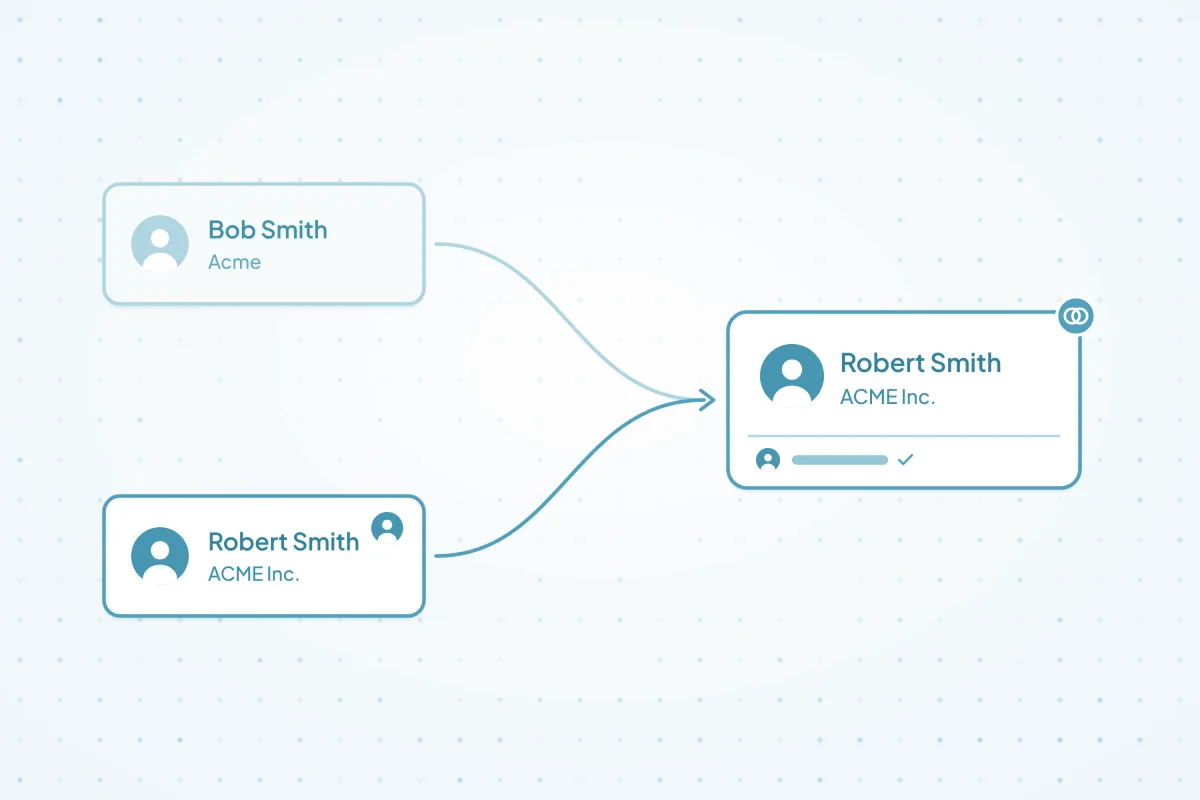
- Spelling and nicknames: "Bob" and "Robert", "Acme" and "ACME Inc.", or a typo in the last name.
- Phone formats: the same number typed with and without a country code, spaces or dashes.
- Two reps, one customer: each rep creates their own record, so the account ends up with two owners.
- Warnings get skipped: where a CRM shows a duplicate alert, a busy rep can click past it.
How Dedupely compares for duplicates reps create
| Criterion | Native CRM tools | Other dedupe tools | Custom scripts | Dedupely |
|---|---|---|---|---|
| Catching nicknames and typos | Most rely on exact or close matches. A few catch common nicknames, from a fixed list. | Most offer fuzzy matching, with varying options. | Possible, with a name dictionary someone maintains. | Fuzzy, Similar and nickname matching on names, and Similar on phone numbers. |
| Checking when a record is created | Some warn or block at creation. Where it's only a warning, reps can click past it. | Some check records as they're created. | Possible, with custom validation. | Doesn't interrupt reps. New duplicates are found and merged after they're saved. |
| Keeping the right owner | Few let you save a rule for which owner wins, so it's decided one merge at a time. | Most offer merge rules, with varying detail. | Whatever the script is written to do. | Merge Rules on the owner field, including a Lose Rule so a former employee never wins. |
| Reviewing close calls | In most, suggestions are reviewed and merged by hand, a pair or set at a time. | Most let you preview merges, and some offer a review queue. | Only if you build one. | Send close calls to Manual Review, and reject the ones that aren't duplicates for good. |
Native CRM tools as of October 2026, from the help documentation of HubSpot, Salesforce, Pipedrive, Close, Nimble and Google Contacts.
How to clean up duplicates your reps create in four steps
-
Step 1Match
How do you match records that reps spelled differently?
Match on more than one field, with a match option for how each one gets typed: nickname or sound-alike matching on names, Similar on phone numbers, and Similar Words on company names.
- Use Fuzzy for names that sound alike ("Sean" and "Shawn") and Match nicknames for "Bob" and "Robert".
- Similar on phone numbers ignores formatting and country codes, and compares the core seven digits.
- For companies, use Similar Words with Ignored Terms, so "Acme" matches "ACME Inc.".
-
Step 2Protect owners
How do you merge duplicates without changing who owns the account?
Decide the rule before you merge, then set it in Merge Rules: for example, the owner of the oldest record keeps the account, and a former employee's name never wins.
- Add a Win Rule on the owner field, like Create Date "is oldest", in Merge Rules.
- Add a Lose Rule on the owner field with "is equal to" and the names of people who've left, so their records never keep the account.
- Add Owner to Visible Fields, so you can spot matches with two different owners before you merge.
-
Step 3Review
What should you do with matches you're not sure about?
Bulk merge the clear duplicates, and send the close calls to Manual Review for the account owner to decide. Reject the matches that aren't duplicates, so they don't come back.
- Two people can share a name or an office phone number. Send those to Manual Review.
- Safety Settings set aside matches built on placeholder data, like 000-000-0000 or "John Doe", in the Excluded tab.
- Rejected matches stay out of every future search for that object.
-
Step 4Automate
How do you keep up with the duplicates reps create every week?
Turn on Auto Merge for your tested exact-match search and Auto Match for the fuzzy one. Keep your CRM's own alerts on, and ask reps to search before they create a record.
- For matches that always need a person, like branches that share a website, build a separate search and put it on Auto Match. Filter those records out of the search on Auto Merge, for example with Parent Account "is blank", so only the clear duplicates merge on their own.
- See Merge incoming duplicates automatically and Review new duplicates before they merge.


What makes Dedupely different
-
All features included in yearly subscriptions.
Merge Rules, Auto Merge and Auto Match come with every plan. Yearly subscriptions add Dedupely Intelligence in full.
-
Priced by records, not seats.
Unlimited users, with no per-user fees.
-
Every merge on record.
Preview each merge first. Merge History keeps the original records, so you can see exactly what changed.


Find the customers your reps added twice.
Connect your CRM
Frequently asked questions
Why do sales reps create duplicate records?
Adding a new record is quicker than searching for an existing one, and reps type names, companies and phone numbers in different ways. When two reps work the same customer, each one often creates their own record, and the account ends up split between two owners.
Will merging duplicates change who owns the account?
Only if your rules allow it. Without Merge Rules, your CRM's own merge logic decides. With them, you choose: for example, the owner of the oldest record keeps the account, and a Lose Rule makes sure a former employee never wins. Check the Merge Preview before you merge.
Can Dedupely warn reps before they create a duplicate?
No. Dedupely doesn't interrupt reps or block records. It finds and merges duplicates after they're saved, on the schedule you choose. Keep your CRM's own duplicate alerts on as well, and agree as a team on how company names are written.
How do you match nicknames like Bob and Robert?
Turn on Match nicknames in Similar Words on the first name field, or use Fuzzy for names that sound alike. Pair the name with another field, like phone number or company, so two different people with the same first name don't match.
Two contacts share an office phone number. Will they merge?
Only if every field in your search matches. Match on at least three fields, like first name, last name and phone, and send unclear matches to Manual Review. If they're two different people, reject the match, and it won't come back.












