Merge History
See every merge Dedupely ran, which record survived, and which values it kept.


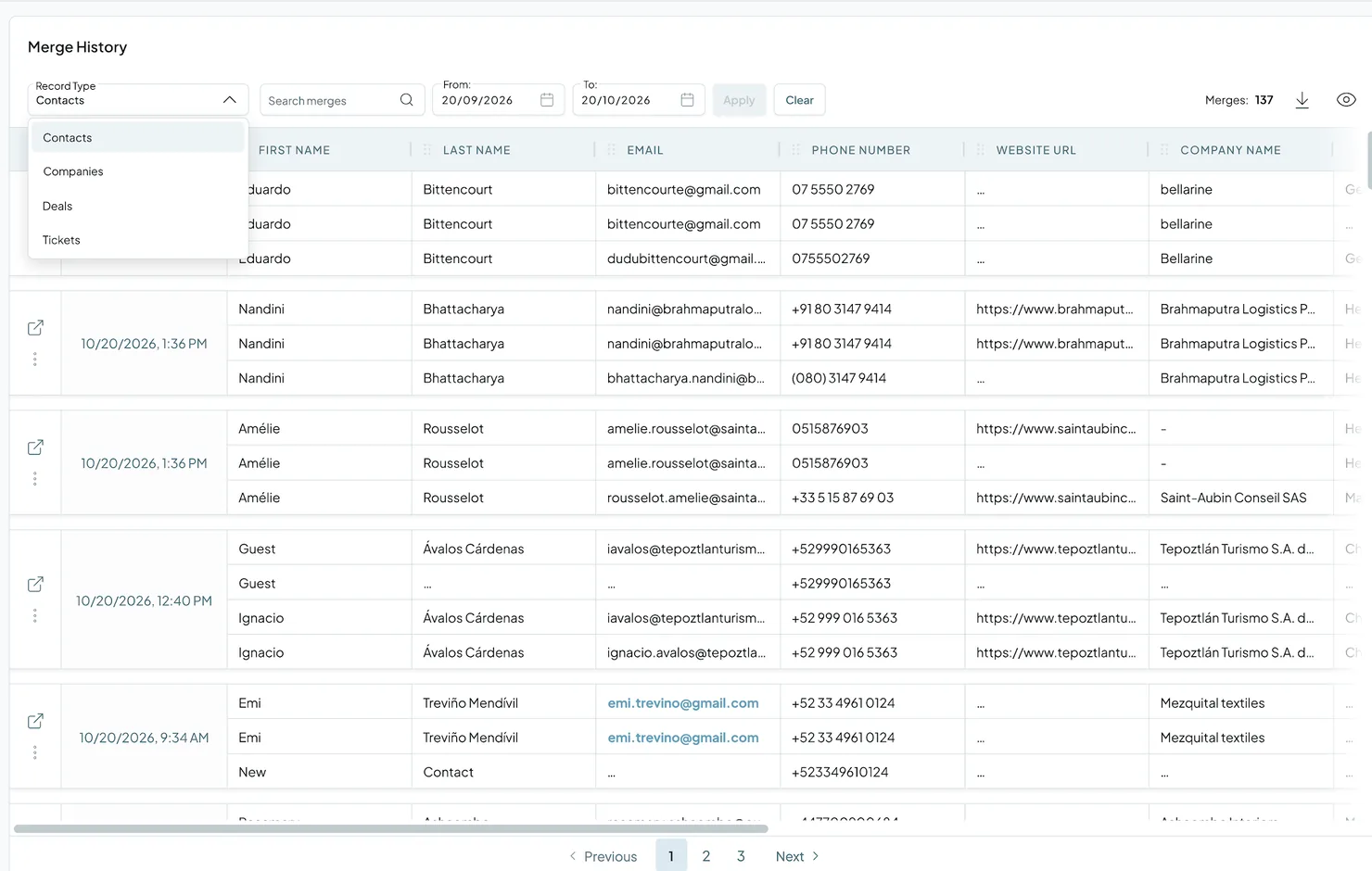
Every merge in Dedupely is recorded in Merge History: Single, Custom, Bulk and Auto Merges, and merges from Dedupely Intelligence. Use it to review past activity, check that merges did what you expected, and get the original values back if you need to restore data.
How to view and filter merges
- Go to Merge History in the left menu.
- Use the Record Type dropdown to choose the object.
- Search for a record with the Search merges bar.
- Filter by date with the calendar fields.
- Click Visible Fields to choose which columns to show.
How to review a merge
Added
- Click the three dots on a merge, then View details, to see the result, the original Primary Record and the removed records side by side, plus who merged (a person or Auto Merge) and when.
- Click the pop-out icon to open the merged record in your CRM.
How to export Merge History
Added
Click the download arrow at the top right of the page to download your Merge History as a CSV file. Dedupely prepares the file and emails you a download link when it's ready.
How to restore data after a merge
Added
Most merges from the last 30 days can be undone from their Merge Details window. See Undo a Merge.
For older merges, and merges that can't be undone, Merge History keeps the original values of every record. To restore data:
- Download your Merge History as a CSV.
- Find the merge and the original values you need.
- Restore those values in your CRM, or re-create the records you need there.
- If the records weren’t duplicates, reject the match, so the re-created record doesn’t match the same record again.
What happens next
- New merges appear automatically in Merge History as they finish.
- You can check what was merged at any time, and export it.
Troubleshooting
I can't find a merge. Check the Record Type dropdown and your date filters, then search for the record by name or email.
A merge isn't in Merge History. It might not have finished yet. Check its status in your Duplicate Search. If it shows Error, hover over it to see why.
I need to see who ran a merge. Open the merge's details: it shows the person who merged, or Auto Merge. Admins can see other account activity in the Audit Log.
FAQs about Merge History
- Can I undo a merge in Dedupely? Yes, within 30 days for most merges, from Merge History. Undo is for records that weren't duplicates, so treat every merge as permanent. See Undo a Merge.
- How do I recover records merged by mistake? Download the Merge History CSV, find the original values, and restore them in your CRM. If the records weren’t duplicates, reject the match so it doesn’t come back. For the full steps, see I Merged the Wrong Records: What Now?
- Are Auto Merges recorded? Yes. Every merge is recorded, including Auto Merge and Dedupely Intelligence.
- Can I choose which columns appear? Yes. Click Visible Fields.
Next up
Changelog
-
Undo a merge for 30 days
Undo a merge from Merge Details for 30 days, in every CRM and in spreadsheets. The merged-away records come back with their links, and the match moves to Rejected Matches. Not for HubSpot leads, Pipedrive products, merges made in both HubSpot and Salesforce, HubSpot companies in a Salesforce-synced portal, or merges before undo existed.
-
Merge History shows who merged
Merge History and Match Details show who ran each merge: the person's name and avatar, or Auto Merge.
-
Exports arrive by email
Matches and merges exports are sent to your email when they are ready.
Still stuck?
Our team helps on every plan and during the free trial, by chat, email or Zoom.
- Need help? Talk to support
- Questions about plans? Book a Zoom with sales
- Reading this with a model? Read this page as Markdown
- Feeding it the whole site? Read llms.txt




 Or sign up with Google
 Pipedrive Marketplace