Merge Rules
Decide exactly which values win and which lose in every merge, so your most accurate data is always kept.


Merge Rules control what your records look like after a merge. You choose which record is the Primary Record, how each field is handled, and custom Win and Lose rules for specific cases. Until you set your own, the default rules apply: the oldest record is the Primary Record (the one with the most data in Google Contacts and spreadsheets). Merge Rules are included in every Dedupely plan and the 7-day free trial.
When records merge, their activities (notes, calls, tasks) and associations (linked companies, deals, contacts) are kept, except where your CRM's API doesn't allow them to be moved. See the Nimble CRM and Close CRM guides.
How to set the Primary Record
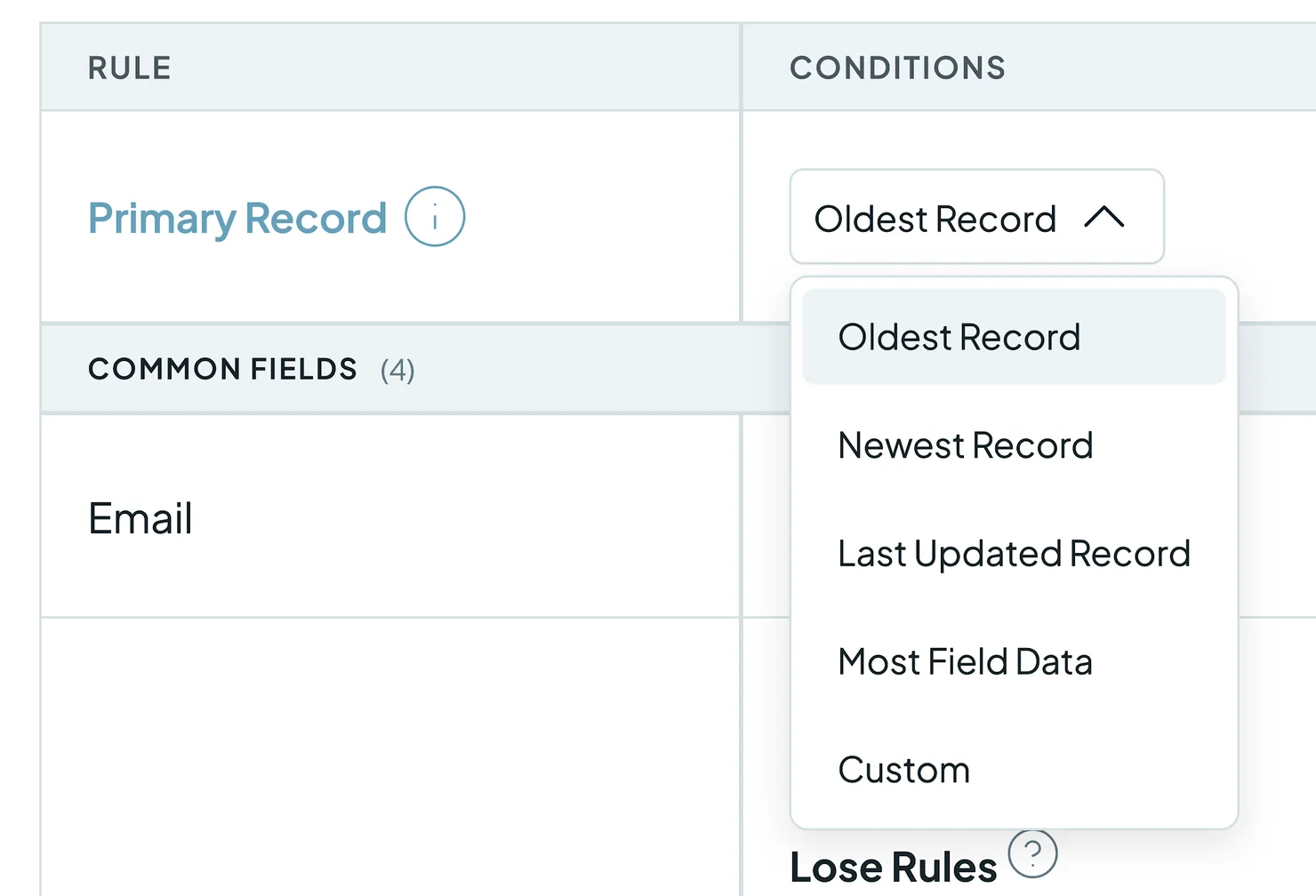
The Primary Record is the record that wins. It provides the data for every field that has no other rule. Choose how it's picked:
- Oldest Record (the default)
- Newest Record
- Last Updated Record
- Most Field Data (the default in Google Contacts and spreadsheets)
- Custom: opens the rule builder, so Win and Lose Rules pick the record. See How rules are applied.
One exception: when a HubSpot company merge includes a company synced with Salesforce, that company stays the Primary Record, whatever your rule says. See Merging duplicates with an active HubSpot-Salesforce Integration.
How to set field-level rules
Under Common Fields and Other Fields, use the dropdown next to each field to choose how its value is kept:
- Primary: the field takes the value from the Primary Record.
- Append: keeps every unique value from all the records. Only for multi-value fields, like a spreadsheet column marked Multi-value.
- Only Primary: for multi-value fields, keeps only the Primary Record's values, without adding the others'. If the Primary Record has none, the field takes the other records' values.
- Primary or active: the default on owner and other user fields. Keeps the Primary Record's user when that user is active in your CRM, otherwise the active user on the next record. If no record has one, the Primary Record's user stays. Read-only user fields, like Created By, are never written.
- Custom: opens the rule builder, so you can set Win and Lose rules for that field.
Best values and Primary or best
Added
On email, phone and name fields, two more choices rank the values:
- Best value (Best email, Best phone, Best name) keeps the strongest value of any record: a work email over a free email provider, and either over a role-based address like info@; a direct number over a toll-free number or a placeholder; a complete, properly capitalized name over initials or placeholders.
- Primary or best keeps the Primary Record's value unless it's unusable, like a placeholder phone number, an invalid email or a name that's only an initial.
A record type you connect for the first time starts its email, phone and name fields on Primary or best.
How to build custom rules
Added

When you choose Custom for a field, set up:
- Rule Type: a Win Rule picks the winning value; a Lose Rule stops a value or a whole record from winning.
- When Field: the field that triggers the rule. It can be the same field or any other synced field.
- Operator: how the data is compared (e.g. is equal to, contains, is proper case, is longest, is blank).
- Target Terms: the value that triggers the rule.
- Duplicate Search: apply the rule to all searches, or to one Duplicate Search only.
- Any / All: with several Target Terms, choose whether a value must match any of them, or all of them.
is equal to and contains are exact, capitals included. is proper case accepts names like José García, Jean-Luc, O'Brien and McDonald. is upper case and is lower case need a letter, so phone numbers and zip codes pass neither.
Example: to make sure the First Name from the oldest record never wins, set Rule Type: Lose Rule, When Field: Create Date, Operator: is oldest, Duplicate Search: All. The First Name now comes from a newer record. You can stack several rules on one field.
Email, phone and name conditions
Added
On a single-value email, phone or name field, Custom offers conditions that read the value itself:
- Email: is role-based, is from a free email provider, and their opposites
- Phone: is a toll-free or service number, is a placeholder, has a country code, and their opposites
- Person name: is not a placeholder, is properly capitalized
- Company name: is not a placeholder, is properly capitalized, is the full legal name, is the brand name only
For example, a Lose Rule on Email with is role-based stops info@ or sales@ addresses from winning a merge.
How rules are applied
Custom rules run the same way on the Primary Record and on every field: every Lose Rule first, then Win Rules from top to bottom.
- Lose Rules first. They're checked before Win Rules, so unwanted values can't win, unless there's no other data.
- A Lose Rule on the field itself removes only the values it matches. On a multi-value field, the record's other values stay. A Lose Rule on Email with contains old-domain.com drops curie@old-domain.com and keeps curie@example.com. A record that lost a value can still win with the values it kept.
- A Lose Rule on another field rules out the whole record. So does one on the same field with a comparison across records, like is longest. A Lose Rule on Phone with When Field Status is equal to Inactive means an Inactive record can't win Phone, even through a Win Rule.
- The first Win Rule that any remaining record passes decides. Later Win Rules aren't used. Reorder them to change their priority.
- Comparisons skip the losers. Win Rules like is newest, is oldest, is longest and is greatest number compare only the records that didn't lose.
- Target Terms are a priority list. With is equal to or contains, a record holding the first term beats a record holding the second, whichever comes first in the match.
- Ties go to record order. On a field, the Primary Record comes first. On a Custom Primary Record rule, the match's own order decides.
- A Win Rule on a multi-value field keeps only the winning values. To keep every value, use Append.
- Fallback on a field: if no rule decides, the value comes from the Primary Record. A blank is filled from the first record that has a value, and multi-value fields combine every unique value.
- Fallback on a Custom Primary Record rule: if no Win Rule decides, the first record in the match that didn't lose becomes the Primary Record. If every record lost, it's the first record.
How to check your rules before merging
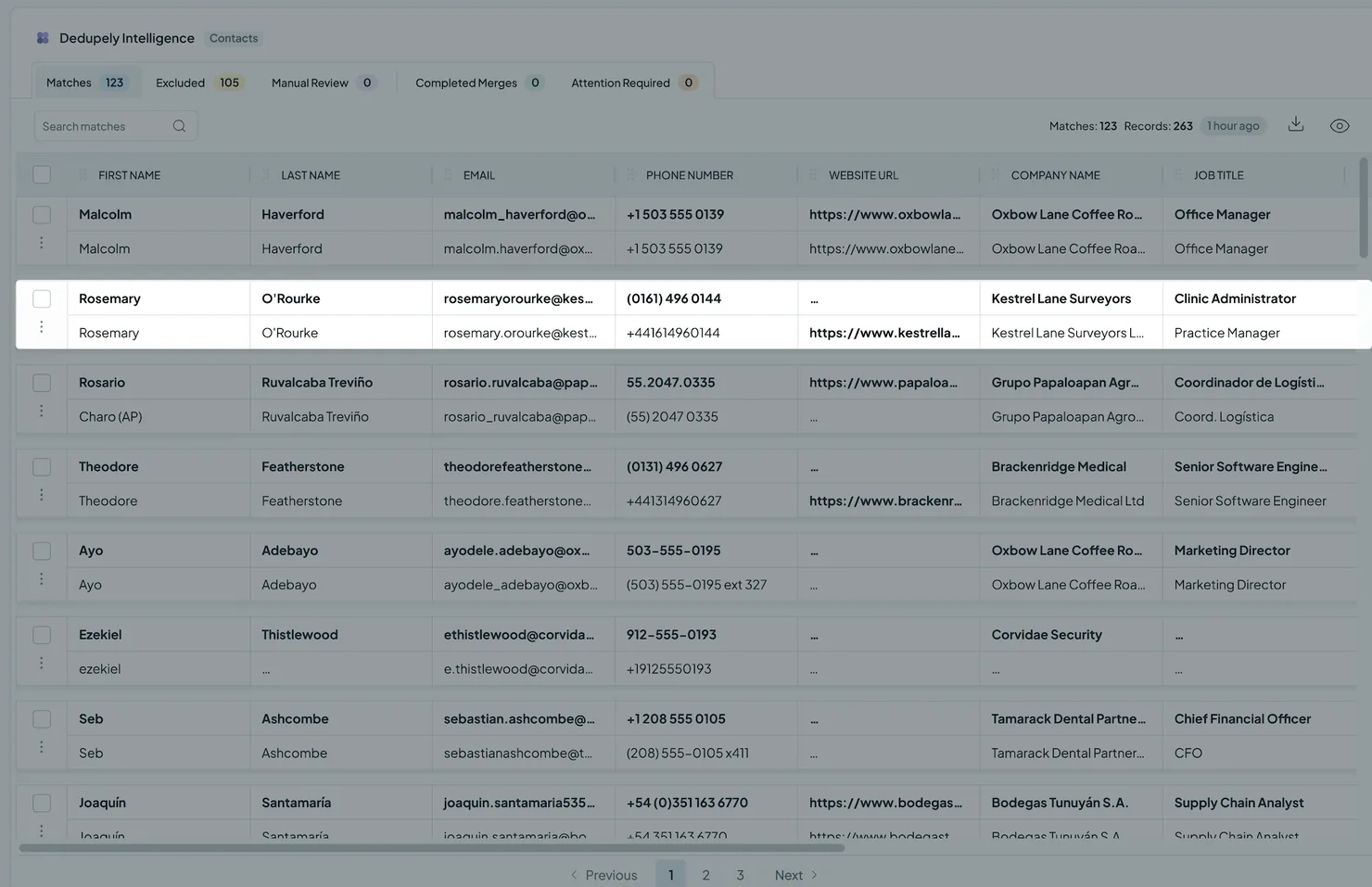
- In your results: the winning values show in bold in each match.
- In View Match Details: the Merge Preview column on the left shows the final record.
Default merge behavior
You don't need to set Merge Rules to start merging. The defaults make the oldest record the Primary Record (the one with the most data in Google Contacts and spreadsheets), and fill a blank field on it from the first record that has a value. Your CRM's own merge still decides some things, like which record ID is kept. See your CRM's guide: HubSpot, Pipedrive, Salesforce, Close, Nimble or Google Contacts.
What happens next
- Your rules apply to every future merge: Single Merge, Bulk Merge and Auto Merge.
- A Custom Merge overrides them for the values you pick in that match. Fields you leave alone still follow your rules, and Only Primary, Primary or active and the best value options treat the record you kept as the Primary Record.
- Past merges don't change. Rules only affect merges you run after saving them.
Troubleshooting
My custom rule isn't applied to a field. The field might be read-only in your CRM, or one your CRM controls, like Create Date in HubSpot. Dedupely can't set rules for those fields. An earlier Win Rule may also have decided the field already: check their order.
The wrong record was kept as the Primary Record. Check your Primary Record setting. On Custom, the first Win Rule that any record passes decides, so check their order. If it needs exceptions, add field-level Custom rules.
A value I wanted was overwritten. Check the field's rule and your Primary Record setting. For multi-value fields, use Append to keep every value: a Win Rule keeps only the winning values. In HubSpot, the other email is kept as a secondary email address.
I can't choose Append for a field. Append only works on multi-value fields.
FAQs about Merge Rules
- Do I need Merge Rules to merge? No. Until you set your own, the defaults apply: the oldest record is the Primary Record, and its blank fields are filled from the other records.
- Can a rule apply to only one Duplicate Search? Yes. Choose that search under Duplicate Search when you build the rule.
- Do Merge Rules apply to Auto Merge? Yes. They apply to every merge. In a Custom Merge, the values you pick override them.
- Can I see the result before merging? Yes. Winning values show in bold, and the Merge Preview column in View Match Details shows the final record.
Next up
Changelog
-
Best presets and a live preview in Merge Rules
Best email, Best phone and Best name rank every value and keep the strongest. Primary or best keeps the Primary's value unless it is unusable. A live preview shows what a merge keeps.
-
New Merge Rules conditions for email, phone and company name
Conditions can test whether an email is role-based or from a free email provider, whether a phone number is toll-free, a placeholder or has a country code, and whether a company name is the full legal name or the brand name only.
-
Conditions can require all of their values
A filter or Merge Rules condition with several values can require all of them instead of any one. Existing conditions keep matching any.
Still stuck?
Our team helps on every plan and during the free trial, by chat, email or Zoom.
- Need help? Talk to support
- Questions about plans? Book a Zoom with sales
- Reading this with a model? Read this page as Markdown
- Feeding it the whole site? Read llms.txt




 Or sign up with Google
 HubSpot Marketplace