No per-user fees Merge Rules decide field by field Every merge in Merge History
Find & merge duplicates in Close CRM
No credit card needed
Trusted by 20,000+ companies around the globe













Merge Close CRM records across your workspace
Dedupely merges the duplicates you have, then keeps Close CRM from filling up again.
They arrive through forms, list imports and the integrations writing into Close CRM over the API, then spread into your Smart Views, your sequences and every report built on them.
Merging them by hand, two records at a time, never catches up. Dedupely connects to your account with OAuth, matching and merging across leads, contacts and opportunities.
What Close CRM can merge, and what it cannot
Close CRM merges Leads natively. It has no contact merge at all.
The Close CRM API offers no way to combine two Contacts, so no tool can call one. Dedupely does the work that endpoint would have done: it consolidates the field values onto the record you keep, moves that record’s opportunities, notes, calls, emails and tasks across, and then removes the duplicate.
Meetings are the exception: Close CRM exposes no writable contact link on a meeting, so it cannot follow the record you keep. Dedupely never reports a merge it could not finish.
Where duplicate people sit under duplicate Leads, the Lead merge brings their contacts together in one step. Dedupely starts there.

Duplicate leads split the call history for one account across two records, so a rep opens the wrong one, and the pipeline counts the same deal twice.
One record per account means the forecast stops counting the same opportunity twice.
A sequence enrolls the right contact, and nobody gets the same email twice.
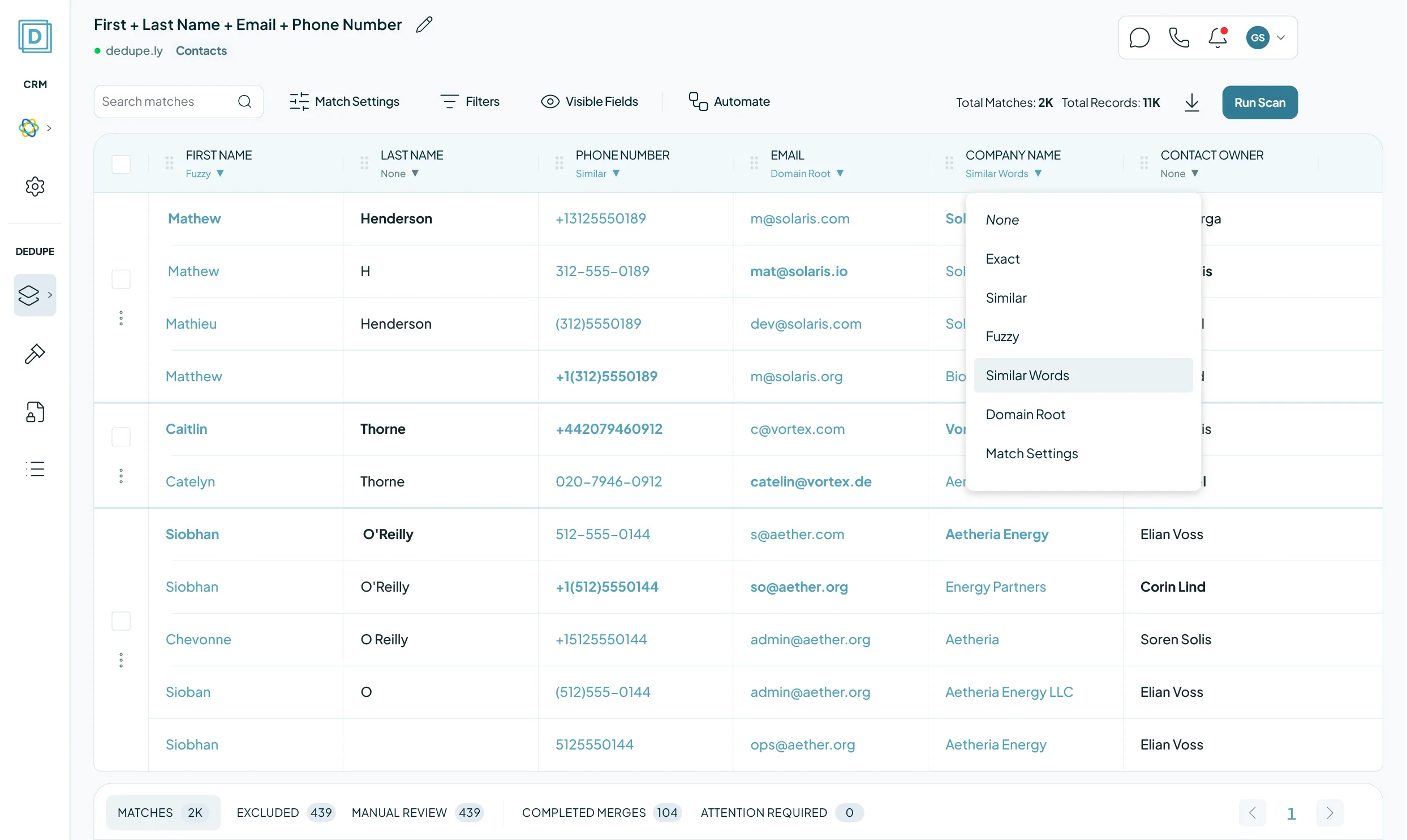
How Close CRM deduplication works here

Access it asks for
An OAuth authorization from your own Close CRM account. There is no API key to generate or paste, and the connection carries your permissions, not more.

Your first sync
Whole objects, not part of one: switch any object off in CRM Settings. After that, new records sync and nothing else changes.

What a merge changes
Leads run through Close CRM’s own merge over the API. Contacts have no such endpoint, so Dedupely consolidates the fields, moves the history, then removes the duplicate.

What stays untouched
Any object you have not switched on, and every field outside the records in the match. Merging is the only write Dedupely makes.

No merge can be undone
Not in Close CRM, and not by any tool that merges through it. What stands in for undo: Manual Review holds anything you are unsure of, and Merge History keeps the original values of every record, exportable as CSV.
Close CRM duplicate management, side by side
| NativeClose CRM | Our SolutionDedupely | |
|---|---|---|
| Finds duplicates already in your account | No: a support tool exports a CSV | Yes, on any field you choose |
| Merges duplicate contacts | No: support merges them for you | Fields consolidated, history moved |
| Records per match | Two | Every record in the group |
| Bulk merge | No: send the CSV to support | Whole result sets in one pass |
| Control over which value survives | No: the destination lead wins | A Merge Rule on every field |
| Runs on a schedule | No | Auto Merge, on every plan |
| What you pay for | Included in your Close CRM plan | Records synced. No per-user fee |
Merge Close CRM duplicates in 5 minutes
Three steps from account to first merge
-
Connect your account
Authorize Dedupely with OAuth. No API key to paste.
-
Match any field
Default searches, or build your own.
-
Merge in bulk
Leads, Contacts and Opportunities.
We love customer service
That's why we offer unlimited support.

Submit a ticket
You can submit a support ticket by emailing us. Our team will respond as soon as possible.


Zoom Support
We offer unlimited video call support. Whether you’re getting started or getting intense.
FAQs

Dedupely uses match options that you define to detect duplicates. You can compare fields like name, email, phone number, company name, or custom fields, using exact or similar matching. Once set, Dedupely scans your CRM and groups duplicates into match sets for you to review before merging. You have full control over the criteria used to detect duplicates, ensuring that only the right records are flagged for merging.
Yes! With Dedupely, you decide which records are considered duplicates by setting match options and merge rules. Match options define what counts as a duplicate, while merge rules control how individual fields are merged. Dedupely follows your CRM’s native merge structure, which means merging happens on a field-by-field basis: not by selecting a single “winning” record. You have full control over the logic, ensuring your most important data is kept.
Yes! You can create a Duplicate Search with your preferences and match options, to run and merge automatically, based on a schedule of your choice.
Dedupely gives you full control over what data is kept by letting you define merge rules for each field. You can choose to keep the most recently updated value, prioritize data over blanks, or apply custom logic, like selecting a specific owner or the highest score. Since merging happens field by field, you can preview results before confirming, and winning values are highlighted so you know exactly what will be kept.
Yes! You can manually review every merge before confirming, or use auto merge with pre-set safety rules to streamline the process.
No. Dedupely enhances your CRM’s duplicate management with more flexibility, automation, and advanced matching options.
Yes! Dedupely allows you to use filters to refine duplicate searches and focus only on the records that matter to you.
Our team is here to assist! You can access step-by-step guides in our Knowledge Base or reach out via chat, email, or Zoom for personalized support.
(We love Zooming, so feel free to book a call: we’re happy to walk through everything with you )
Yes! Our free trial gives you full access to all core features and unlimited customer service. We help you set Dedupely up for your needs, so by the time your trial ends, you’ll have everything running smoothly.
Get started for free
20 free trial merges and as much free support as you need to get your duplicates under control.

 Or sign up with Google
Yuliya
Pipedrive User
 Pipedrive Marketplace
 Running CRM cleanup for clients? See the Partner Program












