Match Options
Control how strict or flexible Dedupely is when comparing records.


Match options decide how each field is compared in a Duplicate Search: Exact, Similar, Fuzzy, Similar Words (Any Order), Domain Root, or None. You set one per field, so a single search can use Exact on Email and Fuzzy on Last Name. All match options are included in every Dedupely plan and the 7-day free trial.
Where to start
When you sync your data, Dedupely gives you preset Duplicate Searches with match options already set for your CRM. You can edit them, clone them, or build new ones.
- Start with Exact on high-impact fields like First Name, Last Name, Email or Phone to find and merge obvious duplicates quickly.
- Then loosen match options to catch the harder edge cases.
- Always combine fields. Matching on at least three key fields gives the best balance of accuracy and volume.
How to set match options
Added
In your Duplicate Search, click the dropdown under each field name and choose a match option. For the rest of the settings, like several match groups and Enhancements, open Match Settings in the search's toolbar.
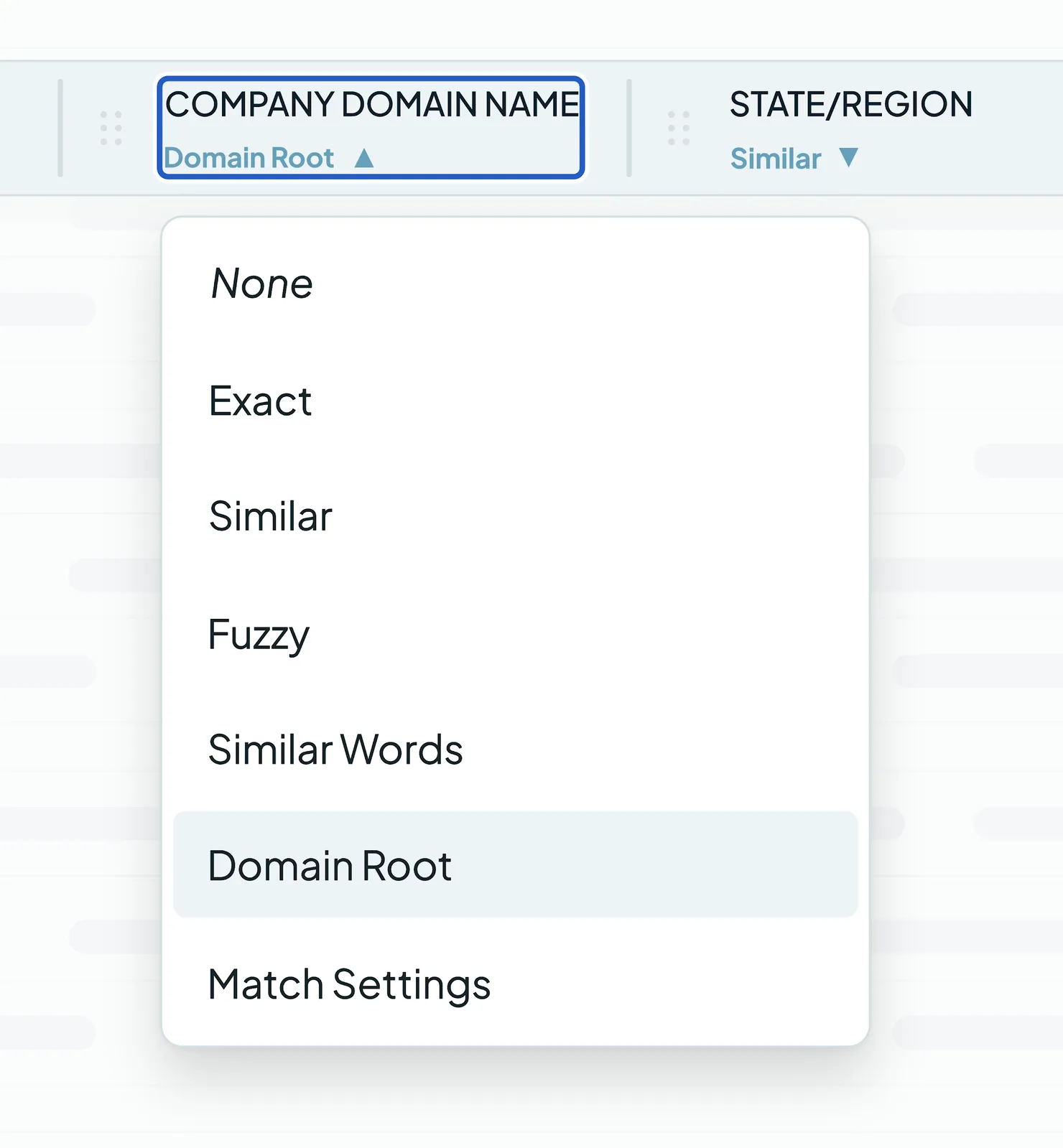
Types of match options
Exact
- Matches identical values, ignoring capitalization.
- Use it for high-stakes fields like email addresses, IDs or names where you can't afford false positives.
- Example: "John Smith" only matches another "John Smith".
Similar
- Catches small typos, swapped letters and missing characters.
- A good balance between precision and flexibility.
- On phone numbers, it strips formatting, hyphens, parentheses and country codes (like +1) and compares the core seven digits.
Fuzzy
- Uses a sound-based algorithm to catch different spellings of names that sound the same.
- Ideal for inconsistent contact names or data collected over the phone.
- Example: "Sean" and "Shawn" are matched.
Domain Root
- Compares the core domain instead of the full email address or website.
- Ideal for B2B data, to group several contacts or records from the same organization.
- Example: sales@example.com and support@example.com share the same domain root.
Similar Words (Any Order)
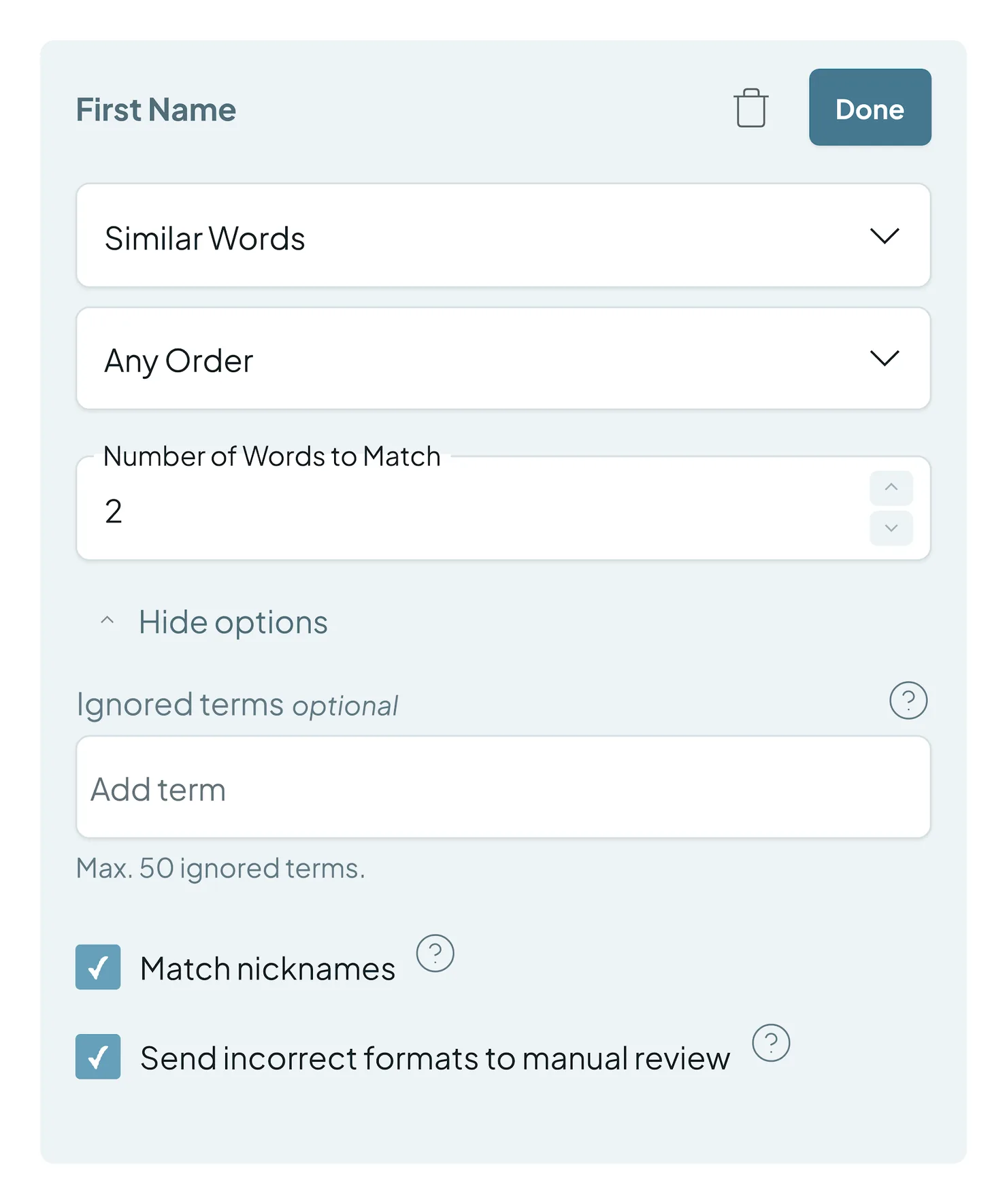
- Compares the words two values share, instead of the whole value.
- By default, it matches the same words in Any Order. You can also compare only the First or Last words of a field.
- Set the Number of Words to Match, so "Fire Company LLC" can match "Company LLC Fire Inc."
- Add up to 50 Ignored terms to skip common words like "LLC" or "Mr.".
- Turn on Match nicknames to match names like "Robert" and "Bob".
- Turn on Send incorrect formats to manual review to send badly formatted values to your review queue.
None
- Leaves the field out of matching. Use it for unreliable fields that would cause false positives.
Related tools
- Filters include or exclude specific segments, like only customers or one region.
- Excluded Matches are risky matches your Safety Settings set aside, like very large matches or placeholder data. You see them in the Excluded tab at the top of your Duplicate Search.
Troubleshooting
Two records that look identical aren't matched. Check the CRM for hidden differences, like a space at the end of a value. Also check your other fields: every field in the search has to meet its match option for records to match.
I'm getting too many false matches. Similar, Fuzzy or Similar Words (Any Order) might be too loose for that field. Switch it to Exact, or add another field to match on.
Phone numbers with different formats aren't matched. Use Similar on the phone field. It ignores formatting and country codes and compares the core seven digits.
Company names with "Inc." or "LLC" aren't matched. Use Similar Words (Any Order) and add the suffixes to Ignored terms.
FAQs about match options
- Does creating or editing a Duplicate Search merge records? No. Duplicate Searches only show potential duplicates in Dedupely. Nothing merges until you click Merge, or turn on Auto Merge.
- Why are there fields in my search that aren't used for matching? Those are visible fields. They give you context during review (like Created Date, Owner or Lead Source) without affecting the match.
- Can I use different match options in the same search? Yes. Match options are set per field, e.g. Exact on Email and Fuzzy on Last Name.
- Should I match on every field? No. Every field you add must match, so too many fields limit your results. Combine three or four key fields, like First Name, Last Name and Email.
- Does changing a match option change my CRM data? No. It only changes which duplicates Dedupely shows you.
- What's the difference between Similar and Fuzzy? Similar catches small typos and variations. Fuzzy catches names that sound alike but are spelled differently.
Next up
Changelog
-
Every field in filters, match settings and custom merge
Filters, Match Settings and custom merge offer every field of the record type, ordered by relevance rather than alphabetically.
Still stuck?
Our team helps on every plan and during the free trial, by chat, email or Zoom.
- Need help? Talk to support
- Questions about plans? Book a Zoom with sales
- Reading this with a model? Read this page as Markdown
- Feeding it the whole site? Read llms.txt




 Or sign up with Google
 Pipedrive Marketplace