Pipedrive Deduplication Guide
Find duplicate people, organizations and deals in Pipedrive and merge them in bulk, step by step.


Dedupely connects to Pipedrive to find and merge your duplicates, including the ones Pipedrive's own duplicate check misses. It works with every Pipedrive plan.
Supported Pipedrive objects
You can dedupe these Pipedrive objects:
- People
- Organizations
- Deals
- Leads
- Products
You can't merge records across different object types, e.g. a Person into an Organization.
Common Pipedrive duplicate issues
Pipedrive is built for fast-moving sales teams, so duplicates hit day-to-day selling directly:
- Reps contact the same prospect twice. Two reps call or email the same person without knowing it.
- Customers get cold-called. Reps accidentally prospect existing accounts.
- Forms and apps keep creating records. Web forms, third-party apps and campaigns create new People and Deals for contacts you already have.
- Call tools push thin records. Dialers often send just a phone number with a blank or placeholder name, which slips past Pipedrive's duplicate check.
- Imports without Pipedrive IDs. Importing a list without mapping Pipedrive IDs creates duplicates and splits deals and activities from the original record.
How Pipedrive's native merge works
Dedupely merges through Pipedrive's API. If you don't set your own Merge Rules, Pipedrive's default merge behavior applies:
- Multi-value fields are combined. Pipedrive keeps every unique email address and phone number on the primary record instead of overwriting them.
- History is kept. Blank fields never overwrite existing data, and all activities, notes, deals and linked organizations move to the record that survives, which keeps its ID.
- Leads and Products are merged by Dedupely. Pipedrive has no merge for them, so Dedupely merges them itself, with the same Merge Rules.
How to dedupe Pipedrive records, step by step
- Dedupe your legacy data first. Merge the duplicates already in Pipedrive before automating anything, so reps stop contacting the wrong people while you build your ongoing process.
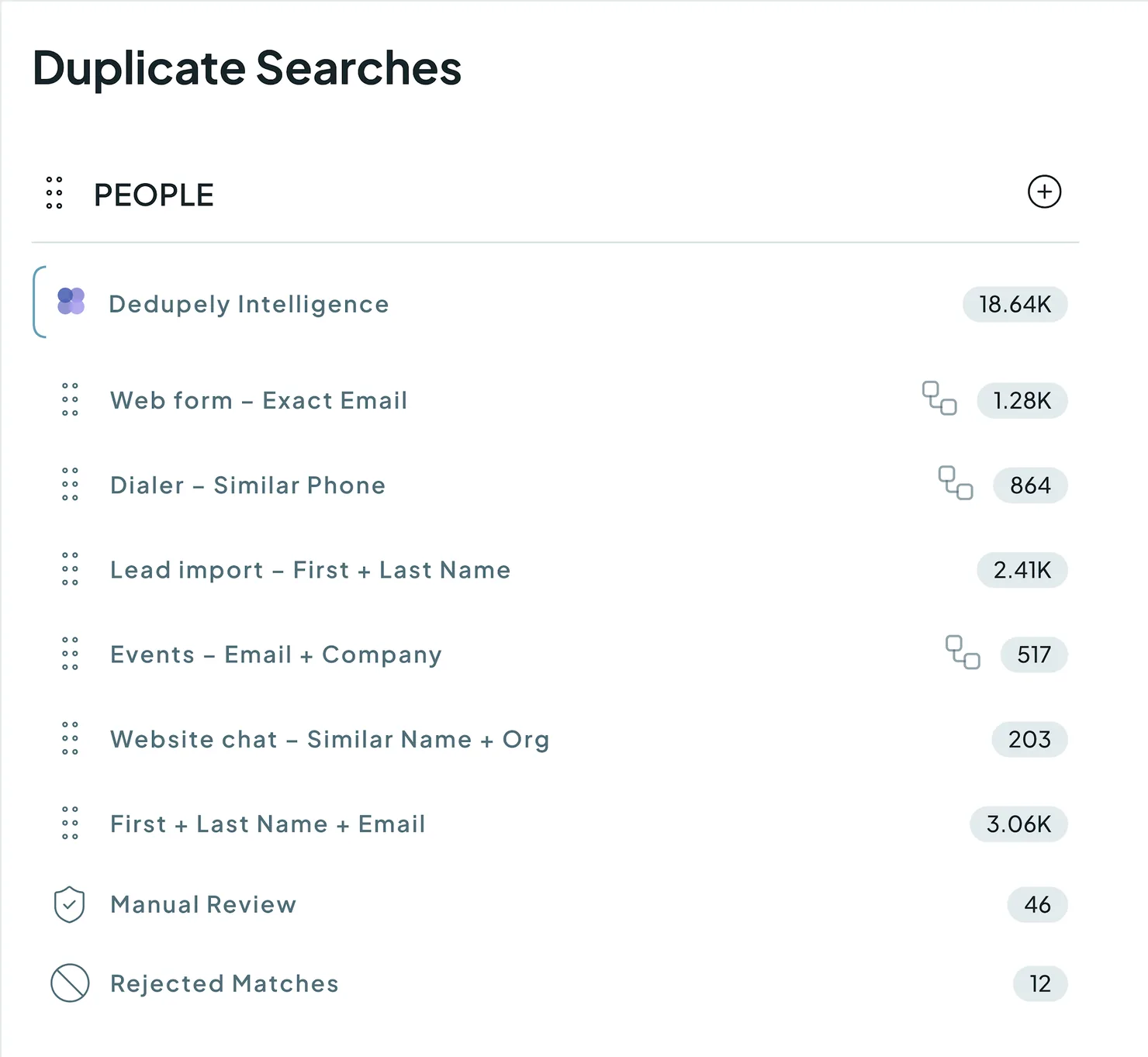
- Find your sources and decide what a duplicate is. Trace where duplicates come from (web forms, imports, integrations) and decide what counts as a duplicate for each, e.g. Exact Email + Exact First Name for high-confidence matches, or Similar Name + same Organization for cases that need review.
- Build one Duplicate Search per scenario. Create a separate Duplicate Search for each source or type of duplicate, instead of one broad search that tries to catch everything.
- Automate by confidence level. Use Auto Match to monitor uncertain matches, and turn on Auto Merge for strict, proven searches, running daily or continuously.
What happens next
After each merge in Pipedrive:
- The surviving record keeps everything. All emails and phone numbers, activities, notes, deals and linked organizations are on it.

- Every merge is logged. Check what was merged and when in Merge History.
Pipedrive's own merges can't be undone. Most Dedupely merges can be undone within 30 days from Merge History, except products (see Undo a Merge). For anything else, download your Merge History and use it to restore the original values in Pipedrive.
Troubleshooting
I can't connect Pipedrive, or merges fail. Your Pipedrive user might not be an Admin. Ask a Pipedrive Admin to update your permissions or connect Pipedrive for you, then try again.
My search misses duplicates with nicknames or typos. Exact match only catches identical values. Switch name fields to Similar or Fuzzy match. See Match Options.
Duplicates keep coming back after I merge them. A form, import or integration is still creating them. Build a Duplicate Search for that source and turn on Auto Merge, so new duplicates are merged as they arrive.
The wrong values survived a merge. Check your Primary Record rule and add field-level rules in Merge Rules. Preview a few matches before your next bulk merge.
FAQs about Pipedrive deduplication
- Do I need a specific Pipedrive plan to use Dedupely? No. Dedupely works with every Pipedrive plan.
- Why doesn't Pipedrive flag obvious duplicates? Pipedrive's duplicate check needs exact matches on specific fields. A nickname or a different spelling is enough for a duplicate to get through.
- Can I match on fields other than name and email? Yes. You can build Duplicate Searches on any standard or custom text, number, date or dropdown field in your Pipedrive account.
- Does Dedupely have more matching options than Pipedrive? Yes. Pipedrive looks for exact matches; Dedupely adds options like Exact, Similar, Fuzzy, Similar Words (Any Order) and Domain Root.
- Can I bulk merge duplicates in Pipedrive? Not natively. Pipedrive makes you review and merge duplicates one by one. Dedupely lets you bulk merge thousands of duplicates in a single action.
- Can I match Organizations on their company domain? Yes. Use Domain Root to match websites by their root (ignoring www, .com or .co.uk), and Ignored Terms to skip legal suffixes like Inc., LLC or Ltd. in Organization names.
- Why aren't my duplicate Organizations detected in Pipedrive? Pipedrive matches Organizations on exact names and addresses, so "Inc" vs. "Inc." or a missing address is enough to hide a duplicate. Domain Root and Ignored Terms in Dedupely catch these.
- Can I undo a merge? Yes, within 30 days for most merges, from Merge History, but not for products. Undo is for records that weren't duplicates, so treat every merge as permanent. See Undo a Merge.
Next up
How to Find Duplicates Create your first Duplicate Search and choose what counts as a duplicate.Still stuck?
Our team helps on every plan and during the free trial, by chat, email or Zoom.
- Need help? Talk to support
- Questions about plans? Book a Zoom with sales
- Reading this with a model? Read this page as Markdown
- Feeding it the whole site? Read llms.txt




 Or sign up with Google
 Salesforce AppExchange











