
Merge Rules
Updated
Dedupely's Merge Rules let you control the outcome of a merge: which record stays as the Primary Record and which values each field keeps. Set them for every Duplicate Search or for just one, check the result in Merge Preview, and bulk merges, Auto Merge and Dedupely Intelligence all follow them.
At a glance
- Works with
- HubSpot, Salesforce, Pipedrive, Close, Nimble, Google Contacts and spreadsheets
- Included in
- Every plan, and the free trial
- What it does
- Choosing the record and the values that stay
How Merge Rules work
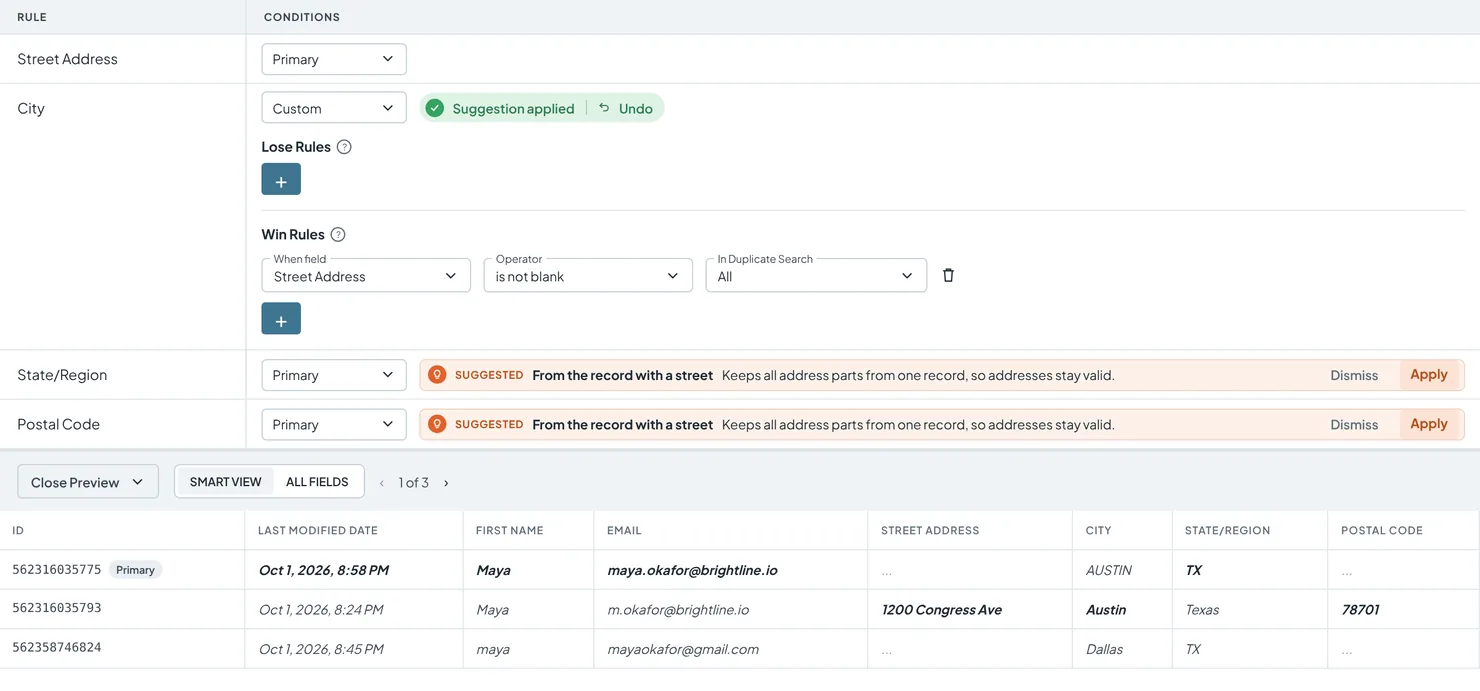
Applying a suggested rule and checking it in the preview.
-
Pick the Primary Record
Choose which record stays: the oldest, the newest, the last updated, the one with the most data, or your own Custom rule.
-
Set a rule for each field
Keep the Primary Record's value, append every value on fields that hold several, or let Best email, phone or name pick the strongest one. For anything else, build a Custom rule with Win and Lose Rules.
-
Check it in Merge Preview
See real matches with your rules before you save, with the winning values in bold.


Start with the rules Dedupely suggests
After your CRM syncs, Dedupely looks at your fields, custom fields included, and suggests a rule where one fits. You'll see it on the field's row, with a short reason. Apply it, adjust it like any other rule, or dismiss it.
| Field | Suggested rule | What it keeps |
|---|---|---|
| Do not call | Checked wins | A checked box wins, so an opt-out is never lost. |
| Rating | Hottest rating wins | The hottest rating wins. |
| State / Region | From the record with a street | State and postal code come from the record with a street. |
| Primary or best email | The Primary Record's email, unless a better one is needed. |
Suggestions are applied one at a time, and nothing changes until you save.
Good to know
- You don't need Merge Rules to start merging. Without them, the oldest record is kept (in Google Contacts and spreadsheets, the record with the most data), and blank fields never overwrite existing data.
- Each rule applies to all your Duplicate Searches or to one search you pick.
- Read-only fields can't have rules, and unique fields keep the Primary Record's value.
- Rules apply from the moment you save. Merges already done don't change.
- With a HubSpot–Salesforce sync, the synced company stays the Primary Record.
- Most merges can be undone within 30 days.

Frequently asked questions about Merge Rules
No. Without them, the oldest record is kept (in Google Contacts and spreadsheets, the record with the most data), and blank fields never overwrite existing data. Add rules when you want a different outcome.
Yes. Each rule applies to all your Duplicate Searches or to one search you pick.
It ranks each email by how it's written. A work email comes first, then a free email, then a shared inbox like info@, and placeholders, typos and invalid emails come last. The best one across the records wins, and on a tie the Primary Record's email stays. It doesn't check whether an email bounced.
Yes. It uses your Primary Record and field rules unless you set rules just for it.
Yes. Merge Preview on the Merge Rules page shows real matches with your current rules, including changes you haven't saved, so you can check the result first.
Learn more
Knowledge Base
Glossary
Choose what stays, then merge.