Billing & Usage
Manage your plan, record count, payment methods, billing details and invoices in one place.


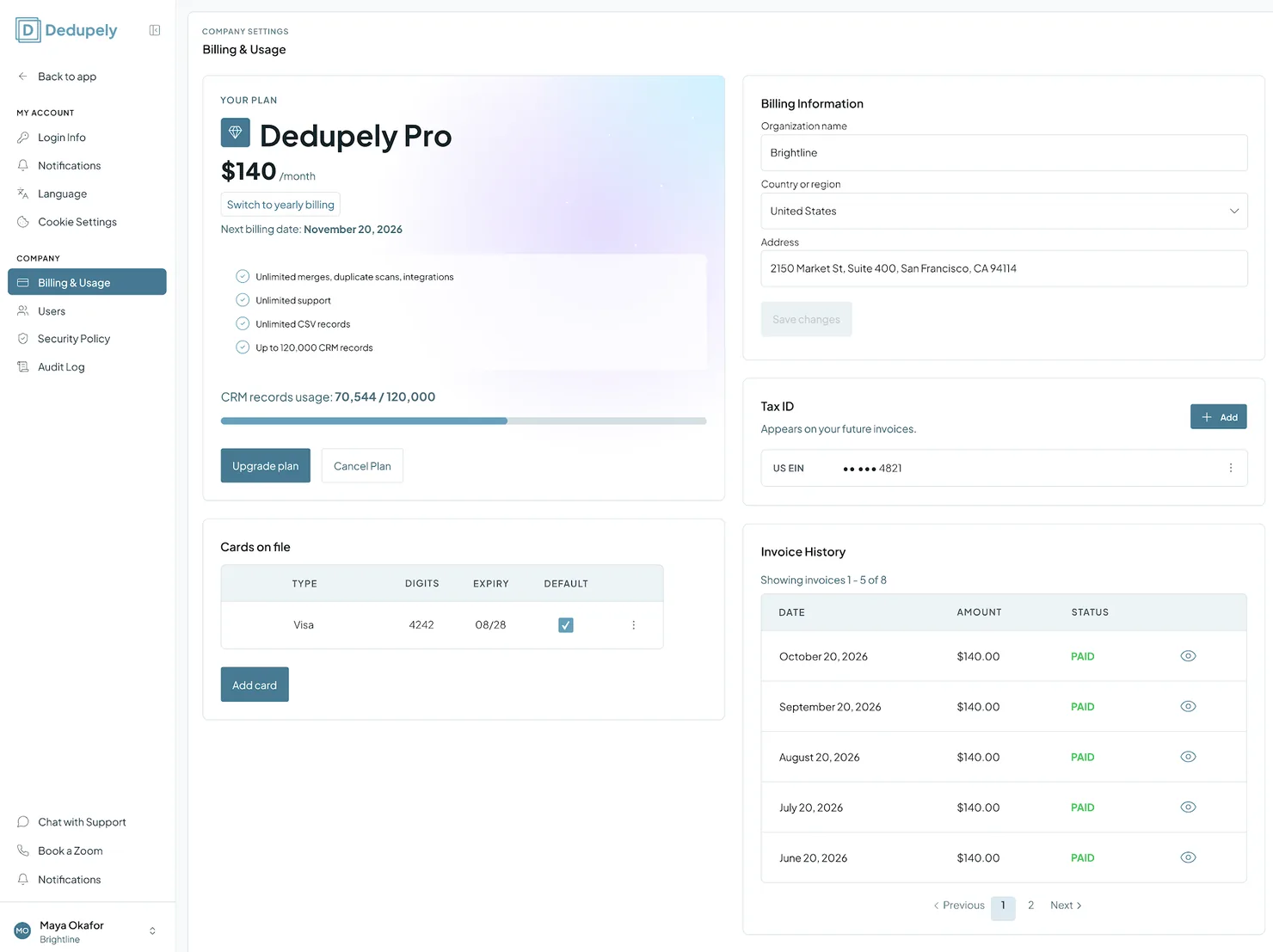
Billing & Usage shows how many records count toward your plan and lets Admins upgrade, switch to yearly billing, manage cards and billing details, and download invoices. Only Admins can open it.
Dedupely never upgrades your plan or charges you for going over your record limit. Every plan change has to be confirmed by an Admin.
How to open Billing & Usage
- Click your profile icon at the top right.
- Select Company Settings.
- Click Billing & Usage in the left menu.
How pricing works
Your plan is based on the total number of records synced across the CRM objects you turn on:
- All objects add up: e.g. Contacts + Companies + Deals.
- All CRMs add up: records from every connected CRM count toward the same limit.
- Spreadsheets don't count: spreadsheet uploads are unlimited and free.
Example:
| Data source | Details | Synced records |
|---|---|---|
| HubSpot | 15,000 Contacts, 18,000 Companies | 33,000 |
| Salesforce | 20,000 Accounts | 20,000 |
| CSV upload | Event list, 50,000 rows | 0 |
| Total | CRM records only | 53,000 |
For plans and prices, see Dedupely Pricing.
Managing your plan
- Record count: the usage bar in Your Plan shows your synced records against your plan's record limit.
- Upgrade: click Upgrade plan. Dedupely shows you the plan that fits your record count, and nothing changes until you confirm.
- Yearly billing: click Switch to yearly billing to get 20% off.
- Cancel: click Cancel Plan to turn off auto-renewal. You keep full access until the end of your billing period.
- Pause: on a monthly plan, you can pause for 1, 2 or 3 months instead of cancelling. See “How to pause your plan” below.
When you go over your record limit
Added
- Up to 10% over: your account keeps working normally for 10 days, including merging, Auto Merge and Auto Match. Admins and billing contacts get an email, and a notice when they log in.
- Within those 10 days: upgrade your plan, or turn off objects you don’t need in CRM Settings to get back under your limit.
- More than 10% over, or still over after 10 days: your account becomes read-only until you upgrade or your record count drops under your limit.
- One grace period per billing period. If you go back under your limit and go over again in the same billing period, your account becomes read-only right away.
Dedupely never upgrades your plan automatically. The plan it suggests is based on your total synced records.
If a payment fails
You have 3 days to update your card, and Dedupely emails you about it. After 3 days, your account becomes read-only until the open invoice is paid. Saving a new card in Cards on file charges the open invoice right away, and everything goes back to normal. Cancelling your plan doesn’t lift the read-only state.
What read-only means
| Keeps working | Stops until it’s sorted out |
|---|---|
| Syncing, scans and Dedupely Intelligence | All merging: Single Merge, Custom Merge, Bulk Merge and Manual Review |
| Viewing everything, including filters, columns and sorting | Auto Merge and Auto Match |
| Billing: card, plan, cancel, pause and resume | CSV exports |
| Your own profile and notifications | Any change to settings |
You can still remove users, cancel running merges, turn Auto Merge or Auto Match off, and disconnect a CRM. Auto Merge and Auto Match keep their settings and start again on their own once your account is back to normal.
Billing details, cards and invoices
- Billing Information: your organization name, country or region, and address. Edit them and click Save changes.
- Tax ID: click Add to include your tax ID on future invoices.
- Cards on file: see your saved cards and their expiration dates. Click Add card to add one, or set a card as your default.
- Invoice History: see past billing dates, amounts and payment statuses. Click the eye icon next to an invoice to open it as a PDF in your browser.
How to pause your plan
Added
On a monthly plan paid by card, you can pause for 1, 2 or 3 months instead of cancelling. You can pause once per account.
- Open Company Settings → Billing & Usage.
- Click Cancel Plan.
- At the top of the dialog, under Need a break instead? Pause your plan, choose 1, 2 or 3 months.
- The pause starts at the end of the month you’ve already paid for.
- During the pause, your account is read-only: syncing keeps running, but merging, Auto Merge and Auto Match are paused. Your data, settings and Merge Rules are kept exactly as they are.
- There are no charges during the pause. Your plan then renews at its usual monthly price on your normal billing day, and you get a reminder email 3 days before.
- You can resume early at any time from Billing & Usage, and billing restarts that day.
The pause option doesn’t show for yearly plans, plans paid by invoice, plans with an unpaid invoice or set to cancel, or accounts that have paused before.
Deduping in phases
Your record count depends on which objects are turned on, so you can dedupe one part of your CRM at a time:
- Turn objects on or off in CRM Settings, e.g. start with Contacts, then move to Companies.
- An object that's on keeps syncing, refreshing and running Auto Merge. Turning it off pauses monitoring, removes its records from matching, and lowers your synced record count.
For ongoing duplicate prevention, keep your main objects on so Auto Merge can catch new duplicates as they come in.
What happens next
- Upgrades apply once an Admin confirms them. If your account was read-only, it goes back to normal right away.
- Switching to yearly applies the 20% discount. Any unused part of your monthly payment goes toward the yearly cost.
- Cancelling keeps your access until the end of the billing period.
Troubleshooting
My account is read-only. Your records went more than 10% over your limit, the 10-day grace period ended, a payment failed more than 3 days ago, or your plan is paused. Upgrade or turn off objects in CRM Settings, update your card in Cards on file, or resume your plan.
My record count is higher than I expected. Every record in every object you turned on counts, across all connected CRMs. Sandbox records count too. See Syncing Records.
I can't see Billing & Usage. Only Admins can. Ask an Admin in your account.
FAQs about Billing & Usage
- Can Users see billing details? No. Only Admins can access Billing & Usage.
- Does Dedupely charge me automatically when I reach my record limit? No. Up to 10% over, you have 10 days to upgrade or lower your record count. After that, your account is read-only until you do.
- Can I pause instead of cancelling? Yes, on a monthly plan paid by card. You can pause once, for 1, 2 or 3 months.
- What happens if a payment fails? You have 3 days to update your card. After that, your account is read-only until the invoice is paid.
- What happens if I cancel? You keep full access until the end of your billing period.
- Can I view past invoices? Yes. In Invoice History, click the eye icon next to the invoice to open the PDF.
- Do spreadsheets count toward my record limit? No. Spreadsheet uploads are unlimited and don't count.
Next up
Changelog
-
Pause a monthly plan instead of cancelling
A monthly plan paid by card can pause once, for 1, 2 or 3 months, from the cancel dialog. The account is read-only while paused, and a reminder email goes out 3 days before billing restarts.
-
Grace periods over the record limit and for failed payments
Up to 10% over your record limit, everything keeps working for 10 days, once per billing period. A failed payment leaves 3 days to update the card. When either runs out the account is read-only until it is sorted out, instead of only merging pausing.
Still stuck?
Our team helps on every plan and during the free trial, by chat, email or Zoom.
- Need help? Talk to support
- Questions about plans? Book a Zoom with sales
- Reading this with a model? Read this page as Markdown
- Feeding it the whole site? Read llms.txt




 Or sign up with Google