★ 4.5/5 on the Pipedrive Marketplace
Find & merge duplicates in Pipedrive
Every Pipedrive object, in bulk, on any field.


Trusted by 20,000+ companies around the globe











Sell faster without Pipedrive duplicates
Duplicates slow a rep down. Dedupely merges them in one pass.
Dedupely works with the fields and pipelines you already have. Matching runs on any field, exact or similar, and nothing about your setup changes.
Set the rules once and Dedupely applies them to every merge, across people, organizations, deals, leads and products, including the products Pipedrive's own merge tool leaves alone.

Rated 4.5/5 on the Pipedrive Marketplace
“To say my contact list was a mess was an understatement.” Dedupely made deduplication, cleansing and selecting which data elements to retain a breeze. For the first time in forever, my contacts are in sync across Pipedrive, Microsoft 365 and my iPhone.
Most Pipedrive teams have no admin to spare. Duplicates arrive from an import, a migration or a sync that never checked, and nobody owns sorting them out. Manual Review holds anything you are unsure about, so nothing merges until you say so.
Setup takes about an hour with nothing to configure, and we stay with you through the first bulk merge.

Duplicate people and organizations split a deal history in two, so a rep opens one record and works from half the story. Dedupely merges them on rules you set, and the activities on both records come across.
Calls, emails and notes sit against a single person instead of being scattered across three.
Pipeline value counts once, and a deal stops hiding behind a duplicate organization.
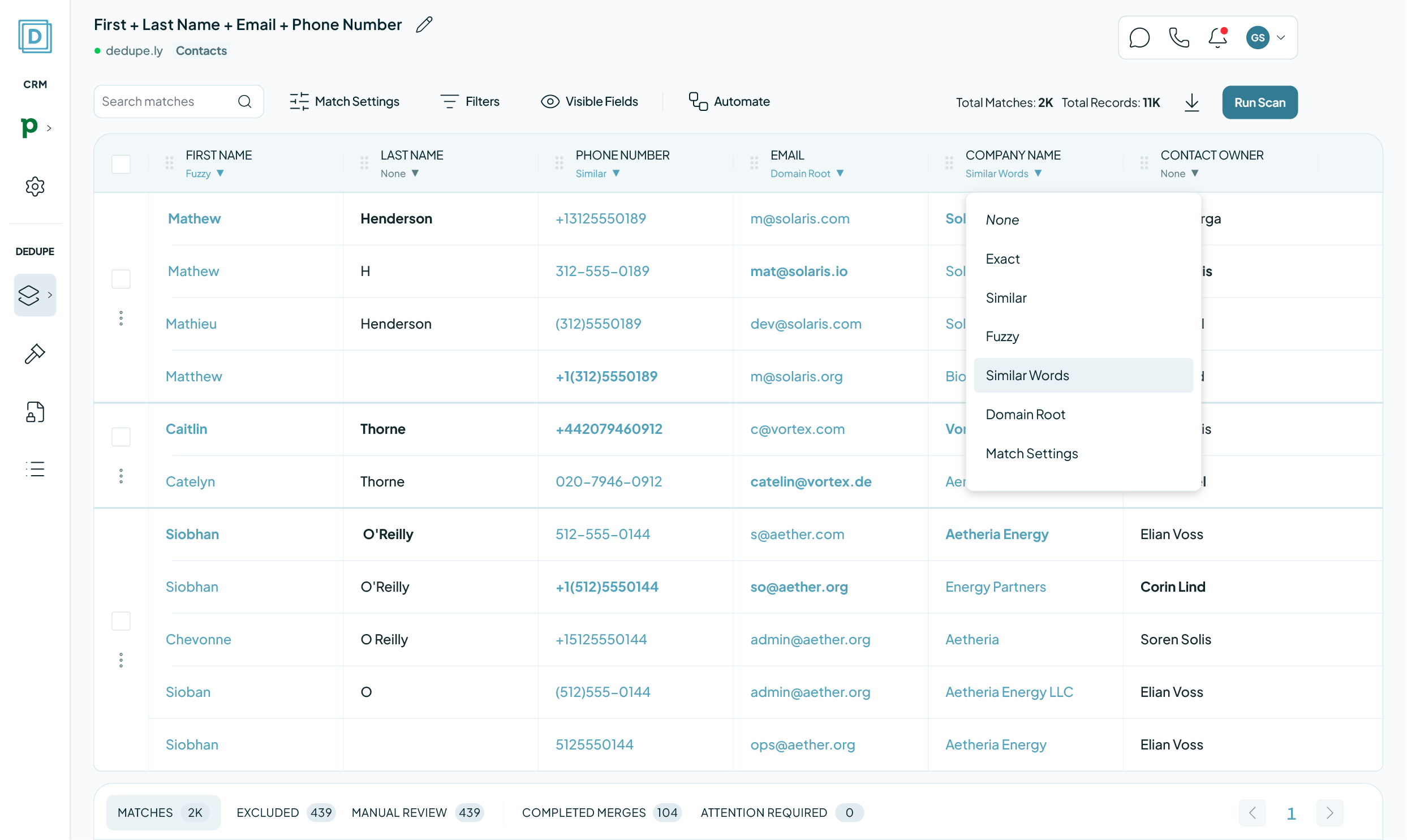
Pipedrive deduplication, start to finish

Access it asks for
A full Pipedrive admin. The scopes cover contacts, deals, leads, products, activities and mail, because a merge has to carry associations across as well as field values.

Your first sync
Whole record types, not part of one. After the first sync, new records come across and new duplicates surface within about three minutes.

What a merge changes
Associations move to the Primary. Multi-value fields let you choose exactly which emails and phone numbers survive, rather than taking whichever record wins.

What stays untouched
Archived deals and leads. Pipedrive will not let either be updated or merged, so archiving behaves like deleting: unarchive one and it returns on its own.

No merge can be undone
Not in Pipedrive, and not by any tool that merges through it. What stands in for undo: Manual Review holds every match until you approve it, Merge History records what each merge kept, and you can keep using Pipedrive's own merge button alongside it.
Managing duplicate Pipedrive contacts, three ways
| NativeMerge duplicates | Third partyOther dedupe tools | Our SolutionDedupely | |
|---|---|---|---|
| Finds duplicates already in your account | Yes, on every plan | Yes | Yes, on any field you choose |
| How it matches | Identical name plus a shared phone, email or organization | Varies | Exact or similar, on any field, with company suffixes ignored |
| Bulk merge | No: one pair at a time | Usually | Whole result sets in one pass |
| Covers products | No | Varies | Yes, like any other record type |
| Runs on a schedule | No | Often a higher tier | Auto Merge, on every plan |
| Ease of use | Easy but limited | Too basic or too complex | Easy to use |
| What you pay for | Included | Often per user or per seat | Records synced. No per-user fee |
Merge duplicates by object in Pipedrive
- PeopleReps check twice before calling, in case the record is stale.
- OrganizationsOne company, three records, deals spread across all of them.
- DealsEvery repeat enquiry opens another deal on the same buyer.
- LeadsThe Leads Inbox fills faster than anyone clears it.
- ProductsOne product on two lines splits what it actually earned.

Merge Pipedrive duplicates in 5 minutes
Three steps from account to first merge
-
Connect your account
One click CRM connection.
-
Match any field
Finds matches no matter how messy.
-
Merge your duplicates
Bulk, single, or Auto Merge.
We love customer service
That's why we offer unlimited support.

Submit a ticket
You can submit a support ticket by emailing us. Our team will respond as soon as possible.


Zoom Support
We offer unlimited video call support. Whether you’re getting started or getting intense.
Pipedrive customer stories
How other teams cleaned up their duplicates
- 3,000+ duplicate records merged How a Wellness App Stopped Sales Reps from Calling the Same Prospect by Merging 3,000+ Duplicate Pipedrive Records with Dedupely Read the story
- 2,000+ duplicate records merged How a Moving Company Stopped Cleaning Up Duplicate Pipedrive Leads by Hand Every Day, with Dedupely Read the story
- 58,000+ duplicate records merged How a SaaS Company Merged 58,000+ Duplicate Pipedrive Records Created by Its Migration from HubSpot, with Dedupely Read the story
20,000+ businesses
feel the magic

"Works really well, support is A++++++"

"Dedupely helped us to quickly de-duplicate hundreds of records, with a level of transparency that gives you confidence in how those changes are being applied."
FAQs

Pipedrive's tool is on every plan, and it matches on an identical name plus a shared phone, email or organization: then merges one pair at a time.
Dedupely matches on any field, exact or similar, groups every duplicate rather than pairs, and merges the whole group in one pass.
Because it compares names exactly. “Acme Ltd” and “Acme Limited” are not an exact match, so they stay apart.
Dedupely ignores common company suffixes and matches websites by domain root, which is where most duplicate organizations actually hide.
People, organizations, deals, leads and products.
Archived deals and leads stay out. Pipedrive will not let anything update or merge them, so Dedupely treats archiving the way it treats deleting: unarchive one and it comes back automatically.
Yes. Products are a record type like any other, matched on the fields you choose. Pipedrive's own merge feature does not cover them at all.
Associations move to the Primary by default, and multi-value fields let you pick exactly which emails and phone numbers survive.
Two exceptions worth knowing: file associations on leads, and follower associations on leads and products, are not changed by a merge.
You choose the Primary. Single-value fields keep the Primary's value unless a Merge Rule or your own selection says otherwise. Everything lands in Merge History.
Yes. Merge inside Pipedrive whenever you like. Dedupely keeps pulling the latest data and the two never conflict.
Yes. Manual Review holds every match until you approve it, and a match you reject stays out of later searches. Connecting your account merges nothing on its own.
Auto Match spots new duplicate people and organizations as they arrive. Auto Merge merges the ones that meet your rules, on the schedule you set, and Merge History keeps the record.
A full admin connection. Pipedrive scopes webhooks, objects and associations by permission level, so anything less means records or associations go missing from a merge.
The 7-day trial connects your account, syncs your records and runs searches, with unlimited support while you set it up.
Get started for free
20 free trial merges and as much free support as you need to get your duplicates under control.

 Or sign up with Google

M Weppner
Running CRM cleanup for clients? See the Partner Program












