No per-user fees Merge Rules decide field by field Every merge in Merge History
Find & merge duplicates in Google Contacts
No credit card needed
Trusted by 20,000+ companies around the globe













Merge Google Contacts duplicates in bulk
Dedupely merges the duplicates you have, then keeps Google Contacts from filling up again.
They arrive from a phone, a work account and an import, so one person ends up as three contacts, each holding part of the detail.
Merging them by hand, two records at a time, never catches up. Dedupely connects to your account with OAuth, matching and merging on any field a contact carries.
Find the duplicates Merge & fix leaves behind
Merge & fix stops where Google's own matching stops.
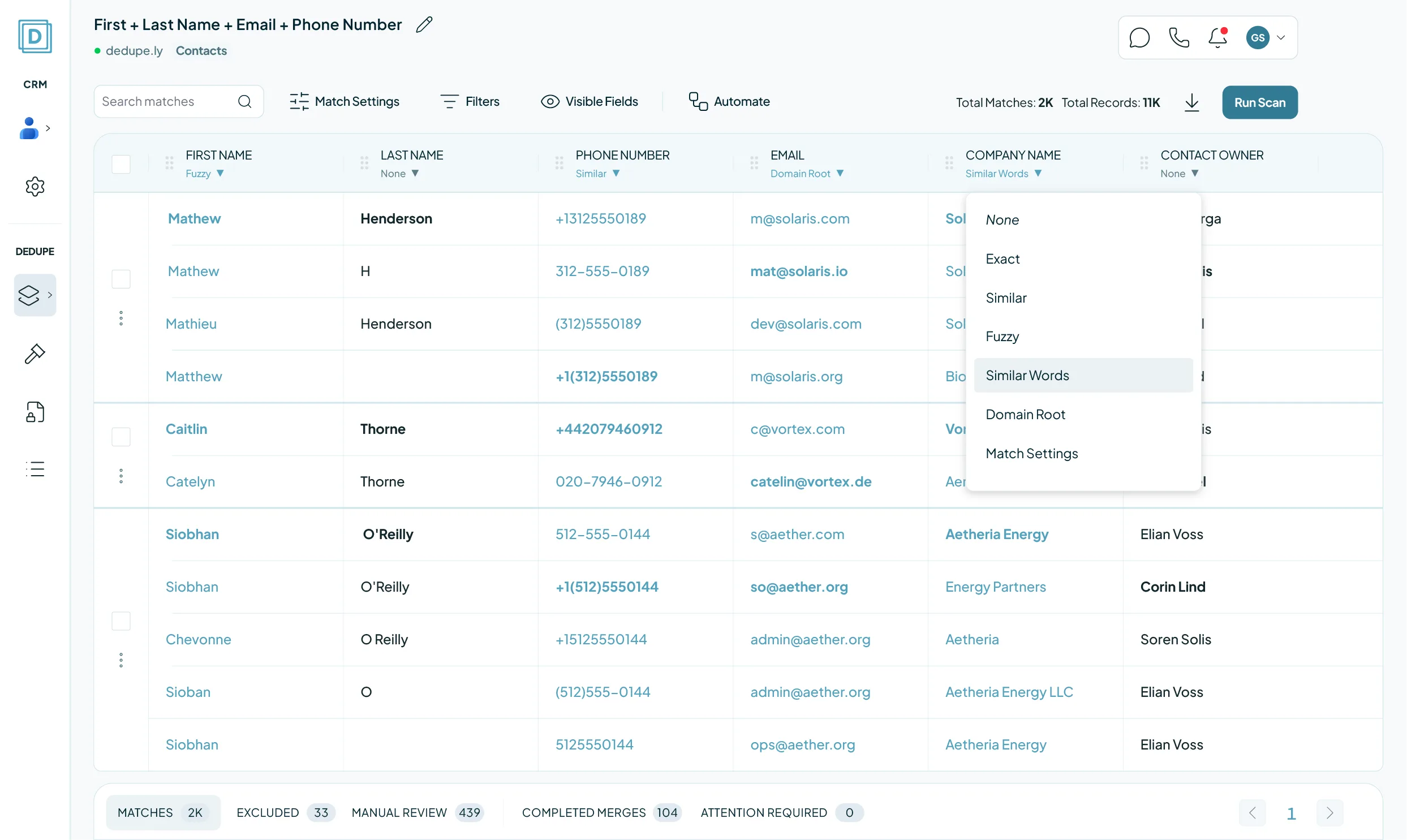
It proposes the pairs Google is sure of, and Merge all accepts them in one click. Everything else stays: Mathew, Mathieu and Matthew Henderson, saved from a phone, a work account and an import.
Dedupely matches on any field a contact carries, the way you set it: Exact, Similar, Fuzzy, Similar Words or Domain Root. Fuzzy on first name groups the three Hendersons; Similar on phone number reads one number through three formats.
The whole group merges in one pass. A Merge Rule decides which value survives on every field, and Merge History keeps the originals.

Duplicate contacts mean the number you dial is on the copy you did not open, and the same person gets the same email twice.
Every address and number on one record, rather than spread across three.
Match on the fields you choose, not only the pairs Google is confident enough to propose.
How Google Contacts deduplication works here

Access it asks for
An OAuth authorization from your own Google account, covering read, write and delete on your contacts. There is no API key to paste.

Your first sync
Your contacts, the one record type Google Contacts has, so there is nothing to switch on or off. After that, new contacts sync and nothing else changes.

What a merge changes
Google Contacts has no merge to call, so Dedupely consolidates the field values onto the contact you keep and then removes the duplicate.

What stays untouched
Connecting and syncing only read. The one change Dedupely makes is a merge you asked for, and Merge History keeps every original value.

A Dedupely merge is a delete
Dedupely consolidates the values onto the contact you keep and deletes the duplicate, so Merge & fix cannot separate it afterwards. Google Contacts holds a deleted contact in Trash for 30 days, and Merge History keeps the original values of every record, exportable as CSV. Manual Review holds anything you are unsure of.
Google Contacts duplicate management, side by side
| NativeGoogle Contacts | Our SolutionDedupely | |
|---|---|---|
| Finds duplicates already in your account | Suggestions only, on its own matching | Yes, on any field you choose |
| Merges on criteria you set | No: it proposes the matches | Any field, with your match options |
| Records per match | Two | Every record in the group |
| Bulk merge | Yes: Merge all, on its own suggestions | Whole result sets in one pass |
| Control over which value survives | No: Google Contacts decides | A Merge Rule on every field |
| Runs on a schedule | No | Auto Merge, on every plan |
| What you pay for | Included with your Google account | Records synced. No per-user fee |
Merge Google Contacts duplicates in 5 minutes
Three steps from account to first merge
-
Connect your account
Authorize Dedupely with OAuth. No API key to paste.
-
Match any field
Default searches, or build your own.
-
Merge in bulk
Every contact in the result set.
We love customer service
That's why we offer unlimited support.

Submit a ticket
You can submit a support ticket by emailing us. Our team will respond as soon as possible.


Zoom Support
We offer unlimited video call support. Whether you’re getting started or getting intense.
FAQs

Merge & fix proposes the matches Google is sure of, and Merge all accepts them at once. It cannot take a match you define.
Dedupely matches on any field, with Exact, Similar, Fuzzy, Similar Words or Domain Root, groups every duplicate rather than pairs, and merges the group in one pass.
Because it runs on Google's own matching, and nothing in Google Contacts lets you change it. One person saved from a phone and again from an import, with the name spelled two ways, stays apart.
Fuzzy on name and Similar on phone number bring them into one match.
Contacts. Google Contacts has one record type, so there is no cross-object merging to consider.
Google Contacts has no merge in its API, so Dedupely consolidates the values onto the contact you keep and deletes the duplicate.
The deleted contact sits in Google Contacts Trash for 30 days, and Merge History keeps the original values of both, exportable as CSV.
Not the way Merge & fix separates a contact. A Dedupely merge deletes the duplicate; Google Contacts holds it in Trash for 30 days, and Merge History has every original value.
Manual Review holds anything you are unsure of before it merges.
You choose the Primary, by criteria such as the oldest, the newest or the most complete record. Merge Rules decide field by field which value survives, and every merge lands in Merge History.
No. The connection is to one Google account's own contacts, and Google Contacts cannot merge across accounts. Each person on the team connects their own.
Yes. Manual Review holds every match until you approve it, and a match you reject stays out of later searches. Connecting your account merges nothing on its own.
Auto Match spots new duplicate contacts as they arrive. Auto Merge merges the ones that meet your rules, on the schedule you set, and Merge History keeps the record.
An OAuth authorization from your own Google account, covering read, write and delete on your contacts. There is no API key to paste, and the connection carries your permissions, not more.
The 7-day trial connects your account, syncs your contacts and runs searches, with unlimited support while you set it up.
Get started for free
20 free trial merges and as much free support as you need to get your duplicates under control.

 Or sign up with Google

Samo J
Founder & CSO, TapHome
 Pipedrive user
 Running CRM cleanup for clients? See the Partner Program











