Merge safety
Merge safety is everything Dedupely does so you can keep merging with confidence. Safety Settings set risky matches aside, you see each merged record before it happens, Dedupely checks your CRM's own limits, and every merge is logged with its original values, who merged and when.
At a glance
- Works with
- HubSpot, Salesforce, Pipedrive, Close, Nimble, Google Contacts and CSV files
- Included in
- Every plan and the 7-day free trial
- What it does
- Giving you the confidence to keep merging
Before, during and after every merge
-
Before
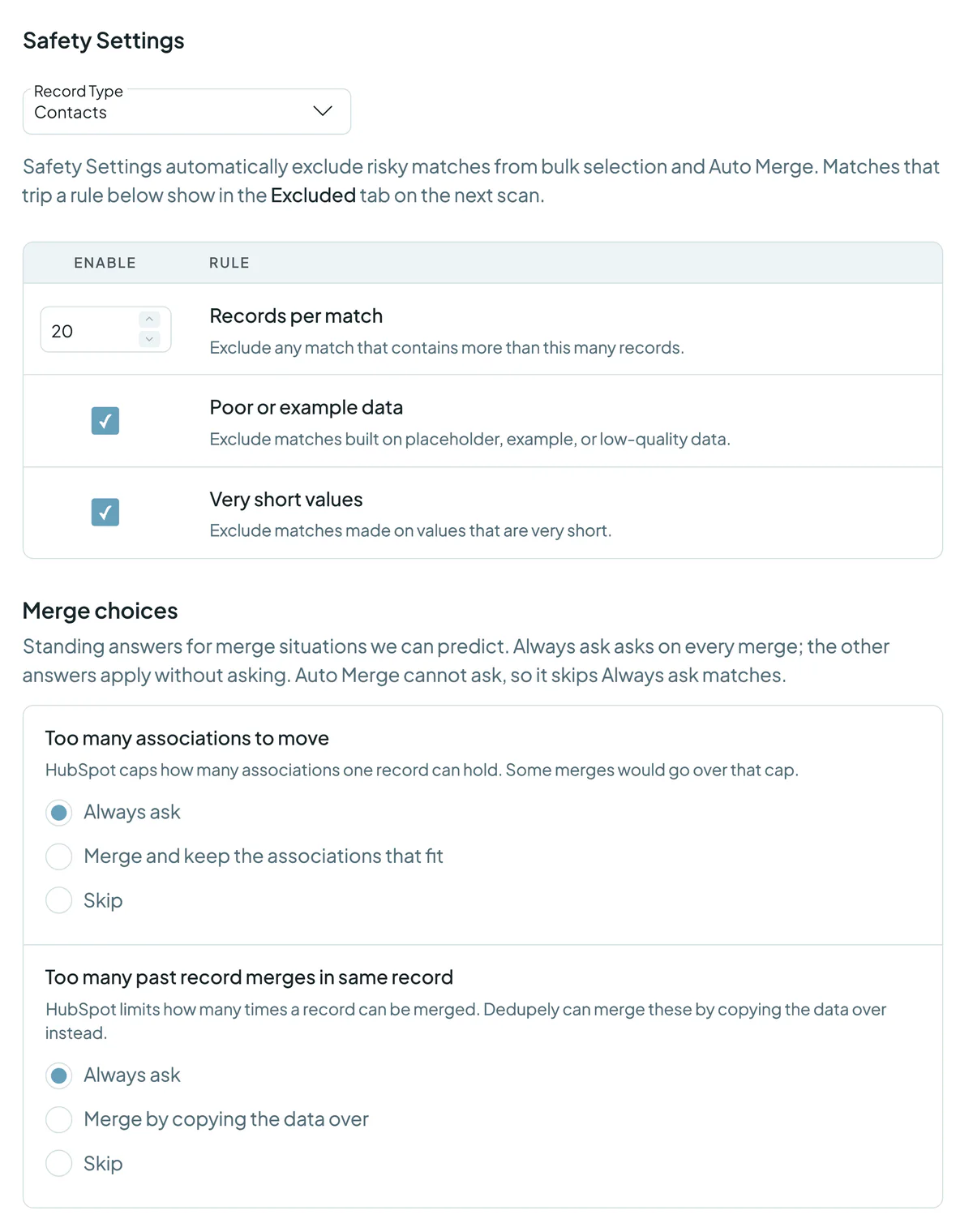
Safety Settings set risky matches aside, and Match Details shows you a preview of the merged record before you merge.
-
During
Dedupely checks your CRM's own limits and leaves out any merge that could break them, like a merge that would break your HubSpot–Salesforce sync.
-
After
Merge History keeps every original value, plus who merged and when, and the Audit Log tracks every change.


What Dedupely checks before a merge
| Check | What happens |
|---|---|
| Too many records in one match | Matches over your limit (20 by default, set per object) go to Excluded Matches. |
| Example or placeholder data | Values like test@test.com or N/A send the match to Excluded Matches. |
| Very short values | Matches built on one- or two-letter values go to Excluded Matches. |
| HubSpot: too many associations | You choose: always ask, merge and keep the associations that fit, or skip. |
| HubSpot: too many past merges on a record | You choose: always ask, merge by copying the data over, or skip. |
| HubSpot and Salesforce synced | Dedupely merges in both CRMs at once and excludes any merge that could break the sync. |
| Salesforce account hierarchies | A merge stops if the accounts are in the same parent–child hierarchy. |
Good to know
- Safety Settings are on by default, for every object.
- Auto Merge never decides for you. It skips Excluded Matches and anything set to "Always ask".
- Treat merges as permanent. Most merges can be undone within 30 days, but undoing adds the records back to your CRM and moves the match to Rejected Matches. Preview first and use Merge History to see what changed.
- Custom Merge for high-stakes records: pick every value yourself, field by field.
- The Audit Log tracks every change. Every merge and settings change in your account, for the people whose role gives them access.

Questions about merge safety

Yes, within 30 days for most merges. Undoing adds the records back to your CRM and moves the match to Rejected Matches, so we recommend treating merges as permanent. Merge History keeps the original values of every merge, plus who merged and when.
Your Safety Settings (records per match, example data and very short values), plus your CRM's own limits, like HubSpot associations and Salesforce account hierarchies.
Yes. Dedupely merges in both CRMs at once and excludes any merge that could break the sync.
Yes. Open Match Details to see the merged record, or use Custom Merge to choose every value yourself.
The people in your account whose role gives them access to it.
Learn more
Knowledge Base
Glossary
Try merge safety on your own CRM.












