Security Policy
Protect your Dedupely workspace with password rules, two-factor authentication, session timeouts and IP whitelisting.


Security Policy lets Admins set how everyone in the workspace logs in: password strength and expiration, mandatory two-factor authentication (2FA), automatic logout after inactivity, and which IP addresses can log in.
Several CRMs connected? Each connected CRM has its own Security Policy, so set it up in each one. See Several CRMs in One Dedupely Account.
How to open Security Policy
- Click your profile icon at the top right and select Company Settings.
- Select Security Policy in the left menu.
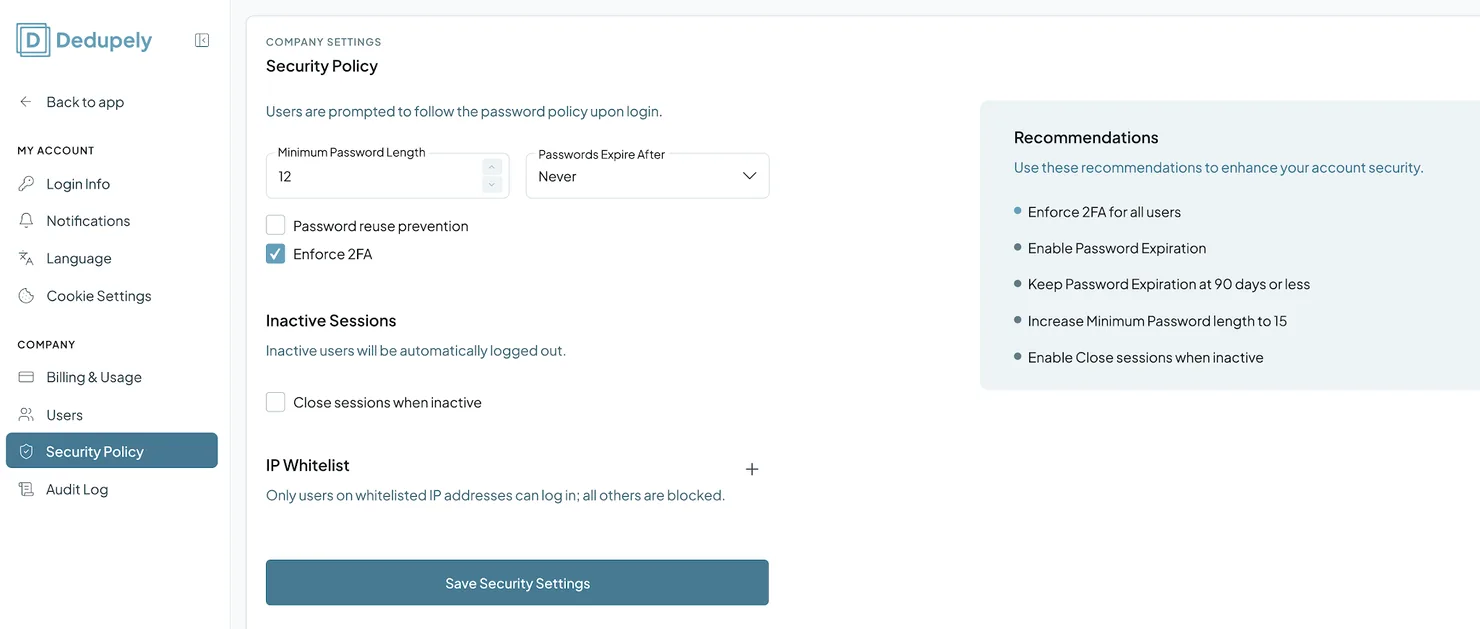
Default settings
- Minimum password length: 12 characters.
- Password expiration: Never.
- 2FA: optional, unless an Admin makes it mandatory.
Settings you can change
Passwords and authentication
Added
- Minimum Password Length: the shortest password users can set.
- Passwords Expire After: make passwords expire every 30, 60, 90 or 180 days, or Never.
- Password Reuse Prevention: stop users from reusing a set number of their past passwords.
- Enforce 2FA: require two-factor authentication for every login.
Inactive sessions
- Close Sessions When Inactive: log users out automatically after a period of inactivity, so unattended screens stay protected.
IP whitelist
- Whitelist IPs: only allow logins from specific static IP addresses.
Recommended settings
- Enforce 2FA for all users.
- Turn on password expiration, at 90 days or less.
- Raise the minimum password length to 15.
- Turn on Close Sessions When Inactive.
What happens next
- Your policy applies to everyone in your workspace, Admins and Users.
- If you enforce 2FA, users set it up with a verification code sent to their email.
Troubleshooting
I can't open Security Policy. Only Admins can. Ask an Admin in your account.
A teammate can't log in after I added an IP whitelist. They're probably logging in from an IP address that isn't on the list. Add their static IP address, or ask them to log in from an allowed network.
A teammate is being logged out often. Close Sessions When Inactive logs people out after a period of inactivity. Adjust it if it's too short for your team.
FAQs about Security Policy
- Who can change the Security Policy? Only Admins.
- Is 2FA mandatory? Not by default. Admins can make it mandatory with Enforce 2FA.
- Do these settings apply to Admins too? Yes. They apply to everyone in the workspace.
- Where do I turn on 2FA for my own account? In My Account → Login Info.
Next up
Audit Log See a record of every action in your account, from merges to logins.Changelog
-
Password expiry
When your company sets a password expiry, users whose password is older than it are sent to reset it.
Still stuck?
Our team helps on every plan and during the free trial, by chat, email or Zoom.
- Need help? Talk to support
- Questions about plans? Book a Zoom with sales
- Reading this with a model? Read this page as Markdown
- Feeding it the whole site? Read llms.txt




 Or sign up with Google
 HubSpot user











