Undo a Merge
Bring back records that were merged by mistake, within 30 days, and keep them from matching again.


If two records that weren't duplicates were merged, you can undo the merge from Merge History for 30 days. Dedupely creates the merged-away records again with their details from before the merge, moves their links back, and marks them as not duplicates so they don't match again.
Undo is a way back for real mistakes, not a step in your process: treat every merge as permanent, and test your searches and Merge Rules before you merge.
When should you undo a merge?
Undo a merge when the records weren't duplicates: two different people, two companies that share a name, a branch merged into its head office.
If the records were duplicates but the wrong value survived, don't undo the merge. Fix the value in your CRM, and set Merge Rules so the right value wins next time.
How to undo a merge
Added
- Go to Merge History in the left menu, and find the merge with the Record Type dropdown and the Search merges bar.
- Click the three dots on the merge, then View details. The Merge Details window shows the result, the original Primary Record and the removed records, side by side.
- At the bottom left, check the date next to Can be undone until.
- Click Undo merge.
- Review what will be restored, and confirm.
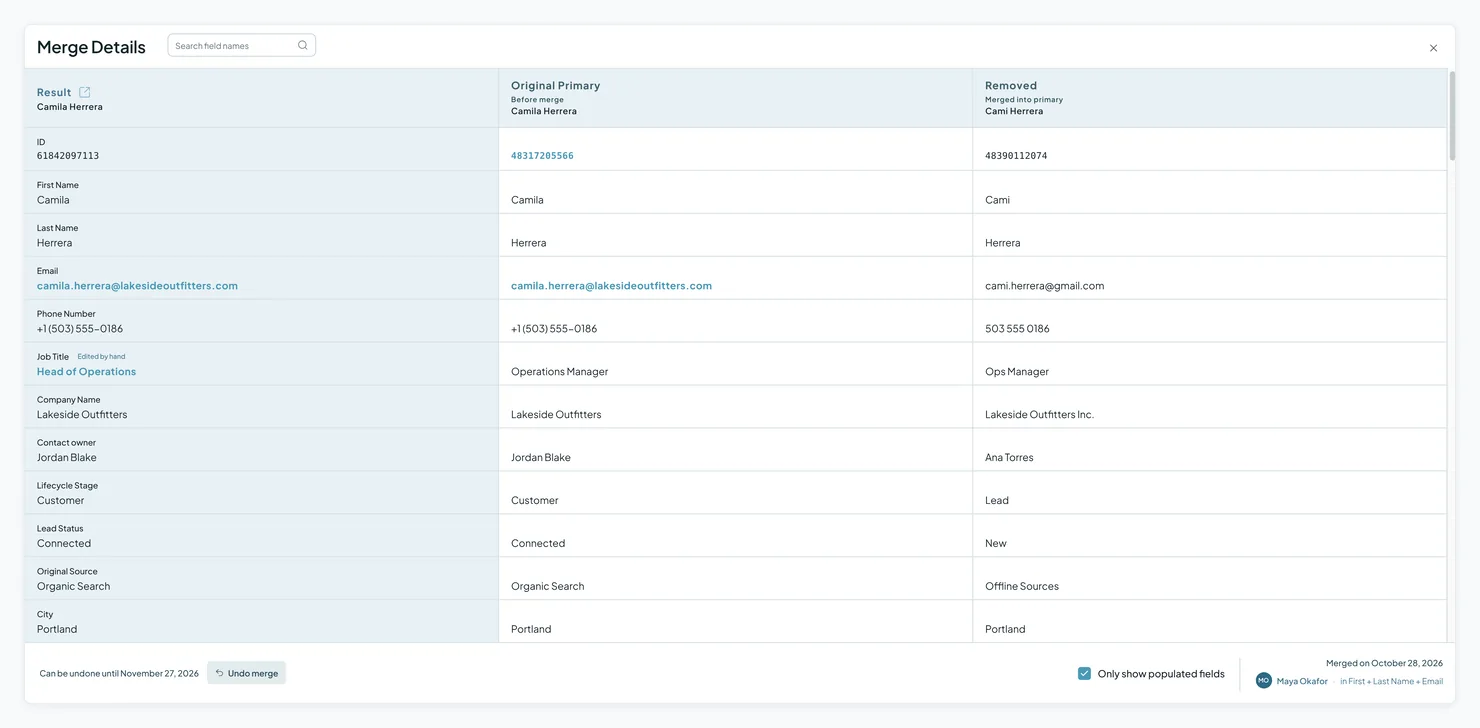
What an undo brings back
- The merged-away records, created again in your CRM with their details from before the merge.
- Their links, like associated companies, contacts and deals, moved back to them.
- The Primary Record's fields, back to their values from before the merge, as long as nobody has edited them since.
The Primary Record stays in your CRM. The records are then marked as not duplicates and go to Rejected Matches, so no search, Auto Match or Auto Merge matches them again.
What an undo can't bring back
- The original record IDs, outside Salesforce. Re-created records get new IDs, so links and integrations that point to the old IDs won't follow. In Salesforce, a record merged in the last 15 days comes back from the Recycle Bin with its own ID.
- Values edited since the merge. If someone changed a field on the Primary Record after the merge, the new value stays.
- Read-only values, like the created date and the record's history.
- List memberships and workflow or sequence enrollments. Re-created records can also start workflows set up for new records.
- Links between the merged records themselves, like a parent and a child company merged together.
- Values your CRM no longer accepts, like a deleted dropdown option. These are listed after the undo.
- In HubSpot, an email address HubSpot won't release from the Primary Record. The restored contact is created without it, and the undo tells you.
Which merges can be undone?
| Can be undone | Can't be undone |
|---|---|
| Merges from the last 30 days in HubSpot, Salesforce, Pipedrive, Close, Nimble, Google Contacts and spreadsheets, including merges by Auto Merge and Dedupely Intelligence | Merges older than 30 days |
| Merges made before undo was available | |
| HubSpot leads | |
| HubSpot company merges in a portal synced with Salesforce | |
| Merges made in HubSpot and Salesforce at once, across a HubSpot-Salesforce Integration | |
| Pipedrive products |
For a merge that can't be undone, use the original values in Merge History to restore your data. See I Merged the Wrong Records: What Now?
What happens next
- The records are back in your CRM as separate records, with new IDs (in Salesforce, their own IDs within 15 days).
- They're in Rejected Matches, so they won't be matched or merged again. If you ever need to merge them, select the match in Rejected Matches and click Remove from Rejected.
- If your CRM refused part of the undo, the merge lists each link or field it couldn't restore under Attention needed. Fix the cause in your CRM, then click Retry undo.
Troubleshooting
I don't see Undo merge. The merge might be older than 30 days, made before undo was available, or a type that can't be undone, like HubSpot leads, Pipedrive products or a merge made in HubSpot and Salesforce at once. Use Merge History to restore the original values instead.
The undo shows "Attention needed". Your CRM refused some links or fields, for example because of a permission, a required field or a value it no longer accepts. Fix it in your CRM, then click Retry undo.
A restored record started a workflow. Re-created records count as new records in your CRM, so workflows for new records can start. Check your workflows' enrollment triggers before you undo a merge.
A restored record is missing its email address. In HubSpot, the email may still belong to the Primary Record, and HubSpot won't let two contacts share it. The undo tells you which email was left out.
FAQs about undoing a merge
- How long do I have to undo a merge? 30 days. The Merge Details window shows the exact date next to Can be undone until.
- Will the undone records be matched again? No. They're marked as not duplicates and go to Rejected Matches.
- Do restored records keep their original IDs? In Salesforce, yes, for records merged in the last 15 days: they come back from the Recycle Bin. Everywhere else, no: they're created again with new IDs.
- Can I undo a merge to change which values won? No. Undo is for records that weren't duplicates. To change a value, edit it in your CRM and update your Merge Rules.
- Can I undo a merge made by Auto Merge or Dedupely Intelligence? Yes. They're undone the same way, from Merge History.
- Can I undo merges in spreadsheets? Yes, for 30 days, like CRM merges.
- Can I undo a merge made before this feature was available? No. Use Merge History to restore the original values.
Next up
Auto Match Get notified when new duplicates appear, so you can keep your CRM clean over time.Changelog
-
Undo a merge for 30 days
Undo a merge from Merge Details for 30 days, in every CRM and in spreadsheets. The merged-away records come back with their links, and the match moves to Rejected Matches. Not for HubSpot leads, Pipedrive products, merges made in both HubSpot and Salesforce, HubSpot companies in a Salesforce-synced portal, or merges before undo existed.
Still stuck?
Our team helps on every plan and during the free trial, by chat, email or Zoom.
- Need help? Talk to support
- Questions about plans? Book a Zoom with sales
- Reading this with a model? Read this page as Markdown
- Feeding it the whole site? Read llms.txt




 Or sign up with Google
 Salesforce AppExchange











