Excluded Matches
Keep edge cases and low-quality matches out of your Duplicate Searches automatically, and keep merging.


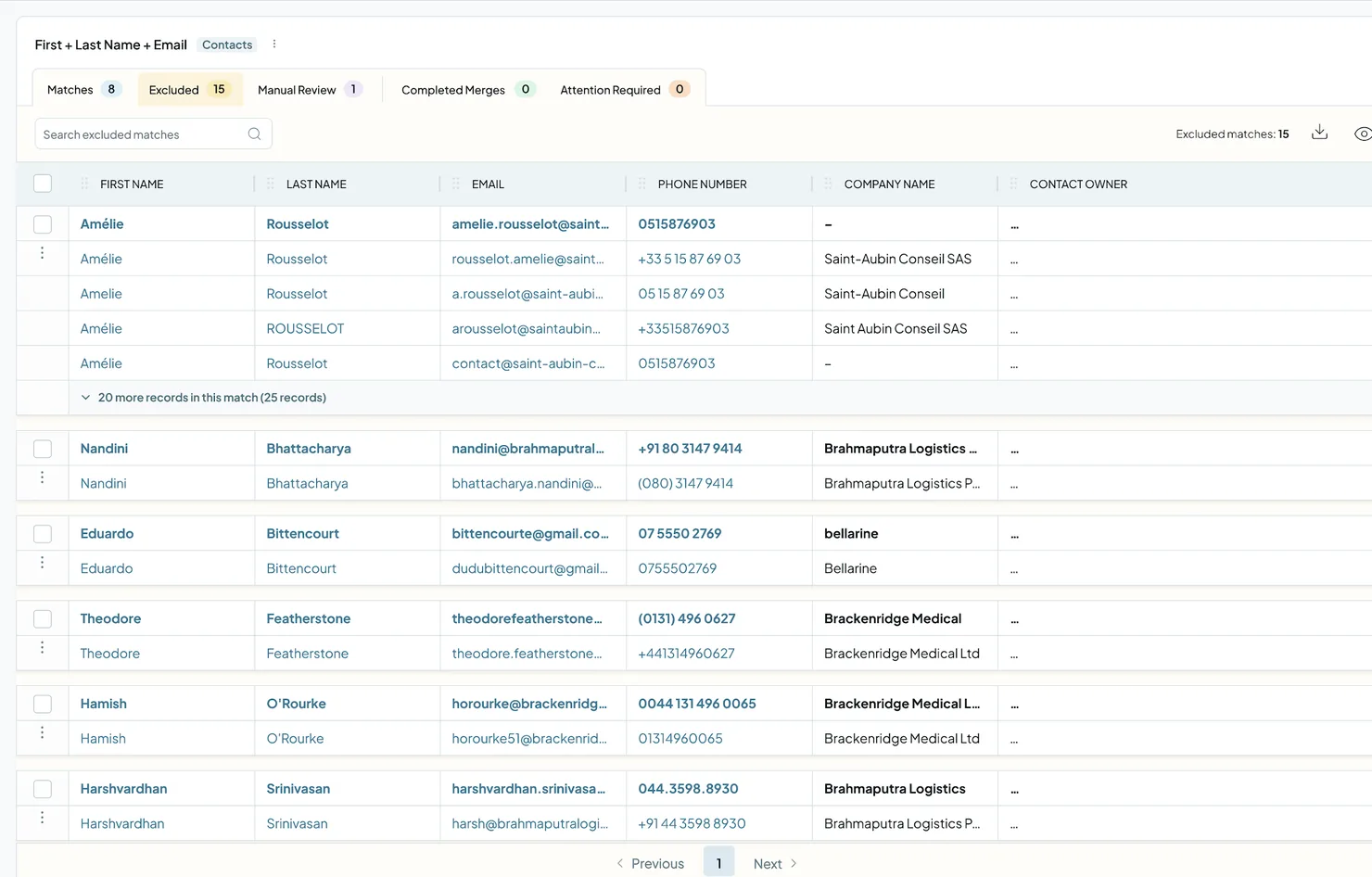
Duplicate Searches can catch edge cases that shouldn't be merged right away, like placeholder data or matches with an unusually high number of records. Your Safety Settings set these matches aside in the Excluded tab, so your results only show the duplicates you can act on. Excluded Matches are included in every Dedupely plan and the 7-day free trial.
Why a match is excluded
Added
Every account starts with Safety Settings turned on. A match goes to the Excluded tab when it trips one of these rules:
- Records per match: the match has more records than your limit (20 by default). Very large matches usually mean the search logic is too broad.
- Poor or example data: the match is built on placeholder, test or low-quality data, like "test@test.com" or "John Doe". On by default.
- Very short values: the match is built on very short values, like a single letter or digit. Off by default.
To change these rules, see Merge Safety.
How to review excluded matches
- Open your Duplicate Search.
- Click the Excluded tab at the top of the search.
- Open View Match Details on a match to see its records side by side.
- Decide what to do with it: merge it, reject it, or click Send to Manual Review.
What happens next
- Excluded matches are never merged automatically. They wait in the Excluded tab until you decide.
- If you change your Safety Settings, the change applies after your next scan.
- Nothing changes in your CRM. Excluding a match only affects what Dedupely shows you.
Troubleshooting
A match I expected is missing from my results. Check the Excluded tab at the top of your search. If it's not there, check the Rejected Matches tab.
A small match was excluded even though it's under my records limit. It probably tripped another rule: placeholder data ("Poor or example data") or very short values ("Very short values").
My Excluded tab is full of very large matches. Your search logic is probably too broad. Add another field to match on, use a stricter match option, or add a filter. See Match Options.
I changed my Safety Settings but nothing changed. Changes apply after the next scan. Click Scan in your Duplicate Search.
FAQs about Excluded Matches
- Can I still merge an excluded match? Yes. The Excluded tab is a holding area, not a block. Open the match and merge it if it's a real duplicate.
- Does Auto Merge merge excluded matches? No. Excluded matches wait for you to review them.
- What's the difference between Excluded and Rejected matches? Excluded matches are set aside automatically by your Safety Settings. Rejected matches are ones you dismissed yourself.
- Do Safety Settings delete data from my CRM? No. They only control which matches Dedupely shows in your results.
Next up
Changelog
-
Excluded tab and Safety Settings
Matches excluded by Safety Settings move to their own Excluded tab instead of returning to Matches. Set the rules per record type.
Still stuck?
Our team helps on every plan and during the free trial, by chat, email or Zoom.
- Need help? Talk to support
- Questions about plans? Book a Zoom with sales
- Reading this with a model? Read this page as Markdown
- Feeding it the whole site? Read llms.txt




 Or sign up with Google