Syncing Records
Updated
Dedupely pulls in your records so you can find and clean up duplicates in one place.


Syncing happens automatically in the background, keeping your working data fresh without manual effort.
How Syncing Works
Initial Sync
When you first connect a CRM, Dedupely performs a full initial sync to import all records within your chosen objects. Estimated initial sync times vary based on database volume:
- 0 to 50k records: 2 to 15 minutes
- 50k to 300k records: 15 to 90 minutes
- 300k to 600k records: 1 to 3 hours
- 600k to 1M records: 3 to 10 hours
- 1M+ records: 10 to 12 hours
These are estimates and can vary based on CRM API rate limits.
Ongoing Background Refreshes
- Automatic Cycles: After the initial sync, Dedupely automatically refreshes your database every 10 to 30 minutes in the background.
- New Record Detection: Newly created CRM records are typically detected and indexed within 1 to 5 minutes.
- Sync Delays: Dedupely is not a live, real-time mirror of your CRM. Brief delays can occur between making a change in your CRM and seeing it reflected in Dedupely.
Supported CRM Objects
You can sync and deduplicate the following objects based on your CRM platform:
- HubSpot: Contacts, Companies, Deals, Leads, Tickets, and Custom Objects
- Salesforce: Accounts, Contacts, Leads, and Custom Objects
- Pipedrive: People, Organizations, Deals, Leads, and Products
Management & Record Counts
Managing Your Connections
You can manage your synced data anytime inside CRM Settings:
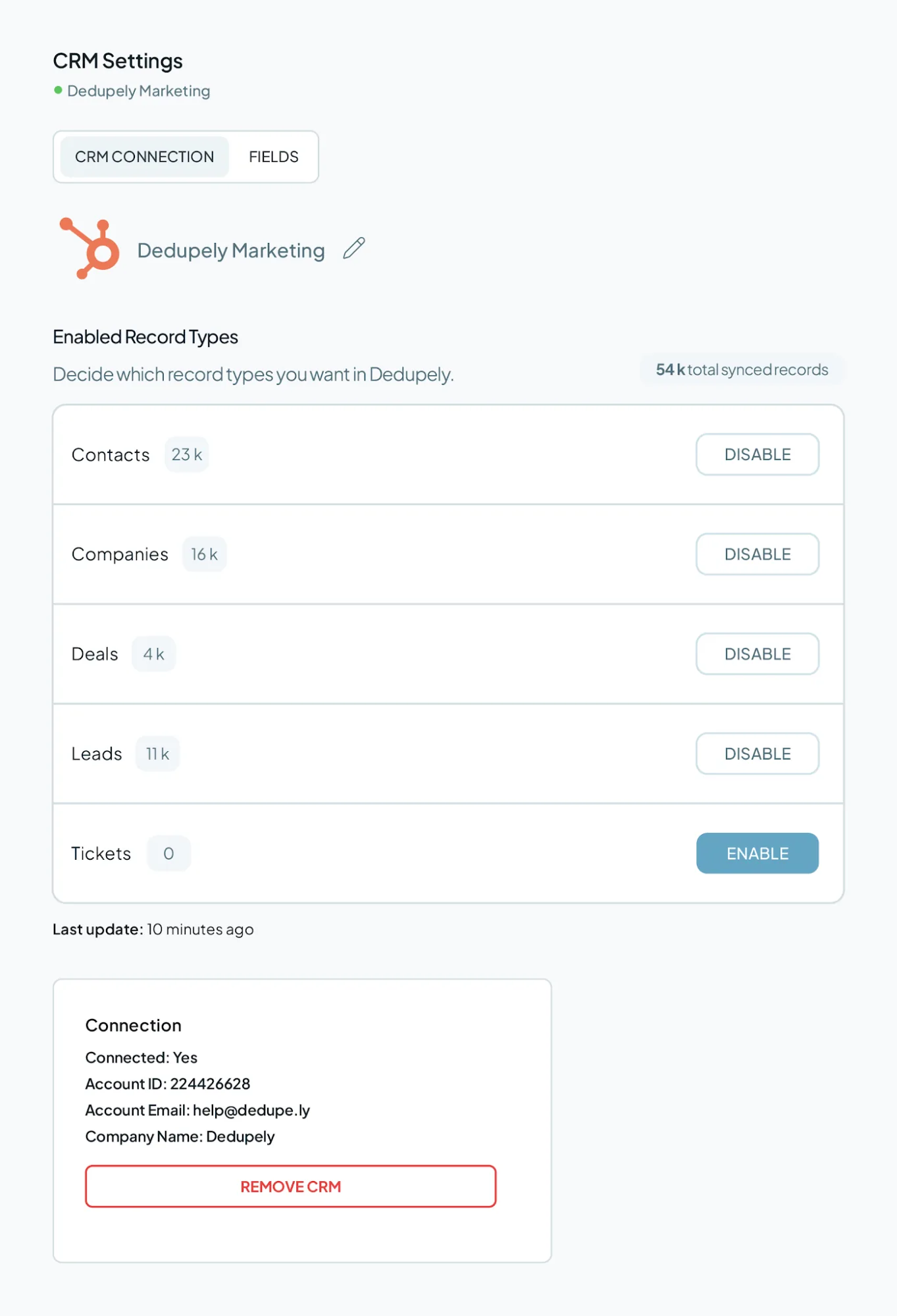
- Add or remove specific CRM objects from syncing.
- Disconnect CRMs you no longer use to free up record limits.
- View your overall synced record count in real time.
Record Counts
Subscription tiers are calculated based on the total number of records synced across the specific active CRM objects you choose to enable:
- Combined Object Totals: All active objects you choose to enable within a single CRM add up toward your plan limit. For example, syncing 15,000 Contacts, 18,000 Companies, and 4,000 Deals in HubSpot equals 37,000 total synced records.
- Multiple CRM Connections: If you connect more than one CRM account, records from all active connections are combined toward your overall plan limit. For example, syncing 20,000 Contacts in HubSpot and 30,000 Accounts in Salesforce equals 50,000 total synced records.
- Unlimited CSV Imports: CSV files and spreadsheets uploaded to Dedupely do not count toward your synced record limit. All plans include unlimited spreadsheet imports. For example, if you sync 10,000 People and 5,000 Organizations from your CRM and also upload 5 spreadsheets containing 50,000 rows, your total billable usage remains 15,000 records.
Data Safety & Environment Support
- No Automatic Merging: Connecting your CRM or syncing data will never trigger automatic merges, edits, or record deletions.
- Manual & Rule Control: Merges only happen when you explicitly say so, by either manually clicking "Merge" (for single, custom, and bulk merging), or confirming a scheduled Auto Merge.
- Salesforce Sandbox Support: Dedupely supports connecting to Salesforce Sandbox environments, allowing admins to test match criteria and merge rules safely before deploying in production.
FAQs about Synced Data
- Do I need to click a button to refresh my data? No. Syncing happens automatically every 10 to 30 minutes in the background. If you are ever troubleshooting a specific record, reaching out to support or reviewing your search filters is usually the best first step.
- Can I connect more than one CRM to the same Dedupely account? Yes. You can add multiple CRMs. Just keep in mind that all records synced across every connected database count toward your total plan limit.
- Will removing an object from syncing reduce my record count? Yes. If you remove an object from your CRM Settings, those records are removed from Dedupely's system, lowering your total synced record count.
- Do CSV imports count against my plan's record limit? No. Unlimited spreadsheet imports are included on all plans and do not count toward your total synced record limit. Only active CRM records count.
- Can I connect a sandbox environment? Sandbox environment connection is fully supported for Salesforce orgs.
- What should I do if my initial sync seems stuck? Databases with over 300k records can take several hours to process within CRM API limits. If your sync exceeds the estimated timeframe by a wide margin, contact support.
Mentioned in this article: Create an account, Connect your CRM, Finding Duplicates, and Merging duplicates.
Still stuck?
- Need help? Talk to support
- Questions about plans? Book a Zoom with sales
- Reading this with a model? Read this page as Markdown
- Feeding it the whole site? Read llms.txt


 Or sign up with Google

 Pipedrive user











