Customer story
How a Personal Injury Law Firm Merged 6,000+ Duplicate Salesforce Records of Providers, Firms and Insurers with Dedupely
- Salesforce
- Manual entry by the team
- Years of legacy data
- Legal

- 6,000+ duplicate records merged
- 3,100+ matches merged
- 600,000+ Salesforce records synced to Dedupely
A match is one set of duplicate records merged into a single record. Every match holds at least two records, so the number of records merged is at least double the number of matches.
Where duplicates came from
Same place, different names
The firm keeps everyone it works with on cases in Salesforce Accounts: medical providers, attorneys, law firms and insurance companies, alongside its clients. The database holds more than 600,000 records.
The team pointed to a few reasons the same business showed up more than once:
- Clinics that changed names. When a clinic was renamed or bought by a larger network, a new record appeared with the new name at the same address and phone number.
- Records saved with a name only. Salesforce required a name but not an address, so some records had a name and nothing else, next to a complete record for the same business.

What duplicates broke
Picking the right record on every case
When staff added a provider or a firm to a case, they could run into two or three records for the same one and have to pick.
Too many to check by hand
Checking duplicates by hand meant looking up each provider's website and address, one at a time. One reviewer estimated the team could get through about ten a day at best, against a database of hundreds of thousands of records.
One provider, many locations
The firm couldn't just match on names either. One provider can have several locations, and every location is its own record. A search on name alone would flag them all as duplicates.
How duplicates were solved
-
1. Match on the address, then the name
With Dedupely's customer success team, the firm learned that every field in a search has to match. Its first search had only 14 matches left, while plenty of duplicates were still in Salesforce. Matching on a similar party name plus the full address turned that into about 1,200 matches in one session. A search on the full address alone found the renamed clinics, with the same address under a new name.
-
2. Use filters to decide what gets compared
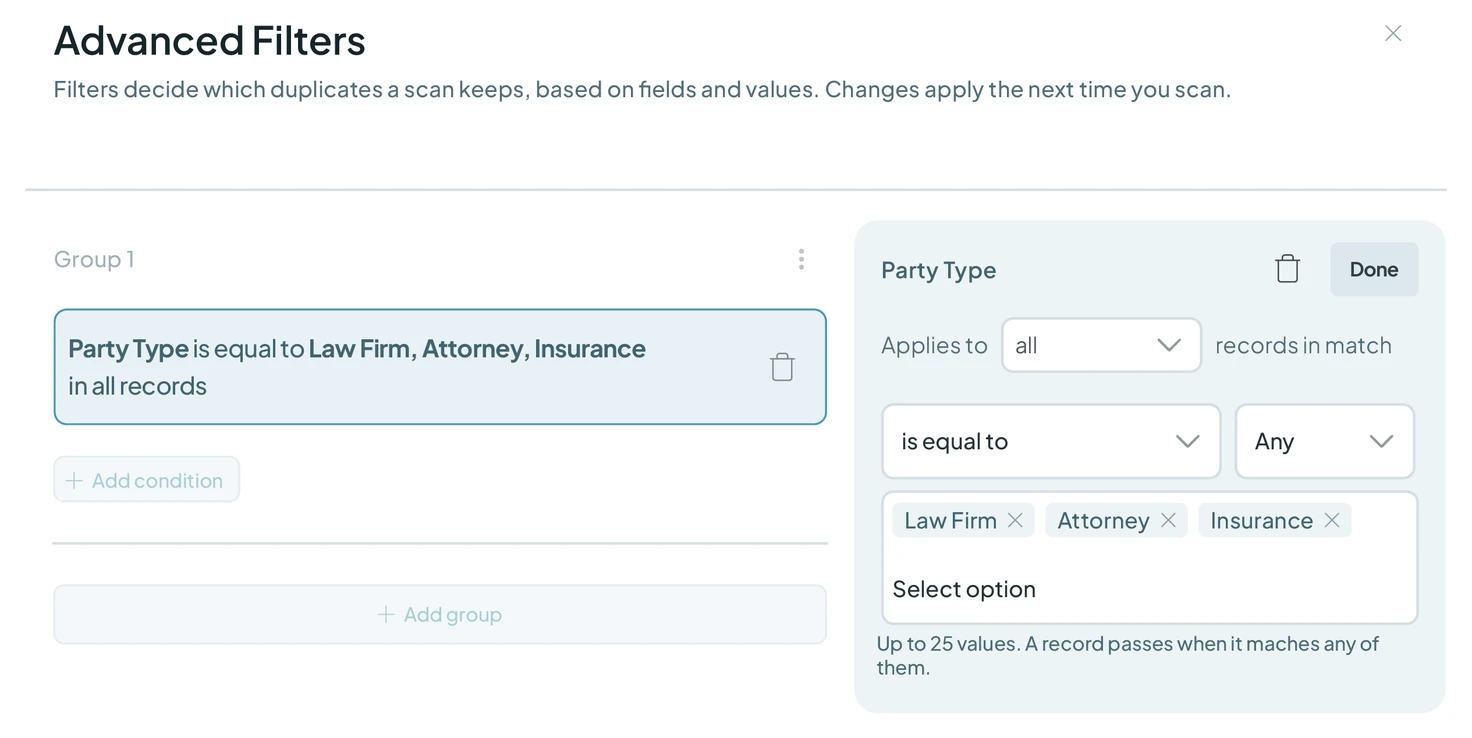
Clients were never meant to be merged. A filter on party type keeps the searches to attorneys, law firms, healthcare facilities and insurance companies, so the team only reviews records it actually wants to merge. Another filter, where the address is blank on only one record, was set up to catch name-only records sitting next to a complete one.
-
3. Loosen one field at a time
Each time a list was finished, the team cloned the search and changed one thing to find the next batch: the phone number set to Similar, so formatting doesn't block a match, or the address matched on its first words, since the same address can be written as West or W, Boulevard or Blvd, with or without a suite number. One reviewer's rule of thumb: the exact same address almost always means a duplicate, and anything doubtful gets rejected.
-
4. Let Dedupely remember the decisions
Pairs that aren't real duplicates get rejected, so they never show up in any search again. Auto Match checks for new duplicates on a schedule and emails the team when enough pile up. Merge Rules keep it simple: the most recently updated record is the primary record, and its values win, so the freshest details survive every merge.
What deduplication changed
6,000+ duplicate records merged
The firm has merged more than 3,100 matches, combining at least 6,000 duplicate records, across more than 600,000 Salesforce records.
From healthcare to the rest
Early on, a senior member of the team said they knew there were plenty of duplicates left and were ready, because they had the system down. The team finished the healthcare providers first, then moved on to attorneys, law firms and insurance companies.

- Customer story 140,000+ duplicate records mergedSalesforce Healthcare
How a Healthcare Software Company Stopped Cleaning the Same Duplicates Twice in HubSpot and Salesforce with Dedupely
Read the story - Customer story 200+ account matches merged a month, on averageSalesforce Retail
How a Retailer Stopped Its Sales Team Guessing Which Account to Use in Salesforce with Dedupely
Read the story - Customer story 1,600+ duplicate records mergedHubSpot Real estate
How a Home Renovation Company Merged 1,600+ Duplicate HubSpot Records Created by a Call-Tracking Integration, with Dedupely
Read the story













