Customer story
How a Healthcare Software Company Stopped Cleaning the Same Duplicates Twice in HubSpot and Salesforce with Dedupely
- Salesforce
- Years of legacy data
- Integration or sync
- Healthcare

- 140,000+ duplicate records merged
- 60,000+ matches merged by the new team
- 500,000+ Salesforce records synced to Dedupely
A match is one set of duplicate records merged into a single record. Every match holds at least two records, so the number of records merged is at least double the number of matches.
Where duplicates came from
Ten years of data, two systems
The company builds medication management software and has been in business for 15 to 20 years. Marketing runs HubSpot, sales and RevOps run Salesforce, and HubSpot syncs into Salesforce, where HubSpot Contacts arrive as Salesforce Leads.
The team was clear there was no single cause. Two things stood out:
- Years of historic data. Records went back at least five and up to ten years, and the same person could have a personal email on one record and a work email on another.
- One big sync instead of an import. When Salesforce was set up, a couple of hundred thousand leads were pushed over from HubSpot through the sync rather than imported cleanly. That meant duplicates could exist in both systems.

What duplicates broke
Every decision, made twice
With two connected systems, every duplicate was a double job. Keeping a record in one system meant going into the other and keeping the matching record there too. RevOps put it plainly: the team didn't want to do all the merging in one system and then have to do it again somewhere else.
A cleanup without an owner
The cleanup had started under someone on the marketing team who later left the company, and the project lost its owner. The marketing manager and her team picked it up as a larger project to merge duplicate HubSpot Contacts and Salesforce Leads and Contacts, with an intern brought on to help. Before they found the existing setup, the intern had been building his own list of duplicates by hand.
Not every match is a duplicate
The team was just as worried about merging the wrong records. Someone who has worked at two different companies shouldn't become one record, the team didn't want to lose a second email address in a merge, and records with different owners shouldn't merge at all.
How duplicates were solved
-
1. Merge once, in both systems
With Dedupely's customer success team, they worked with the HubSpot and Salesforce integration turned on. That way, each merge lands in both systems at the same time, and every decision only gets made once.
-
2. Start with the obvious matches
The first searches went after the easy wins: matches on first name, last name, phone and company name, with Contact Owner set to Exact. Requiring the same owner meant these matches never needed someone to decide whose record wins. Last Name was set to Similar so small typos still match, and Phone to Similar so brackets, plus signs and periods don't block a match.
-
3. Keep records with different owners apart
For records that had no owner, they cloned the search, set Contact Owner to None and added a filter for Contact Owner is blank. Together, the two searches never put two records with different owners in the same match, so those cases are left for the team to decide.
-
4. Agree the rules, then write them into Merge Rules
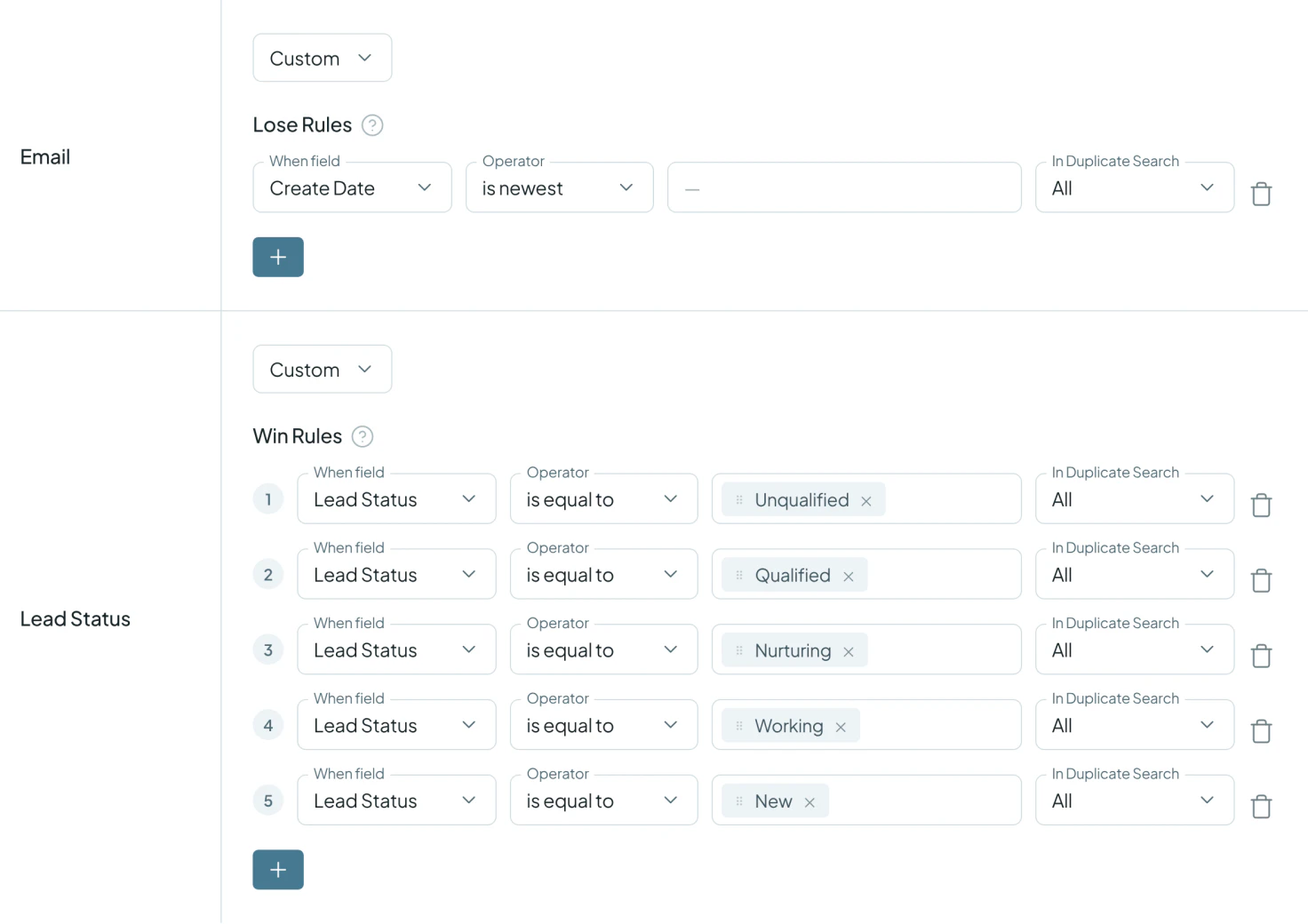
The intern collected the team's decisions in one document, and those were set up as Merge Rules:
- Primary Record: the oldest record wins.
- Email: a Lose Rule makes the email from the most recently created record lose, and Dedupely keeps it on the record as a second email, so no address is thrown away.
- Lead Status: five Win Rules, checked from top to bottom, decide which status survives: Unqualified first, then Qualified, Nurturing, Working and New.
Blank values never overwrite existing data.
-
5. Test, check, then merge in bulk
Same-name, different-company cases went into their own search, to be checked against other sources instead of merged. For the rest, the approach was to merge a few matches one by one, check each result in the contact's property history in HubSpot, where merges made by Dedupely are labeled, show a handful to management for sign-off, and then merge in bulk. Every merge is saved in Merge History, which can be exported as a CSV.
What deduplication changed
60,000+ matches merged by the new team
When the new team took over, Merge History showed a little over 9,000 merges. Since then, the team has merged more than 60,000 matches, bringing the total past 70,000 matches and at least 140,000 duplicate records, across more than 500,000 Salesforce records. With the integration on, each of those merges reached both systems.
A setup the next person can run
After walking through the setup, the marketing manager said Dedupely had the functionality they needed and felt straightforward to use. With the rules written down and set up in Dedupely, the next person can pick up the cleanup where it was left.
Related

- Customer story 6,000+ duplicate records mergedSalesforce Legal
How a Personal Injury Law Firm Merged 6,000+ Duplicate Salesforce Records of Providers, Firms and Insurers with Dedupely
Read the story - Customer story 1,600+ duplicate records mergedHubSpot Real estate
How a Home Renovation Company Merged 1,600+ Duplicate HubSpot Records Created by a Call-Tracking Integration, with Dedupely
Read the story - Customer story 200+ account matches merged a month, on averageSalesforce Retail
How a Retailer Stopped Its Sales Team Guessing Which Account to Use in Salesforce with Dedupely
Read the story













