Customer story
How a Retailer Stopped Its Sales Team Guessing Which Account to Use in Salesforce with Dedupely
- Salesforce
- Manual entry by the team
- After a list import
- Retail

- 200+ account matches merged a month, on average
- 75+ contact matches merged a month, on average
- 280,000+ accounts and contacts kept in check
A match is one set of duplicate records merged into a single record. Each account match held between two and five records, and each contact match held two, so the number of records merged is at least double the number of matches.
Where duplicates came from
Hundreds of schools with the same name
The company is a retailer that sells to school districts and individual schools across the United States, and runs its sales in Salesforce. Its biggest data problem is built into the market: hundreds of different schools share the same common names, so many accounts that look like duplicates are really separate schools. A district and one of its schools can also show up as two separate accounts, even though they belong together.
The sales manager who looks after Salesforce traced the real duplicates to two sources:
- Accounts created without a check. Some employees created new accounts without looking up whether the school already existed. Nobody realized it was a problem until about a year later.
- An import nobody checked. The first upload brought in a large existing database on top of data already in Salesforce, and no one checked it for duplicates.

What duplicates broke
Salespeople asking which account to use
The problem became obvious once the whole team started working in Salesforce. His salespeople kept asking him which account to use for a school. A duplicate account starts with no history, so an order logged on one record was invisible from the other, and with schools, that history matters.
Why fixing it by hand stalled
People had worked through the duplicates by hand on and off, merging on name alone, and it was taking too long. Each pair had to be opened and checked for history before merging it, and he still had about 10,000 accounts to go through, with contacts after that. The cleanup was holding up two other projects, including the next integration he needed to launch.
How duplicates were solved
-
1. Test the obvious field first
With Dedupely's customer success team, he started by matching accounts on the national school ID number. The search found nothing, partly because many accounts never had the number filled in. The name alone wasn't safe either, because so many different schools share a name. They needed a second field to match on.
-
2. Bring in the website as a second field
The website was a good candidate, but it wasn't in Dedupely yet. Customer success added it through the Extra Fields Manager, and once it synced, the search matched accounts on both name and website.
-
3. Start with accounts that have no orders
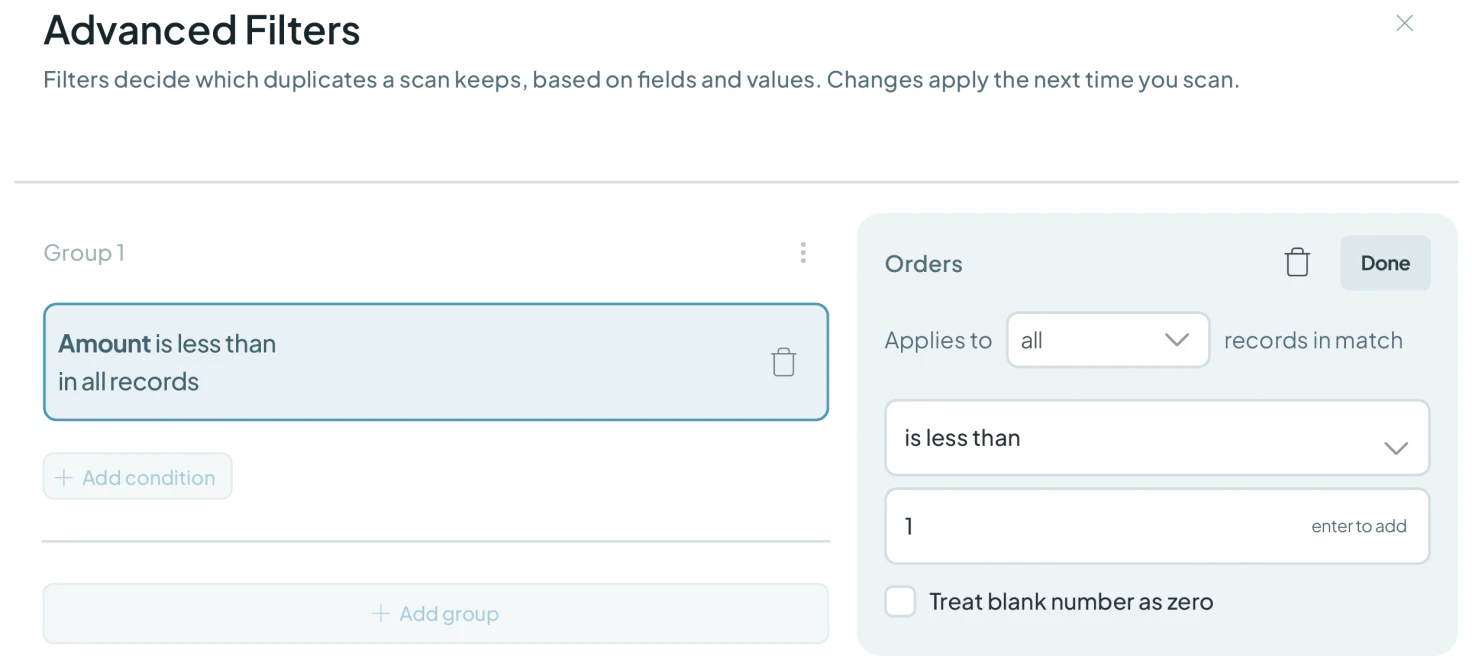
To make the first merges safe, they added a filter so the search only showed accounts with no orders. A duplicate with no orders has no order history to lose. The name, website and no-orders search found 2,319 matches, roughly 5,000 records, and he agreed they were the same accounts almost every time. He exported the results as a CSV backup before merging, so he could always check what changed.
-
4. Check a sample, back up, then bulk merge
A second search matched on name alone, again only for accounts with no orders, and found 7,046 matches, some holding five or six records. Customer success suggested merging five or six first to check the result. He exported another backup, added a filter on the account owner to focus on the records he and two colleagues had worked on, and started the bulk merge, which runs in the background. He chose not to turn on Auto Merge until he'd checked the results.
One pattern needs care: schools in the same district often share a website. For those, name and website aren't enough, so they stay out of bulk merges and get a manual look.
What deduplication changed
From hand checks to bulk merges
What had been a slow account-by-account job became a few searches and bulk merges that run in the background. Salesforce's own merge stops at three records at a time, while Dedupely bulk merges thousands of records in one action. On average, the team now merges more than 200 account matches and 75 contact matches a month, with a CSV backup of every bulk merge.
A clearer view of where duplicates start
Working through the searches also showed him where the duplicates come from: accounts created without a lookup, and an import nobody checked. Knowing the causes gave him a starting point for stopping new duplicates, not only clearing the old ones.
Related

- Customer story 6,000+ duplicate records mergedSalesforce Legal
How a Personal Injury Law Firm Merged 6,000+ Duplicate Salesforce Records of Providers, Firms and Insurers with Dedupely
Read the story - Customer story 140,000+ duplicate records mergedSalesforce Healthcare
How a Healthcare Software Company Stopped Cleaning the Same Duplicates Twice in HubSpot and Salesforce with Dedupely
Read the story - Customer story 9,092 people matches mergedPipedrive Recruiting
How an Executive Search Firm Cut Its Pipedrive People List by a Third After an Import Duplicated Nearly Everyone, with Dedupely
Read the story













