Customer story
How a Home Renovation Company Merged 1,600+ Duplicate HubSpot Records Created by a Call-Tracking Integration, with Dedupely
- HubSpot
- Integration or sync
- Years of legacy data
- Real estate

- 1,600+ duplicate records merged
- 800 matches merged
- 26,162 records synced to Dedupely
A match is one set of duplicate records merged into a single record. Every match holds at least two records, so the number of records merged is at least double the number of matches.
Where duplicates came from
A new contact for every phone call
The company renovates the outside of people's homes: roofs, walls and windows. It sells door to door and over the phone, and runs everything through HubSpot, including a custom deal object. Its marketing and communications manager owns HubSpot.
Duplicates came from a few places:
- A call-tracking integration. Set up by an outside agency, it created a new contact on every inbound call, whether the caller was already in HubSpot or not. Thousands of contacts ended up named Unavailable or N/A.
- Repeat visits by design. Canvassers can knock on the same door years apart, and each visit brings the household in again.
- Years of history. The team set HubSpot up its own way early on, and older records often have no phone number.
To protect the data, the manager hadn't let anyone merge for about a year, so the duplicates kept piling up.

What duplicates broke
A daily spreadsheet check before every call
Before calling a new inbound contact, the confirmation team checked whether the person had been in touch before. To do that, they exported HubSpot into a spreadsheet every day and looked people up there. The manager wanted a quick way to see a possible match without leaving their work.
Placeholder names winning merges
By default, a merge keeps the most recent value, so a placeholder like Unavailable could replace the real first name. The manager was fixing them one by one, deleting the placeholder text by hand, and said this wasn't how it was supposed to work. She couldn't just delete the placeholder contacts either, because they could hold calls and notes.
How duplicates were solved
-
1. Clear the easy ones first
She started on her own with the matches she was sure of, merging exact matches search by search. With Dedupely's customer success team, a cloned search with filters for records with a phone number but no address picked out the call-tracking contacts, since those had only a phone number.
-
2. Make placeholder names lose
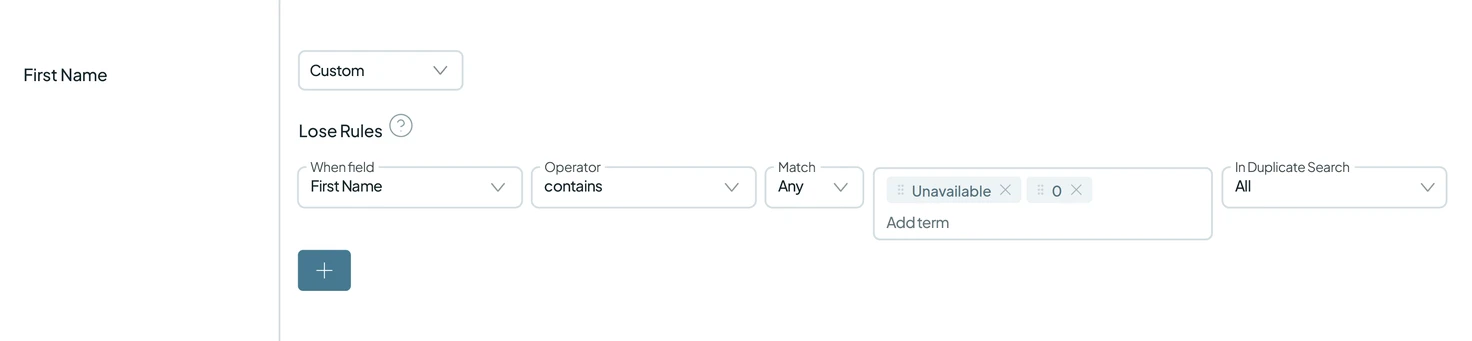
Lose Rules make a first name containing Unavailable or 0, or a last name containing N/A, lose in a merge, so the real name survives. The Primary Record is the oldest record. A filter set to match on one or more records catches matches where only one record has the placeholder.
-
3. Match on the address when the phone number differs
One real duplicate didn't show up in the phone-based searches because the two records had different phone numbers. A search on the address found it: last name (Similar), house number, the first two words of the street, and postcode.
-
4. Automate the safe matches, check the rest
That address search, with the phone number added, now runs on Auto Merge, scanning and merging in a continuous loop. A half-entered contact won't merge unless all five fields match. When it was switched on, it merged its first matches right away. A separate search stays manual, and the confirmation team now checks it for possible matches before they call, instead of the daily spreadsheet.
What deduplication changed
1,600+ duplicate records merged
The company has merged 800 matches, combining at least 1,600 duplicate records. Today, Dedupely syncs 26,162 records for the company.
No more daily spreadsheet
The confirmation team now checks for duplicates in Dedupely instead of a spreadsheet rebuilt every day. After a year of nobody merging, the manager has started letting the team back in and is training them on the manual and automatic searches. Looking at the Auto Merge results, she said there was nothing there that made her doubt they should merge.

- Partner story 16,000+ duplicate records mergedHubSpot Recruiting
How a CRM Consultant Helped a Staffing Firm Merge 16,000+ Duplicate HubSpot Records Left by Its Rollout, with Dedupely
Read the story - Customer story 9,000+ duplicate records mergedHubSpot Healthcare
How a Telehealth Company Merged 9,000+ Duplicate HubSpot Records Created by Its Calling App, Forms and Integrations, with Dedupely
Read the story - Customer story 2,158 company matches merged in under 7 weeksHubSpot Financial services
How a Fintech Gave Its Sales Team a Pipeline It Can Trust by Clearing 4,000+ Duplicate Matches with Dedupely
Read the story












