Customer story
How a Telehealth Company Merged 9,000+ Duplicate HubSpot Records Created by Its Calling App, Forms and Integrations, with Dedupely
- HubSpot
- Integration or sync
- Form fills and sign-ups
- Healthcare

- 9,000+ duplicate records merged
- 4,600+ matches merged
- 23,082 records synced to Dedupely
A match is one set of duplicate records merged into a single record. Every match holds at least two records, so the number of records merged is at least double the number of matches.
Where duplicates came from
Many doors into one HubSpot
The company is a US direct-to-consumer telehealth business. It works with contacts only, with no companies or deals, and contacts reach HubSpot from many places:
- Integrations that match on email. When the same person came in with a different email, the integration created a new contact, even with the same phone number.
- Two patient platforms. Each platform sends contacts into HubSpot. One brings people in through a single intake form. The other brings them in through landing pages, demos, consults and a chatbot, so one person could end up with two or three contacts.
- A calling app. Inbound calls created generic contacts with a placeholder name, like New Call App Contact, for people who were already leads.

What duplicates broke
Marketing lists that didn't add up
Before an email send, the marketing list said about 7,000 leads had no email, more than it should have been. Many of the contacts left out of marketing were phone-only records the calling app had created for people the team already knew.
One person, split across records
One record might hold someone's email while another held their latest activity. HubSpot's own duplicate tool flagged them, but merging meant reviewing each pair by hand. The goal was to bring everything about a person into one place without one record overwriting the other.
How duplicates were solved
-
1. Keep the two patient platforms apart
The two patient platforms had to stay separate, so a contact from one could never merge with a contact from the other. With Dedupely's customer success team, they brought the custom field that records each contact's platform into Dedupely and added a filter that leaves one platform's contacts out of the searches. That way, the cleanup focuses on the platform with many entry points.
-
2. Match on the phone number, not the name
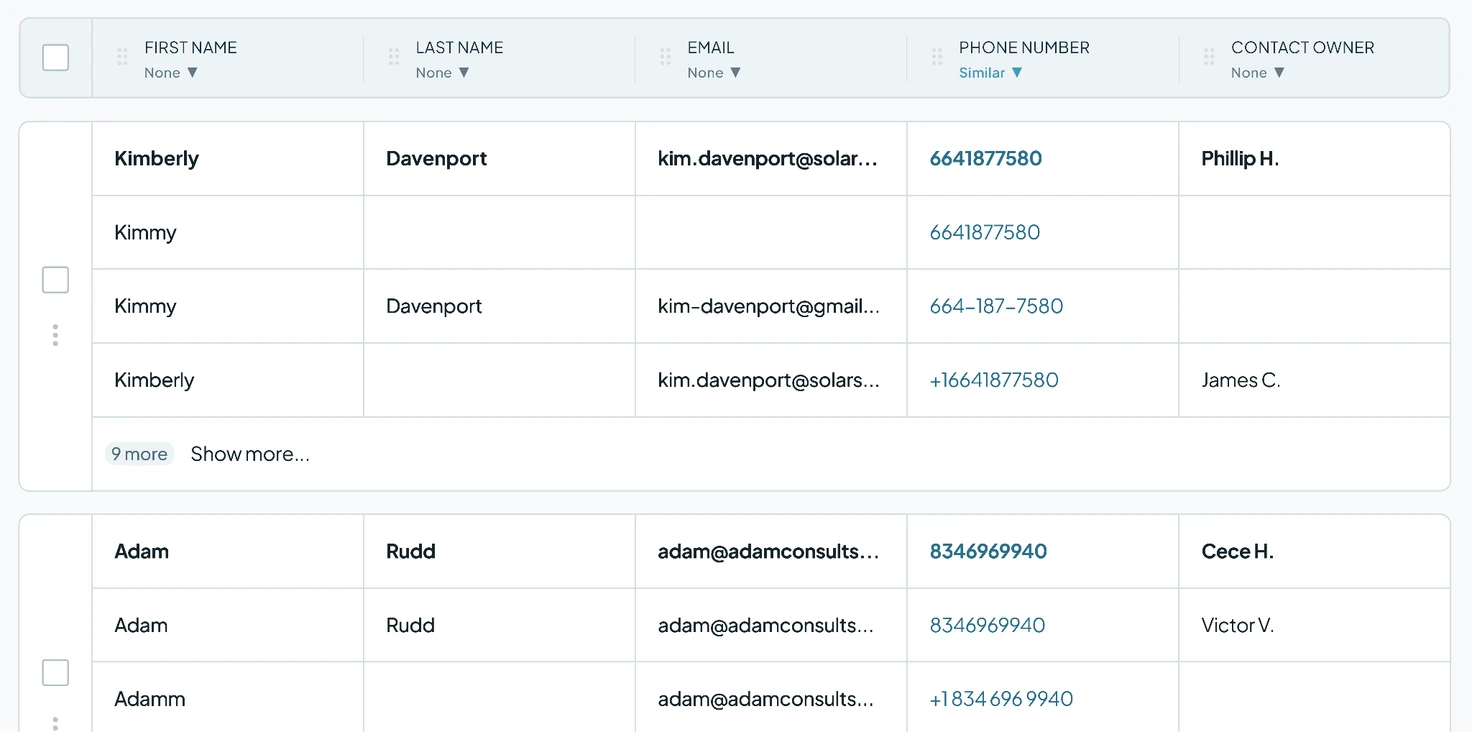
Two people can share a name, but rarely a phone number. A search on first and last name alone found more than 1,400 matches, but a shared name doesn't prove it's the same person. Adding the phone number narrowed it. The main search matched on the phone number only, set to Similar, so country codes, spaces and dashes don't hide a match, with first and last name ignored.
-
3. Make placeholder names lose
The calling app's placeholder name could have replaced a real one in a merge. Two Lose Rules fix that: when First Name or Last Name contains the placeholder, that value loses, so a real name wins over the placeholder. Blank values already lose, and notes, calls and other activity from every record move to the one that's kept.
-
4. Merge in bulk
Once the rules were in place, the co-founder who runs the company's HubSpot started a bulk merge of all 1,129 matches in the phone search, which ran in the background.
What deduplication changed
9,000+ duplicate records merged
The company has merged more than 4,600 matches, combining at least 9,000 duplicate records. Today, Dedupely syncs 23,082 records for the company.
One person, one record
Right after the bulk merge, the lead list was already smaller. The co-founder said that as long as each person's information sat in one place, everything would be easier from then on, and that Dedupely was the tool they wanted for keeping their data clean.

- Partner story 16,000+ duplicate records mergedHubSpot Recruiting
How a CRM Consultant Helped a Staffing Firm Merge 16,000+ Duplicate HubSpot Records Left by Its Rollout, with Dedupely
Read the story - Customer story 1,600+ duplicate records mergedHubSpot Real estate
How a Home Renovation Company Merged 1,600+ Duplicate HubSpot Records Created by a Call-Tracking Integration, with Dedupely
Read the story - Customer story 2,158 company matches merged in under 7 weeksHubSpot Financial services
How a Fintech Gave Its Sales Team a Pipeline It Can Trust by Clearing 4,000+ Duplicate Matches with Dedupely
Read the story












