Customer story
How an AI Phone Answering Company Stopped Hand-Checking Pipedrive and Merged 20,000+ Duplicate Records with Dedupely
- Pipedrive
- Manual entry by the team
- Form fills and sign-ups
- SaaS

- 20,000+ duplicate records merged
- 10,000+ People and Organization matches merged
- 0 duplicate people in Pipedrive's own duplicate check
A match is one set of duplicate records merged into a single record. Every match holds at least two records, so the number of records merged is at least double the number of matches.
Where duplicates came from
Same company, written different ways
The company sells AI phone answering software to home services contractors, and runs both marketing and sales out of Pipedrive. Records came in through manual entry by the team and through form fills, so the same contractor or contact could land in Pipedrive more than once. When the cleanup started, the account held about 22,000 Organizations and 19,000 People.
Pipedrive wasn't flagging duplicates that were obvious to a person:
- Name variants. One contractor could appear as the business name alone, with Inc. added, or with an extra service in the name, like HVAC on one record and HVAC and Plumbing on another.
- Half-filled records. Sometimes the website was missing, sometimes the phone number or the address, and sometimes a record had nothing but a company name.
- People entered differently. Some first names included a middle name, and the same person could be Steven on one record and Steve on another.
Some look-alikes had to stay
Many of their customers are groups with several branches. In Pipedrive, those branches are linked to a parent company, and some share the same website. They look like duplicates but aren't, and the links between them had to stay exactly as they were.

What duplicates broke
Review, merge, repeat
Without a way to deduplicate in bulk, the senior director of marketing was finding duplicates herself, reviewing them and merging them one at a time. She said it took forever. Earlier that same day, she had merged four duplicate organizations by hand.
Growth on bad data
The company was building out its team and its business, and she said it couldn't keep doing that on bad data. Nothing was flagging new duplicates either, so the manual work kept coming back.
How duplicates were solved
-
1. Protect parent companies before merging anything
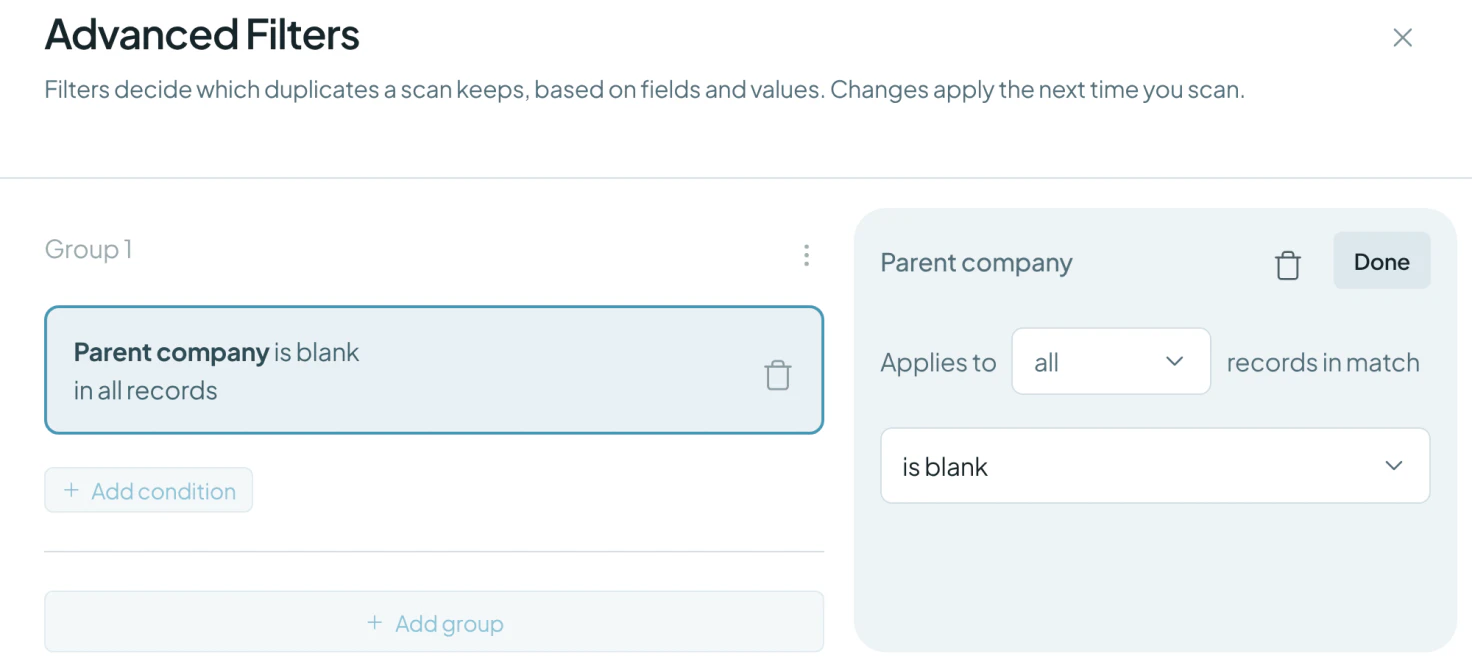
With Dedupely's customer success team, they synced Organizations and brought Pipedrive's parent company field into the search. A filter, Parent company is blank, keeps every branch that has a parent set out of the search, so a branch can't be merged into its parent or into another branch. That left most of the database in the search. The few dozen branches are checked by hand.
-
2. Match organizations on name and city
Matching on the name alone found about 7,000 matches, too broad to trust: two plumbing companies with nearly the same name, one with a city added, can be two different businesses. Adding the city narrowed it to matches she could trust. The name uses Similar matching, which catches typos and small differences, and she checked a result in Pipedrive before merging. Name with website and name with phone were planned as the next passes.
-
3. Clean People in passes, each one catching a new group
People started with an exact email match, then a bulk merge. To find the duplicates that were left, they tried new pairs of fields:
- Last name and email, which she said she had never thought of trying.
- Last name and phone, which caught people like Steven and Steve.
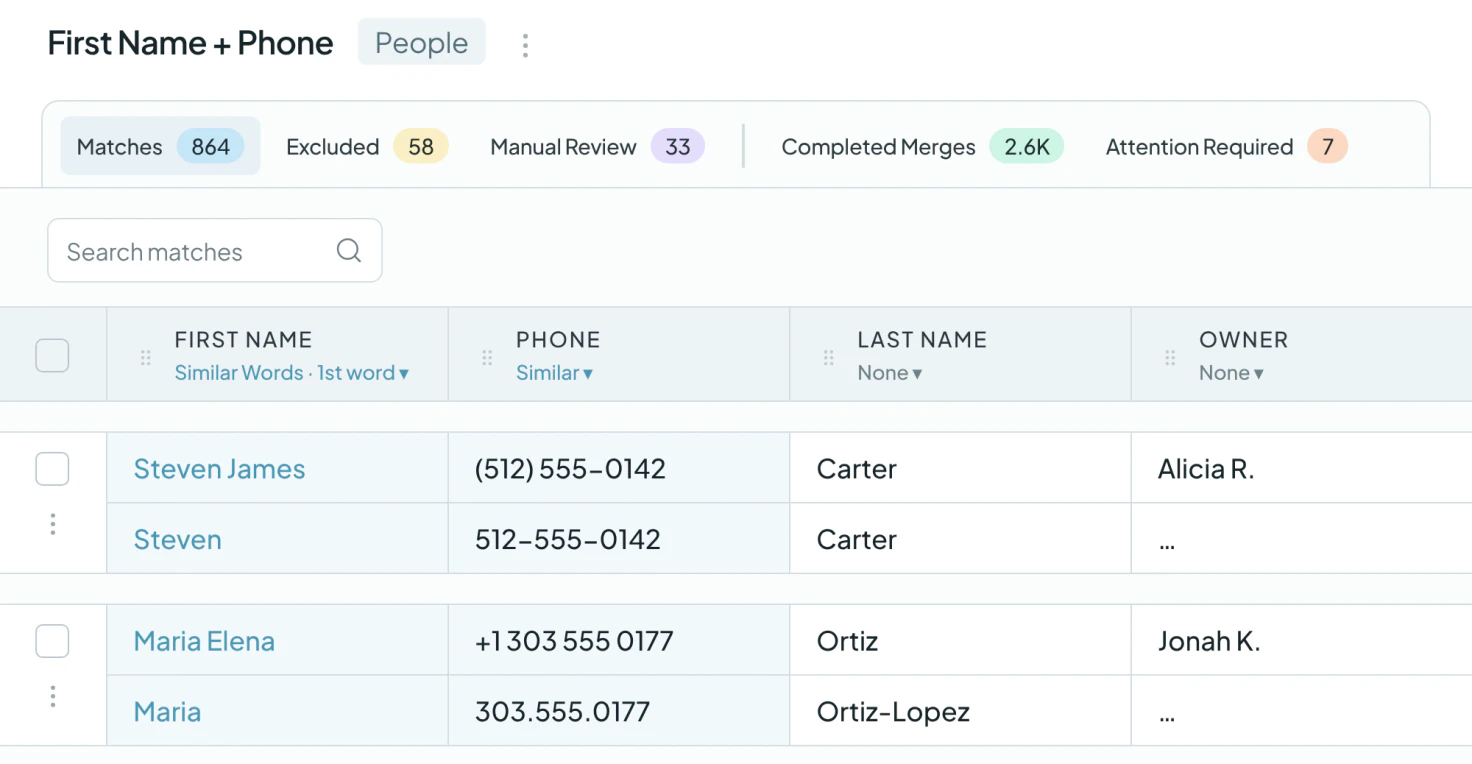
- First name and phone, with First Name set to Similar Words on the first word only, so a middle name doesn't block a match.
The remaining matches are reviewed one by one, because a couple sharing a phone number may be two different people.
What deduplication changed
Zero duplicate People, confirmed by Pipedrive
The company has merged more than 10,000 matches across People and Organizations, combining at least 20,000 duplicate records. After the last passes, Pipedrive's own duplicate check showed no duplicate People and two Organizations.
New ways to slice the data
She said the passes showed her ways to look at the data she hadn't thought of, and she plans to keep checking with new combinations to make sure nothing is missed.
Related

- Customer story 2,000+ duplicate records mergedPipedrive Real estate
How a Moving Company Stopped Cleaning Up Duplicate Pipedrive Leads by Hand Every Day, with Dedupely
Read the story - Customer story 9,092 people matches mergedPipedrive Recruiting
How an Executive Search Firm Cut Its Pipedrive People List by a Third After an Import Duplicated Nearly Everyone, with Dedupely
Read the story - Customer story 3,000+ duplicate records mergedPipedrive SaaS
How a Wellness App Stopped Sales Reps from Calling the Same Prospect by Merging 3,000+ Duplicate Pipedrive Records with Dedupely
Read the story












