4.73/5 average rating on Salesforce AppExchange

Merge duplicate Leads in Salesforce

Prevent top of funnel from re-selling leads you’ve already sold.

(No credit card needed)

Recognize the customers you already closed

Someone you sold to downloads a guide. A new Lead opens on a person who is already a Contact. The rep finds out at conversion after the outreach has gone.

Dedupely matches duplicate Leads in Salesforce on any synced field including your custom ones.
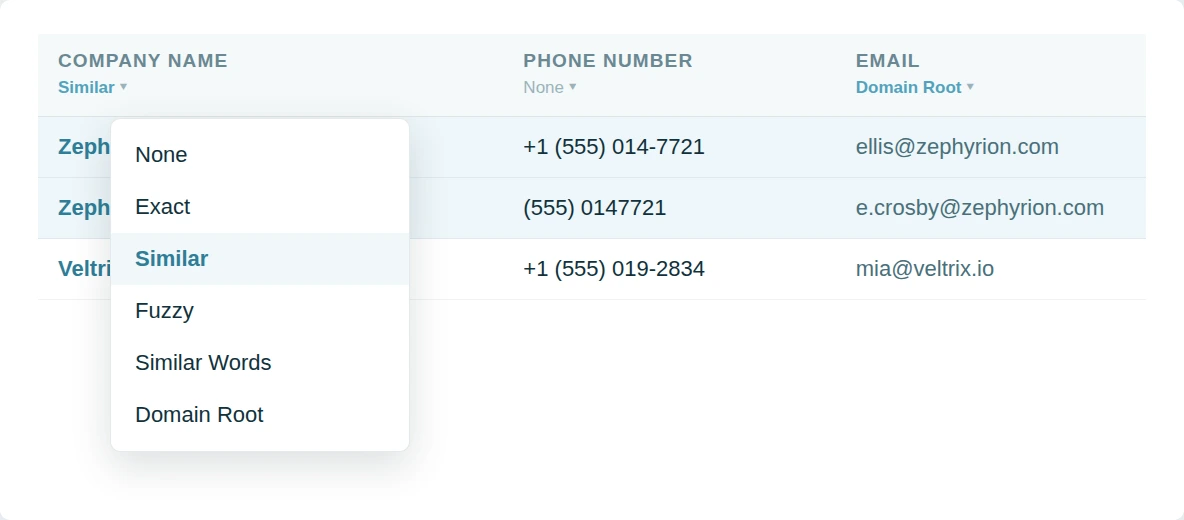
A match option dropdown open on a column: None, Exact, Similar, Fuzzy, Similar Words and Domain Root.
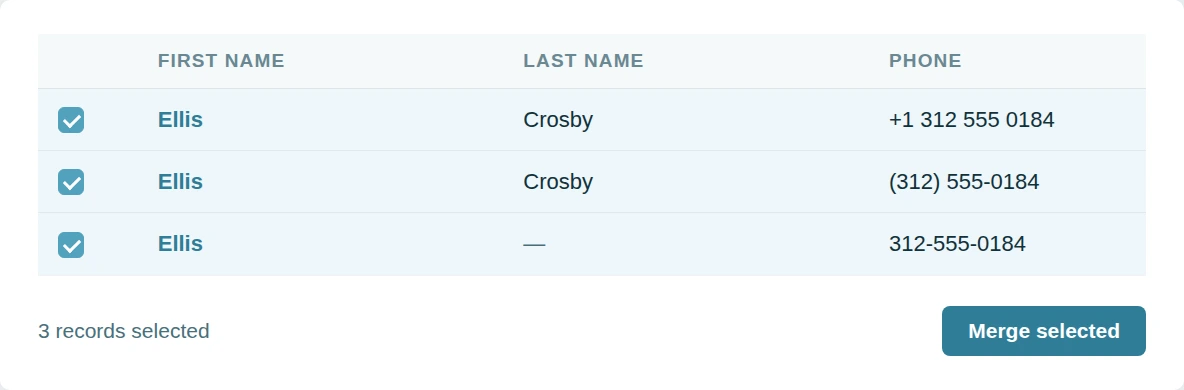
A duplicate group of three records selected, with the same phone number written three ways, beside a Merge selected button.

Merge duplicate leads at scale

Three records at a time does not clear an org carrying years of imports. The backlog outpaces the clicking. Lead deduplication has to happen in bulk or not at all.

Dedupely mass merges Leads and Contacts and Accounts and Opportunities and custom objects.

Audit every merge afterwards

A Lead carries campaign history and attribution. Nobody wants a merge they cannot check. Trust needs a paper trail.

Dedupely keeps the original values of both records and exports them as CSV.
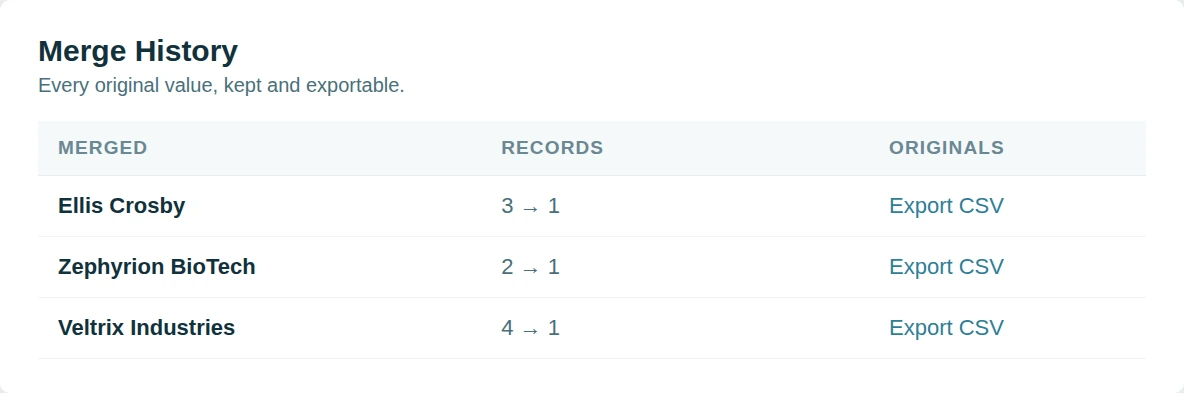
Merge History: each merge with its record count and an Export CSV link for the original values.

Why Dedupely?

Dedupely offers something others don't.

The big Salesforce dedupe names are built for certified admins. Teams tell us the rules take training to write and the pricing takes a committee to approve. Some vendors now turn away smaller orgs altogether.

Dedupely keeps it simple. Every feature is on every plan, custom objects included, and the price follows the records you sync rather than seats or tiers.

Nothing installs inside your org and your rules and workflows stay untouched. Support is unlimited, and on a large org we go through your Match Options with you before anything merges.

CRM Settings listing the record types Dedupely syncs, with Tickets switched off.

Start merging in 5 minutes

Three steps from org to first merge

The Connect a CRM screen in Dedupely, showing a Salesforce tile with a Connect button and a Sandbox Supported label.
STEP 1

Connect your org

OAuth, with the REST API enabled.

STEP 2
STEP 2

Match any field

Standard or custom, exact or similar.

STEP 3
STEP 3

Merge through the API

In bulk, one by one, or scheduled.

20,000+ businesses
feel the magic

Mercy Housing logo
Tillhub logo
Efecte logo
David J Anderson - School of Management logo
Taphome logo
Target 3D logo
Fieldbee logo
YCharts logo
Netlify logo

"I was really pleased with Dedupely. It's highly configurable and works well when used manually or for automated deduping. And the customer service is incredible. Responsive and incredibly helpful."

"Dedupely is now my go-to deduplication tool when working with clients. Their product is best-in-class, [...] is both very easy to use/learn and highly customizable for more complex scenarios."

"The application works great and when I was having difficulty setting up the matching rules their customer support was responsive and helped me get on the right track!"

FAQs

How does Dedupely find duplicates in Salesforce?

Dedupely syncs your Leads, Contacts, Accounts, Opportunities and custom objects, then matches on the fields you pick (Email, Company, any custom field) exact or similar. Each object arrives with default Duplicate Searches, and every one shows the record owner next to each match.

Read the Salesforce deduplication guide

Which Salesforce objects does Dedupely merge?

Contacts, Accounts, Leads, Opportunities, Individuals and your custom objects. Dedupely syncs a whole object at a time, so switch off the record types you don’t need in CRM Settings.

Person Accounts stay out, because Salesforce will not merge one with a business account. Leads drop out of the sync the moment they convert.

How syncing works

Where do Salesforce Duplicate Rules and Matching Rules stop?

They run when someone saves a record, and they flag Potential Duplicates. Duplicate Jobs scan the records already in your org and report duplicate record sets.

None of them merges anything. Dedupely matches across the whole org and merges in bulk, so what your rules flagged actually gets merged.

How Dedupely finds duplicates

Do my Duplicate Rules block a Dedupely merge?

No. Dedupely writes with the Salesforce Duplicate Rule header set to allow the save, so a rule that alerts or blocks on save cannot stop a merge you approved. The rules stay in force for everyone entering records by hand.

How merging works

What happens in Salesforce when I merge?

The merge runs inside Salesforce through its API the moment you confirm: nothing is exported and nothing is re-imported. Record associations move to the Primary, Merge Rules decide field by field which value survives, and Merge History keeps every merge.

How Merge Rules work

When does Dedupely stop a Salesforce merge?

Whenever finishing it would lose data. A value that breaks a field’s validation rule, two Accounts in the same parent-child hierarchy, a Contact whose Report To points at the Primary, more than one portal user across the group, or an org that blocks reparenting: each one stops the merge and tells you why.

Unique fields take the Primary’s value and take no Merge Rule. Encrypted and masked fields are left alone.

What keeps a merge safe

Can I review Salesforce matches before anything merges?

Yes. Manual Review holds every match until you approve it, and a match you reject stays out of later searches. Syncing your org merges nothing on its own.

Manual Review

Can Dedupely keep Salesforce clean on its own?

Auto Match finds new duplicates as records arrive. Auto Merge merges the ones that meet your rules, on the schedule you set. Both write to Merge History like any other merge.

Set up Auto Match

What about Salesforce API limits and sandbox orgs?

Dedupely reads the API usage Salesforce returns on every call and backs off at your org’s daily limit, then picks up where it stopped once the limit resets.

Connect opens a Production or Sandbox picker, so you can rehearse in a sandbox before touching the live org. Either way Dedupely needs the REST API enabled and full admin permissions.

Connecting your CRM

Can I try this on my own Salesforce org first?

Yes. The 7-day trial connects your org, syncs your records and runs searches, with unlimited support while you set it up. Nothing merges until you merge it.

Start your 7-day free trial

Get started for free

20 free trial merges and as much free support as you need to get your duplicates under control.

"The data in our CRM is much cleaner thanks to this App. Easy to use and relatively inexpensive."
H Chitty

H Chitty

HubSpot User

HubSpot MarketplaceHubSpot Marketplace
"I do recommend! A++ Pretty easy to use. Adequate reporting. SUPERB CUSTOMER SUCCESS!"
Alina T

Alina T

Sales Operations Specialist, FieldBee

51–100 employees
"Great tool that works as promised. Great customer support - Nestor was super helpful onboarding."

R McNaught

HubSpot User

HubSpot MarketplaceHubSpot Marketplace
"It prioritizes merging while keeping key data. Highly recommended for anyone using Pipedrive integration."
John K

John K

Head of Marketing, David J Anderson School of Management

Pipedrive MarketplacePipedrive user
"The app worked great and helped me a lot with hundreds of duplicates in Pipedrive."
Samo J

Samo J

Founder & CSO, TapHome

Pipedrive MarketplacePipedrive user
"Superior deduping logic with excellent support - highly recommend for cleaning up messy HubSpot records."
M Weppner

M Weppner

"Dedupely was incredibly easy to set up, and the support team replied almost instantly each time I reached out. In just a few

Yuliya

Pipedrive User

Pipedrive MarketplacePipedrive Marketplace
"Incredibly effective at tackling massive duplicate data cleanup - exactly what we needed."

D Wright

HubSpot User

HubSpot MarketplaceHubSpot Marketplace
"The application works great and [...] their customer support was responsive and helped me get on the right track!"

Shawnee K

Salesforce User

Salesforce AppExchangeSalesforce AppExchange
"Worked as expected and Nestor at Customer support was extremely helpful walking me through some nightmare duplicate issues."

DiBlasio S

HubSpot User

HubSpot MarketplaceHubSpot Marketplace
"I was really pleased with Dedupely. It's highly configurable and works well when used manually or for automated deduping."

Laura R

Salesforce User

Salesforce AppExchangeSalesforce AppExchange
"It couldn't have been much easier to connect to HubSpot and run my first dedupe."

Emily K

Mercy Housing

HubSpot MarketplaceHubSpot user
"It did more than I expected. Support is great!"

Paweł S

Pipedrive User

Pipedrive MarketplacePipedrive Marketplace
"Dedupely helped us to quickly de-duplicate hundreds of records, with a level of transparency that gives you confidence..."

Grattan H

Pipedrive User

Pipedrive MarketplacePipedrive Marketplace
"Our customers want to achieve great results fast. Everybody at HubSpot already knows what Dedupely can do..."
Scott B

Scott B

VP Platform Ecosystem, HubSpot

"This tool made a week long project take a few hours. Definitely a go-to for deduplication processes."

Burchard J

HubSpot User

HubSpot MarketplaceHubSpot Marketplace
"It took away the huge headache we had of merging over 27,000 duplicate contacts."
Sean B

Sean B

Managing Director, Legal CPD

"Most of all, our team has been impressed by the way the Dedupely Customer Success team consistently goes above and beyond."

Isaac J

Salesforce User

Salesforce AppExchangeSalesforce AppExchange
"Great support. They are on top of things, and answer questions very quickly."

Larry D

Pipedrive User

Pipedrive MarketplacePipedrive Marketplace
"Works really well, support is A++++++"

Andy G

Pipedrive User

Pipedrive MarketplacePipedrive Marketplace
"We had 300k records in our CRM. Despite the large amount, Dedupely was perfect. The support was especially outstanding."
Simon W

Simon W

Tillhub

~50 employees
"Worked very simply and effectively and suited my budget [...] Very happy to recommend a good app and integration."
Allan R

Allan R

Co-founder & Managing Director, Target3D

11–50 employees
"Dedupely was huge in improving the quality of my CRM database. It saved me hours of manual merging."
Marco S

Marco S

Information Systems Manager, Efecte

~200 employees
"Fantastic time saver with great filters - auto and bulk merging made so much easier!"
A Team

A Team

HubSpot User

HubSpot MarketplaceHubSpot Marketplace
"It helped us clean up a giant mess of duplicates after migrating to HubSpot from our old CRM."

J Eddie

HubSpot User

HubSpot MarketplaceHubSpot Marketplace
"Perfect solution that delivers exactly as promised. Does exactly what we need it to. Great tool."

A Grogan-Crane

HubSpot User

HubSpot MarketplaceHubSpot Marketplace
"In a matter of maybe 30 minutes [...] Dedupely automatically took care of my dupes and merge needs. So happy I found it."

Wasmer D

HubSpot User

HubSpot MarketplaceHubSpot Marketplace

Running CRM cleanup for clients? See the Partner Program

Skip to content