Merge your duplicate leads and stop calling leads you’ve already sold.
Stop duplicate leads at the source
A form fill and a meeting booking each open their own lead. A lifecycle change opens another. The same person ends up in the queue three times.
Dedupely groups duplicate leads in HubSpot however each one was created.
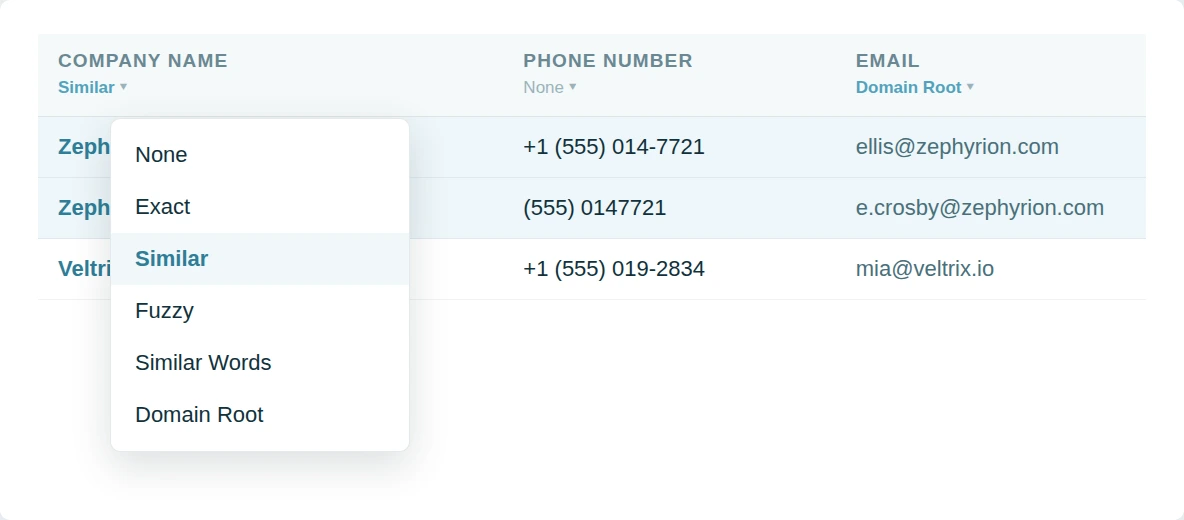
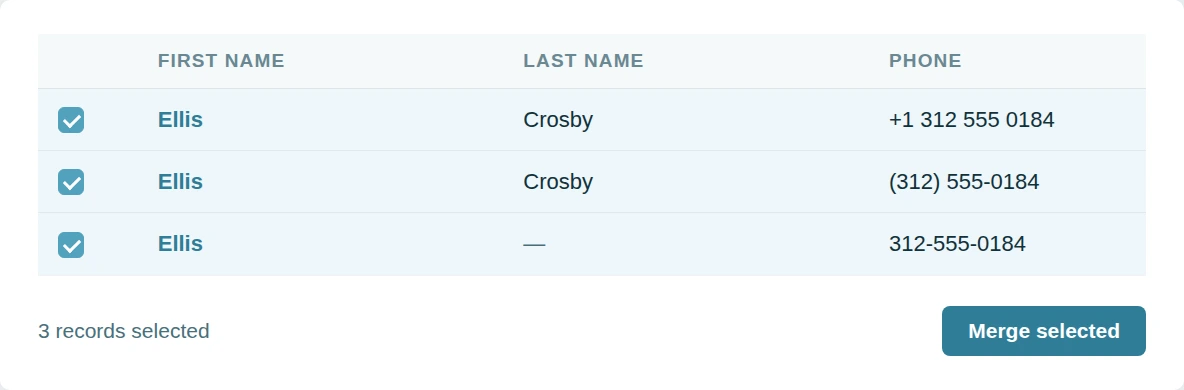
Give reps a queue they can trust
Duplicate leads make the queue look busier than it is. What you know about a prospect splits across rows. Reps stop believing the list.
Dedupely merges the copies and leaves one lead per prospect with the history intact.
Keep the queue clean
Clearing duplicate leads by hand is a job that comes back every week. The same forms keep making more. Nobody keeps up forever.
Dedupely runs the searches you trust on a schedule and tells you when new ones appear.

Why customers choose us
Configurable without becoming a project.
Dedupely is between tools that take weeks to learn and others that don’t give you any options. Match on any property, set a rule on any field, and still run your first merge the day you connect.
Our pricing.
It follows the records you sync, with no per-user fee. All features included in yearly subscriptions.
We go deeper.
The hard merges are the ones where both records look right. Dedupely turns those into a single click between two sensible options.

"It couldn't have been much easier to connect to HubSpot and run my first dedupe. The online chat was always quick, and the ease of scheduling a Zoom call with support was so easy."
 HubSpot user
 Merge duplicates by object in HubSpot
- ContactsThe next import is on hold until this is sorted out.
- CompaniesOne record holds the contacts, the other holds the deals.
- DealsRenewals logged twice, and an ARR number that will not hold.
- LeadsA second lead opens while the first one is still open.
- TicketsTwo agents answering one customer, neither aware of the other.
- Custom ObjectsThe timeline vanishes if the wrong record wins.


Merge HubSpot duplicates in 5 minutes
Three steps from portal to first merge
-
Connect your portal
Two clicks, through the HubSpot Marketplace.
-
Match any property
Default searches, or build your own.
-
Merge in bulk
Whole groups, singly, or scheduled.

HubSpot customer stories
How other teams cleaned up their duplicates
- 16,000+ duplicate records merged How a CRM Consultant Helped a Staffing Firm Merge 16,000+ Duplicate HubSpot Records Left by Its Rollout, with Dedupely Read the story
- 9,000+ duplicate records merged How a Telehealth Company Merged 9,000+ Duplicate HubSpot Records Created by Its Calling App, Forms and Integrations, with Dedupely Read the story
- 1,600+ duplicate records merged How a Home Renovation Company Merged 1,600+ Duplicate HubSpot Records Created by a Call-Tracking Integration, with Dedupely Read the story
20,000+ businesses
feel the magic









"Perfect solution for cleaning up CRM migration duplicates - works like a charm and saved us from a giant mess."

"Easy to use tool that gives you much deeper logic than HubSpot’s native deduping abilities. Friendly and fast support team."

Questions about duplicate leads in HubSpot

A lead is a prospecting object that sits on top of a contact. Two leads can point at the same person, so the prospecting queue shows them twice even when the underlying contact is single.
No. The lead records merge; the contact they reference is untouched unless you run a contact search as well.
Merge Rules decide which stage survives. The queue then shows one entry, so a sequence is not sent twice to the same prospect.
Yes. Any lead property, including the associated contact's email or company, and several of them at once.
Get started for free
20 free trial merges and as much free support as you need to get your duplicates under control.


Yuliya
Pipedrive User
 Pipedrive Marketplace
 Running CRM cleanup for clients? See the Partner Program












