




TL;DR
- Fast-growing sales teams can't keep every duplicate out of the CRM.
- CRMs and connected tools create some records in ways your team can't change.
- Agree on who imports data, and clean spreadsheets of duplicates before importing them.
- Merge new duplicates automatically before they spread into reports, sequences and ownership.
- Dedupely cleans spreadsheets before import and merges new CRM duplicates automatically.
Fast-growing sales teams want a CRM where every contact exists once. In practice, they add tools, imports and people faster than anyone can check what comes in. From what I've seen, full prevention is rarely possible, because CRMs and integrations do things you can't change. What you can do is stop duplicates from spreading and from staying. In this post, you'll learn which prevention steps hold up in a fast team, and where each one falls short.
Why you can't stop every duplicate at the door
Every CRM, tool and integration has native behavior you can't switch off. Some of them create records on their own, with rules you don't control.
One example is HubSpot creating orphan companies: it creates a company from an email domain, with no contact attached. It's a known issue, and it hasn't changed yet.
Fast teams also run on results. Reps add tools that help them sell, marketing adds forms and events, and nobody wants to slow down to check data.
In an ideal world, you'd prevent every duplicate. In reality, bad data will come in, and the goal is to keep it from spreading and from staying.
What native deduplication catches, and where it stops
Native deduplication works, to an extent. I've seen Pipedrive, Salesforce and Nimble catch some duplicates when a record comes in and ask whether you still want to add it.
Each check has its own limits, too. In some CRMs, for example, imports without an email, domain or record ID create new records, and records created through the API can skip the check.
The bigger limit is time. In a fast team, users don't stop to read a warning, so they click through it.
In many teams, more people than the CRM admin can import and upload whenever they need to. Even with a protocol in place, they skip it, and the duplicates become the admin's problem.
Native tools also struggle once duplicates are already in. Many teams that try to clean up with them stop partway.
35% of teams give up on their CRM's native dedupe tools because of two-at-a-time merges, display caps or missing field controls.
What realistic prevention looks like
Prevention in a fast team works as a set of layers. Each one catches part of the problem, and the last one catches what the others miss.
Agree on who imports, and how
Limit imports to a small group, or at least agree on one way to do them. Decide which fields must be filled, how names and emails are formatted, and which object each list goes into.
Write it down where reps will see it, and keep it short. A protocol that takes too long is the one people skip.
Name one person who owns the protocol and answers questions about it. When a new tool or list source shows up, that person decides how its data gets in.
Check spreadsheets for duplicates before they go in
Event lists, partner lists and rep spreadsheets are some of the easiest duplicates to stop. Check each file for duplicates inside itself, and against what's already in the CRM, before you import it.
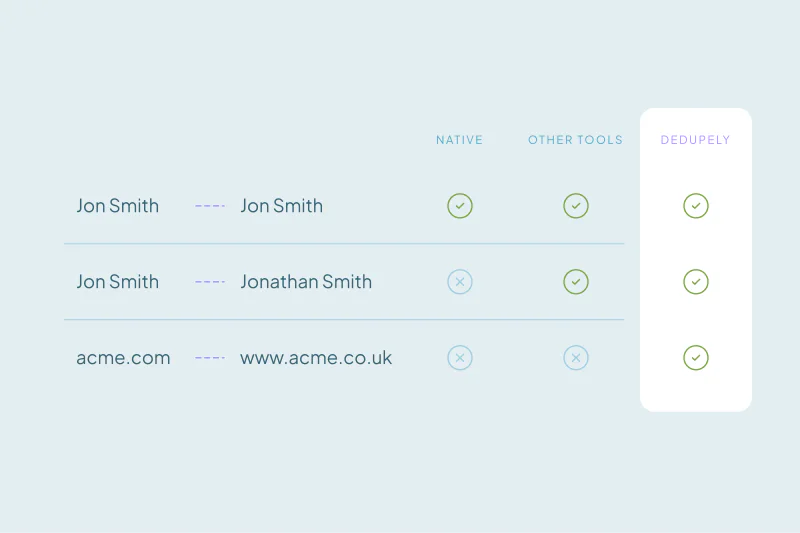
Use the same matching you'd use in the CRM. Allow for typos, nicknames and company suffixes, so near matches don't slip in as new people.
Use your CRM's native deduplication for what it catches
Turn on the native deduplication your CRM offers, and tune its native matching to your data. Every duplicate it stops is one less to merge later.
Check them now and then, too. If reps click through the same warning every day, the rule may be too broad. It may also point to a source worth fixing.
Merge new duplicates in a continuous loop
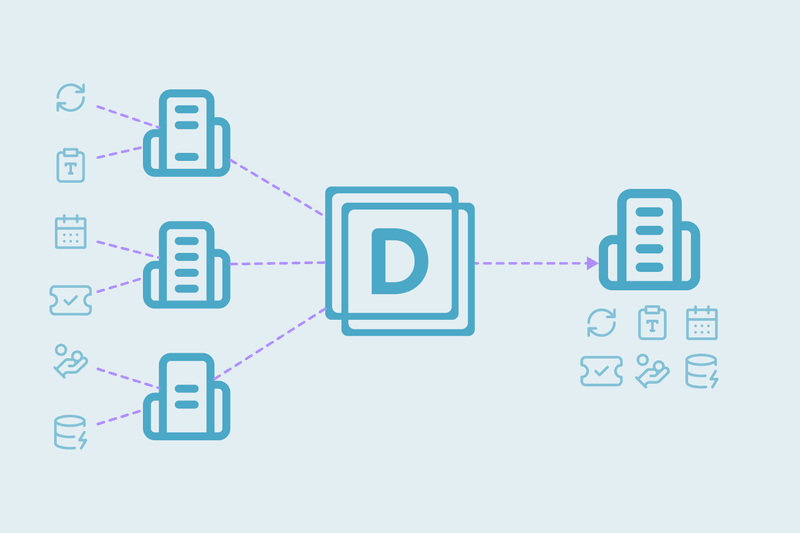
For everything that still gets through, schedule automatic merging to run ASAP. The tool scans, matches and merges right away, then starts over as soon as it finishes. New duplicates are found and merged within minutes of arriving.
Those minutes matter. A duplicate merged early doesn't reach reports, email sequences or ownership rules, where it turns into double calls and commission disputes.
Merge the matches you're most certain of automatically, such as the same email, or the same name and company. Send edge cases to review.
50% of the teams that gave up on their CRM's native dedupe tools found them too limited, too expensive or too clunky for a deep cleanup.
| Layer | What it catches | Where it falls short |
|---|---|---|
| Agreement on who imports and how | Badly formatted lists from reps and events | People skip it when they're in a hurry |
| Spreadsheet check before import | Duplicates inside a file and against the CRM | Only covers files someone remembers to check |
| CRM's native deduplication | Some duplicates at creation, when a user is asked | Users click through, and some records created through integrations or the API aren't checked |
| Continuous match-and-merge loop | What gets through the other layers, within minutes | Duplicates exist for a few minutes first, and edge cases still need review |
Where to start
Clean the duplicates you already have before you turn on any automatic merging. A loop on top of a messy backlog spends its time on old problems.
Then add the layers one at a time, starting with who imports. Watch which duplicates still get through, and adjust the layer that let them in.
How Dedupely keeps duplicates from spreading in a fast sales team
In Dedupely, you can clean a spreadsheet of duplicates before you import it. Once records are in the CRM, you can merge new duplicates automatically, and new records show up for matching within 1 to 5 minutes. Read more in How to automate CRM deduplication without losing data.
Build your prevention in layers
You won't stop every duplicate in a fast team, and you don't need to. Prevention works as layers: an agreement on who imports, a check of each spreadsheet before it goes in, and the native deduplication your CRM already has.
Each layer catches part of the problem, and none of them catches all of it. What gets through is merged within minutes, before it reaches reports, sequences and ownership, so the team can keep moving without spreading bad data.
Frequently asked questions
Can you completely prevent duplicate contacts in a CRM?
Rarely. CRMs, integrations and sales tools create records with native rules you can't change, and busy users don't always stop to check warnings. Plan to reduce duplicates at entry, then find and merge the rest quickly, before they spread into reports, sequences and ownership.
What causes CRM deduplication to fail in fast-growing sales teams?
It tends to fail when data comes in faster than anyone checks it. Many people import and upload, entry warnings get clicked through, tools create records on their own, and native cleanup tools struggle at volume. Teams that keep up agree on who imports, check files first and merge new duplicates continuously.
How do I stop duplicates when importing a spreadsheet?
Check the spreadsheet before it goes in. Look for duplicates inside the file and against records already in your CRM, allowing for typos, nicknames and different formatting. Limit who can import, agree on required fields and formats, and use your CRM's import checks where they exist.
Do CRM duplicate warnings work?
They work to an extent. Several CRMs warn about possible duplicates when a record is created and ask whether to continue, but some don't check records created through integrations or the API. Busy users also click through warnings, so keep them on for what they catch and plan another way to find the rest.
How quickly should new duplicates be merged?
As soon as you're confident they're duplicates. A duplicate merged within minutes rarely reaches reports, sequences or ownership rules, while one left for weeks collects calls and emails on both records. Merge the clear matches automatically, such as the same email or the same name and company, and send the edge cases to review.



 Or sign up with Google
 Salesforce AppExchange











