



TL;DR
- A good deduplication tool lets you decide how each field is matched.
- Control over what the merged record keeps matters as much as finding duplicates.
- Ask whether you can preview each merge and recover if a merge goes wrong.
- Test any deduplication tool on your own data before comparing prices.
- Dedupely lets you control matching and merging and preview each merge before it runs.
Once a team decides its CRM needs more than the built-in tools, the next question is which deduplication tool to pick. Feature pages tend to look alike, and many tools say they find duplicates and merge them.
The differences sit in the details: how you control matching, what the merged record keeps and what a failed merge costs you. Pricing models, support and security answers vary just as much.
This post is a checklist of questions to ask any deduplication tool, grouped by area, with why each one matters. If you're still deciding between native tools, a dedicated tool and custom scripts, start with our comparison of native CRM deduplication and deduplication tools.
Know your own duplicates before you compare tools
A checklist only helps if you know what you need the tool to find. What counts as a duplicate is case by case: what one team considers a duplicate, another may not.
Write down a few duplicate sets you know well
Pick a handful of real duplicate sets from your CRM. Include obvious ones, like two contacts with the same email. Add a few harder ones, like one person with a personal and a work email.
Add one or two pairs you're certain aren't duplicates, such as two branches of one company. A good tool finds the first group and lets you keep the second apart.
Note your objects, volume and sources
List the CRM objects with duplicates, roughly how many records each one holds, and where new records come from. Forms, imports and integrations decide whether you need a one-time cleanup or ongoing merging.
Matching: can you control how duplicates are found?
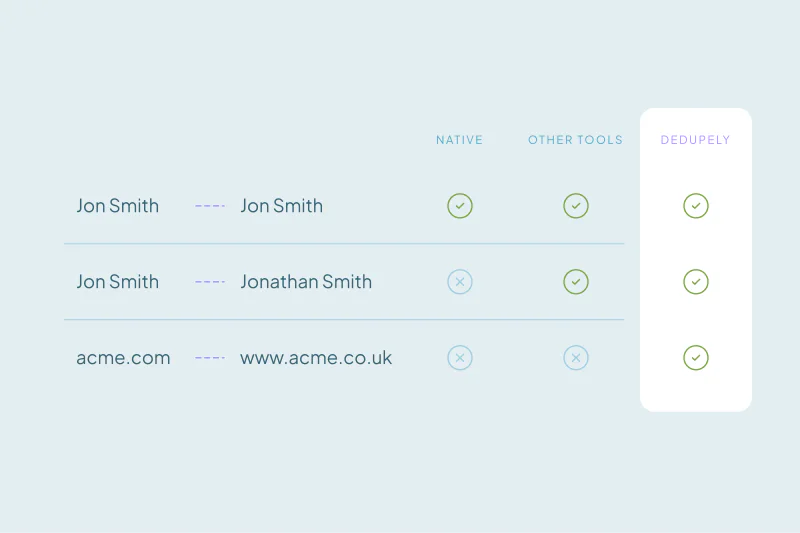
Matching decides what you find. A tool that only matches exact values misses typos and formatting differences, and it can also group records that aren't the same. Our guide on how duplicate matching works explains why.
- Can you choose how each field is compared: exactly, with typos allowed, by sound, or by the core of a domain?
- Can you combine several fields in one search, and leave unreliable fields out?
- Can you run different criteria for different groups of records, like regions or record types?
- Can you filter which records are evaluated without changing CRM data?
- If you reject a match you're certain isn't a duplicate, does it stay out of future results?
- If the tool uses AI to find matches, where is your CRM data processed, and is it used to train models?
Merging: can you control what the merged record keeps?
Finding duplicates is half the job. The merge decides which values survive. A wrong owner or lifecycle stage can cause more trouble than the duplicate did.
- Can you choose which record survives, such as the oldest, the newest or the one with the most data?
- Can you set which value wins field by field, with blanks kept from overwriting existing data?
- Do activities, notes and associated records move to the surviving record?
- Can you merge a whole duplicate set in one step, or only two records at a time?
- Which record ID survives, and what does that mean for integrations that store IDs?
Our post on merging CRM records without losing data covers these decisions in more detail.
Objects and volume: will it cover your whole cleanup?
Objects in your CRM
Ask which objects the tool supports in your specific CRM. Coverage often differs by CRM, so a tool that handles companies in one CRM may not handle them in another. Check deals, leads and custom objects if you use them.
Bulk merges and new duplicates
A backlog of thousands of duplicates needs bulk merges. Ask whether there's a limit per merge, and how long the first sync of a large database takes.
If new duplicates keep arriving from forms or integrations, ask whether the tool can merge the ones you're certain of automatically. Also ask how quickly it sees new records.
Preview and safety: what happens before and after a merge?
In some CRMs, merges can't be undone. That makes the safety questions some of the ones worth asking first.
- Can you preview the merged record before the merge runs?
- Does the tool hold back risky matches by default, like very large sets or placeholder data such as test@test.com?
- Can you send unclear matches to review instead of merging them?
- Is every merge recorded, with the original values, so you can recover a record if needed?
- Can you stop a running bulk merge?
A history of original values works alongside a backup. Our guide on backing up your CRM before a large merge covers when you need one.
More than one CRM, spreadsheets and users
Some teams run more than one CRM, or sync two of them. If you do, ask whether one account covers several CRMs. Also ask how the tool handles duplicates across more than one CRM when records sync between them.
Ask whether you can clean spreadsheets before an import, and whether those rows count toward your plan. Then ask how many people can use the tool, whether roles limit who changes settings, and whether each user costs extra.
Pricing model: what are you paying for?
Deduplication tools price in different ways: per user, per record, per CRM or per module. The same database can cost very different amounts depending on the model.
- What counts toward the price: all records in the CRM, only the objects you sync, or only merged records?
- Are features like AI matching or automation limited to certain plans?
- What happens when you go over a limit: does the plan upgrade on its own, or do you decide?
- Can you test the tool on your own data before paying?
Support and security: who helps you, and who sees your data?
Support
A first large merge is where teams often need a second opinion. Ask whether onboarding help is included, whether you can talk to a person on a call, and whether support costs extra.
Security
A deduplication tool needs admin access to your CRM, so a security review is common. These are questions worth asking early:
- Where is CRM data stored and processed?
- Which certifications does the vendor hold, and which subprocessors does it use?
- Who at the vendor can see your data, and when?
- Does the tool support two-factor authentication, password policies and an audit log of user actions?
- Will the vendor sign an NDA or fill in your own security questionnaire?
Deduplication tool checklist at a glance
| Area | Question to ask | Why it matters |
|---|---|---|
| Matching | Can I set how each field is compared? | Exact-only matching misses typos and can group the wrong records |
| Merging | Can I choose which value wins in each field? | The merged record is what your team works from |
| Objects | Which objects are covered in my CRM? | Coverage often differs by CRM |
| Volume | Can I merge thousands of records in one action? | Two-at-a-time merges don't scale to a backlog |
| Safety | Can I preview merges and see the original values after? | In some CRMs, merges can't be undone |
| Several CRMs | Does one account cover all my CRMs? | Synced CRMs need duplicates merged on both sides |
| Users | Does each user cost extra? | Cleanups often involve more than one team |
| Pricing model | What counts toward the price? | The same database can cost very different amounts |
| Support | Can I talk to a person during setup? | The first large merge is where questions come up |
| Security | Where is my data stored, and who can see it? | Security teams often ask before approving a tool |
How Dedupely answers a deduplication tool checklist
In Dedupely, you build duplicate searches field by field, set rules for which value wins and preview each merge before it runs. Risky matches are excluded by default, and every merge is recorded with the original values. Our Customer Success team helps you set it up on calls, chat and email.
Choose the tool that handles your duplicates
Deduplication tools can look alike on a feature page. The differences show up when you ask how each field is matched, what the merged record keeps and how you recover.
Start from the duplicates you know, then work through matching, merging, safety, scale, pricing, support and security. The tool that handles your own duplicate sets, edge cases included, is the one worth paying for.
Frequently asked questions
What should I look for in a CRM deduplication tool?
Look for control over matching and merging first: setting how each field is compared, and which value wins in the merged record. Then check which objects it covers, whether it bulk merges, whether you can preview merges and how it records them. Pricing model, support and security answers complete the comparison.
How do I test a deduplication tool before buying?
Use a trial on your own data, with a few duplicate sets you know well, including hard cases and records you're certain aren't duplicates. Check what the tool finds, what it misses and what the merge preview keeps. A demo database can't show you how the tool handles your edge cases.
What questions should I ask a deduplication vendor?
Ask how matching works per field, how the merged record is built and which objects are covered in your CRM. Ask about bulk merge limits, previews and merge history. Then ask what counts toward the price, whether support includes calls, where data is stored and which certifications the vendor holds.
How are deduplication tools priced?
Pricing models vary: per user, per record, per CRM or per module. Some tools also limit features like AI matching or automation to certain plans. Ask what counts toward the price, what happens when you pass a limit and whether adding users or CRMs costs extra.
Is a deduplication tool safe to connect to my CRM?
It depends on the vendor, so ask before connecting. Check where data is stored and processed, who can access it, which certifications and subprocessors apply, and whether CRM data trains AI models. Also check whether merges can be previewed and whether original values are recorded.




 Or sign up with Google
 Pipedrive Marketplace











