



TL;DR
- A CRM's native deduplication can be enough for a small team with simple data.
- Native tools work best when duplicates share an exact email or domain.
- Merging a few records at a time stops scaling once duplicates arrive every week.
- Duplicates in deals, leads or custom objects often fall outside native coverage.
- Dedupely adds custom matching, rules for which value wins and bulk merging when native tools stop.
Every CRM has some form of deduplication built in. For a small team, the plain answer is that it may be all you need, at least at first.
The question is how long "at first" lasts. Native tools are built for the common case, and many small businesses stay in that case for a while. Others outgrow it in a few months, often without noticing.
In this post, you'll see when your CRM's own tools are enough, where they usually stop and when to look further. The goal is to help you decide, without spending on a tool before you need one.
What native deduplication usually covers
Native deduplication tends to work in two places. It checks new records as they're created, and it lets you merge records you've found yourself.
The check at entry usually compares one field, like email for contacts or domain for companies. Merging is usually manual, a few records at a time. Some paid tiers add suggestions for existing duplicates.
The details differ a lot from one CRM to the next. Our comparison of native CRM deduplication vs. deduplication tools covers the general differences.
When native tools are enough
Native tools often cover everything a small team needs when most of these are true:
- Few duplicates: you can list them in an afternoon, and new ones show up rarely.
- Simple duplicates: most share an exact email or website domain, so the check at entry catches them.
- Few sources: records come from one form, a few people and the occasional import.
- One object: duplicates sit mostly in contacts or companies, where native tools focus.
- A team that knows its customers: someone can look at two records and say whether they're the same person.
In that situation, a short routine is enough. Merge what you find each week, keep imports tidy and fill the key field on every record.
Where native tools usually stop
Native tools are built for the common case. These are the places where small teams most often find their limits.
Duplicates without an exact match
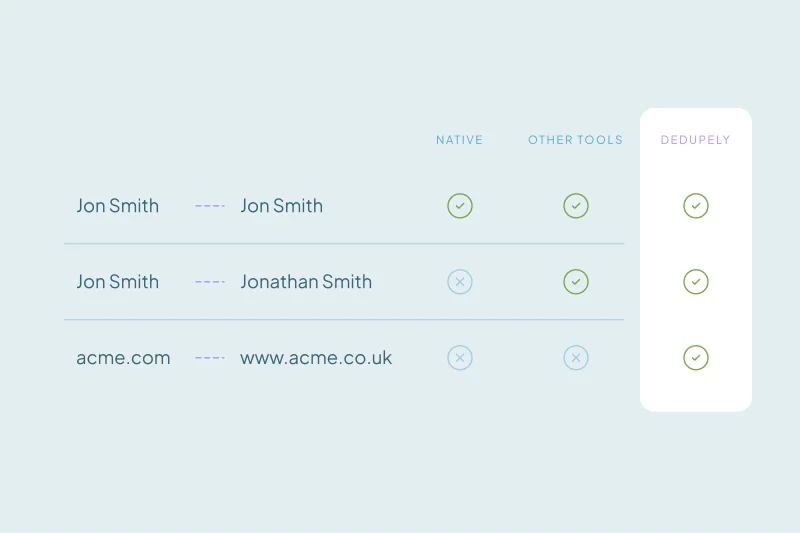
A typo in an email, a work and a personal address, or "Acme Inc." and "ACME" can slip past a check on one field. The records look different to the CRM and identical to a person.
Merging a few records at a time
Merging two or three records per action is fine for ten duplicates. It's a different job for five hundred, where each merge is its own decision and its own click.
Which value wins
Many native merges keep the values of the record you pick as primary. That works until owners, stages and email preferences need different rules in the same merge.
Objects outside the main two
Deals, leads, tickets and custom objects often get less help, or none, from native suggestions. Those duplicates have to be found another way.
Duplicates that keep arriving
Native tools leave new duplicates for someone to find. Once a sync or a booking tool adds them every week, finding them becomes a recurring chore.
What native tools do in your CRM
Each CRM draws these lines in a different place, and plan tiers matter. If you want the details for yours, these posts cover what each one does natively, as of October 2026:
- HubSpot deduplication on free vs. paid plans
- Salesforce deduplication and where native tools stop
- Pipedrive duplicates and where native merging stops
- Duplicate leads and contacts in Close CRM
- Duplicate contacts in Nimble and how merging works
- How to find and merge duplicate Google Contacts
Signs it's time to look further
None of these signs means you need a tool tomorrow. Two or three together usually mean native tools have stopped keeping up.
| Sign | What it tells you |
|---|---|
| Someone spends hours a week merging by hand | The volume has outgrown one-at-a-time merging |
| The same duplicates come back after every cleanup | A source keeps creating them faster than you merge |
| You find duplicates the check at entry didn't catch | Your duplicates don't share an exact email or domain |
| Merges keep the wrong owner or stage | You need rules for which value wins, field by field |
| Deals or leads are duplicated too | Your duplicates sit in objects native tools cover less |
| Nobody trusts the suggested pairs | You need matching you can see and adjust |
Get the most out of native tools first
Before you add anything, make sure the native tools have a fair chance. Many teams get further than expected with a few habits.
- Fill the field the CRM matches on, on every record and every import.
- Import on that field, so existing records update instead of new ones appearing.
- Merge on a fixed day each week, while the list is short.
- Decide which values win before you merge, since most merges can't be undone.
If those habits hold and the signs above don't show up, your CRM's own tools are doing their job. What counts as a duplicate is case by case, and for some teams the simple case is the whole story.
How Dedupely takes over where native tools stop
Dedupely connects to your CRM and lets you build duplicate searches on any combination of fields, with matching that catches typos and spelling differences. You set rules for which value wins, preview each merge and bulk merge the matches you're sure of. Once your rules are tested, you can merge new duplicates you're certain of automatically on a schedule, as our page for small businesses explains.
Use what you have until it stops working
Your CRM's own deduplication can be enough, and for many small teams it is, for a while. Simple data, few sources and a team that knows its customers keep the work small.
The change usually comes quietly: more sources, more objects, more time spent merging. Watch for those signs, and you'll know when the native tools have stopped keeping up.
Frequently asked questions
Are my CRM's built-in deduplication tools enough?
They can be, for a small database with few sources where most duplicates share an exact email or domain. Hours of merging each week, returning duplicates or duplicates in deals and leads suggest the native tools have stopped keeping up.
What can't native CRM deduplication do?
It depends on the CRM and plan. Native tools often compare a fixed field, merge a few records at a time and focus on contacts and companies. Rules for which value wins in each field and automatic merging of new duplicates are less common.
When should a small business get a deduplication tool?
When the signs add up, like hours of manual merging each week, duplicates returning after every cleanup, or wrong owners after merges. One sign alone may not justify it. Two or three together usually mean native tools have stopped keeping up.
How do I get more out of my CRM's native deduplication?
Fill the field your CRM matches on, like email or website, on every record, and import on that field so existing records update. Merge on a fixed day each week while the list is short. Decide which values win first, since most merges can't be undone.
Why does my CRM miss some duplicates?
Many native checks compare one field exactly, so a typo, a second email or another company spelling makes two records look different. A person would still see one customer, and records missing that field skip the check entirely. Matching on two or three fields catches what one field misses.




 Or sign up with Google


 HubSpot Marketplace












