


TL;DR
- Count duplicate records in each CRM object before you clean anything.
- A native duplicate count uses matching you can't see, so the number can be low.
- Duplicate searches you build yourself show where records overlap in your own data.
- What counts as a duplicate differs by team, so define it before you count.
- Dedupely finds duplicates in contacts, companies and leads with no setup, so you can measure first.
Many teams know they have duplicates long before they know how many. A rep finds two records for one customer, or a report counts a company twice. Sometimes one person gets the same email three times.
The next question is how bad it is. Some CRMs show a duplicate count, and it's tempting to stop there. That number rests on matching you can't see, so it may not match what your team calls a duplicate.
Without a number per object, you can't size the cleanup, explain it to anyone or tell whether it worked. In this post, you'll see why your CRM's count may be low, how to measure duplicates yourself and how to read the results.
Why you should measure duplicates before you clean
Measuring first tells you how big the problem is and where it sits. Starting to merge without that picture often means fixing the duplicates you happened to see, and missing the rest.
Measure each object on its own
Contacts, companies, leads and deals duplicate for different reasons and at different rates. A database can have clean companies and messy contacts, or the other way around.
Count duplicate records per object. One total for the whole CRM hides where the work is.
Know what the number is for
A count gives you a starting point. It tells you whether the cleanup is an afternoon or a project, and which object to start with. Later, it shows whether duplicates are coming back.
Why your CRM's duplicate count can look low
Some CRMs show a list or a count of possible duplicates. It's a useful signal, and it's tempting to take it as the answer.
You don't see how it matches
A native count is based on the CRM's own matching algorithm. You often can't see which fields it compares, or how close two values must be to count as a match.
So you have a number without knowing what it measures. Two CRMs with the same data could show very different counts.
Strict matching misses variations
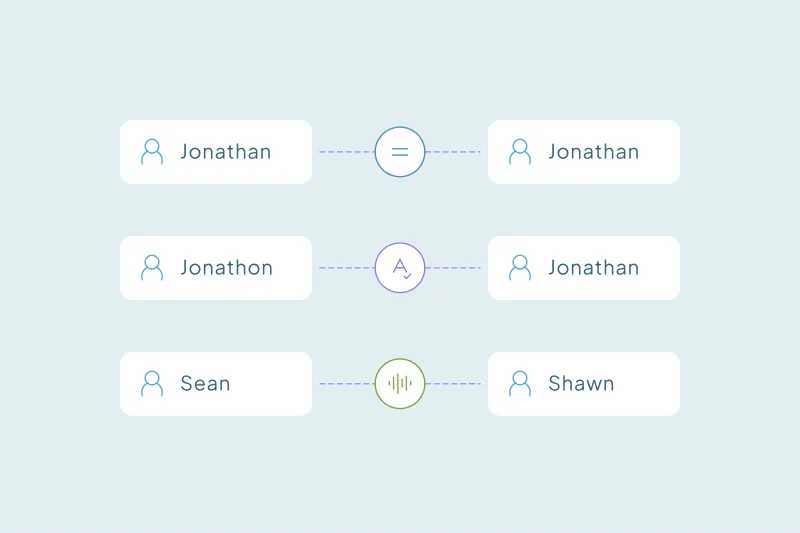
Native matching can be tight and rigid. If it needs an exact email, it won't count "Jon Smith" and "Jonathan Smith" at the same company with different emails.
The same goes for "Acme Inc." and "Acme" or a phone number typed in two formats. Each of these is a duplicate to many teams, and none shows up in a strict count.
Some counts stop at a limit
Some native tools list possible duplicates only up to a set number of pairs, or only for contacts and companies. In others, scanning the whole database for existing duplicates is limited to higher editions.
Check what your CRM's count includes before you treat it as the total.
Decide what counts as a duplicate in your CRM
Before you count, decide what you're counting. What counts as a duplicate is case by case: what one team considers a duplicate, another may not.
- Two contacts with the same email are duplicates for many teams. For a company where families share one inbox, they may be two people.
- Two companies with the same domain are one account for some teams. For others, regional branches on one domain must stay apart.
- Two deals for the same customer can be a duplicate, or a renewal your team tracks on purpose.
Start by understanding what makes a record a duplicate in your data, and where records overlap. That decides which searches you build and how loose or strict each field should be.
Build your own searches to see the real issues
Building duplicate searches yourself shows exactly what each count means. You choose the fields and how strictly each one matches, so you know what you're looking at.
Start with the obvious duplicates
Begin with exact matches on the key fields: email for contacts and leads, website domain for companies. These are the duplicates teams are least likely to debate, and they give you a first, reliable count.
Then loosen one field at a time
Next, try combinations such as first and last name with company, or name with country. Then allow small typos, nicknames or company suffixes on one field.
Change one thing per search. If the count jumps, you know which change caused it, and you can check whether the new matches are real.
Read a sample of every result
A count is only as good as the matches behind it. Open a sample from each search and check whether you'd merge those records.
If many look wrong, the search is too loose. If you keep finding duplicates the search didn't catch, it's too strict.
How to read the count
Once your searches return results, turn them into numbers you can compare and repeat.
Count the extra records in each set
A duplicate set is a group of records that belong together. A set of three records means two extra records, since one survives the merge.
The extra records are the number the cleanup will remove. The number of sets tells you how many merges you'll make.
Turn it into a share of each object
Divide the extra records by the total records in that object. That share is what you compare from one audit to the next.
There's no universal healthy rate to compare against. The useful comparison is your own number over time, object by object.
| Step | What you calculate | Example |
|---|---|---|
| 1. Duplicate sets | Groups of records that belong together | 400 sets |
| 2. Records in those sets | Every record in every set | 1,000 records |
| 3. Extra records | Records in sets minus one per set | 1,000 − 400 = 600 |
| 4. Share of the object | Extra records ÷ total records in the object | 600 ÷ 20,000 contacts = 3% |
Note where the duplicates come from
While you read the results, look at creation dates, record sources and owners. A cluster created on one day often points to an import. A steady trickle can point to a form or an integration.
Knowing the sources tells you which duplicates will come back after the cleanup.
How Dedupely helps you measure your duplicates
Dedupely's matching, built with AI, scans your contacts, companies and leads with no setup. It finds duplicates you might never think to search for. You can also build duplicate searches field by field and see each count, and scanning never changes your CRM data.
Start with a number you trust
A diagnosis turns "we have duplicates" into a count per object, with matches you understand. Native counts are a signal, but they rest on matching you can't see, so they can be low.
Your own searches, starting with the obvious exact matches, show where records overlap and what your team considers a duplicate. That number sizes the cleanup, and the same searches tell you later whether it held.
Frequently asked questions
How do I find out how many duplicates are in my CRM?
Build duplicate searches for each object and count the results. Start with exact matches on email for contacts and domain for companies, then loosen one field at a time. Check a sample of each result, and count the extra records in each set, since one record per set survives a merge.
Can I trust my CRM's duplicate count?
Use it as a signal, and check what it covers before treating it as the total. Native matching is often hidden and can be strict, so near matches with typos or nicknames are left out. Some native tools also stop at a set number of pairs or cover only some objects.
What is a normal duplicate rate in a CRM?
There's no universal benchmark, because what counts as a duplicate differs between teams and databases. The most useful comparison is your own rate over time. Divide the extra records by the total records in each object, and repeat the same searches at every audit.
How do I know if a duplicate search is too loose?
Read a sample of its results. If many matches are records you wouldn't merge, like colleagues at one company, the search is too loose. Tighten one field at a time and compare the count, so you can see which change made the difference.
Should I measure duplicates per object or for the whole CRM?
Per object, because contacts, companies, leads and deals duplicate for different reasons and at different rates. A single total hides where the work is. A count per object tells you where to start and which sources to watch after the cleanup.



 Or sign up with Google