


TL;DR
- Exact matching finds records with identical values, usually ignoring capitalization.
- Fuzzy matching catches typos, and phonetic matching catches names that sound alike.
- Multi-field matching combines several fields, so one shared value isn't enough to match.
- Matching that's too loose pairs different records, and matching that's too strict misses duplicates.
- Dedupely lets you choose how strictly each field matches when finding duplicates.
Every deduplication tool, whether built into a CRM or added on top, has to answer one question: are these two records the same? The way it answers is called matching.
Matching sounds technical, but the ideas behind it are simple, and knowing them helps you read any tool's results. Some methods compare values letter for letter, some allow small differences, and some compare how names sound. Many real searches combine several fields.
In this post, you'll see how each match type works, what it catches and what it gets wrong. You'll also see why knowing your own duplicates matters more than the method you pick.
Exact matching
Exact matching pairs records whose values are identical. It's the most predictable method and the safest place to start.
What exact matching catches
Two contacts with jane.doe@example.com, or two companies with example.com as their domain. Exact matching often ignores capitalization, so Jane.Doe@Example.com matches too.
These are usually the obvious duplicates: the same key field, entered twice. They're a good first set to merge.
What exact matching misses
One extra space, a missing letter or a different phone format, and an exact match fails. "+1 (555) 010-2030" and "5550102030" are the same number, but they aren't the same text.
That's why many tools clean values before comparing them: trimming spaces, removing phone formatting or stripping www from a website.
Fuzzy matching
Fuzzy matching pairs values that are close, even when they aren't identical. It measures how many changes it takes to turn one value into the other.
What fuzzy matching catches
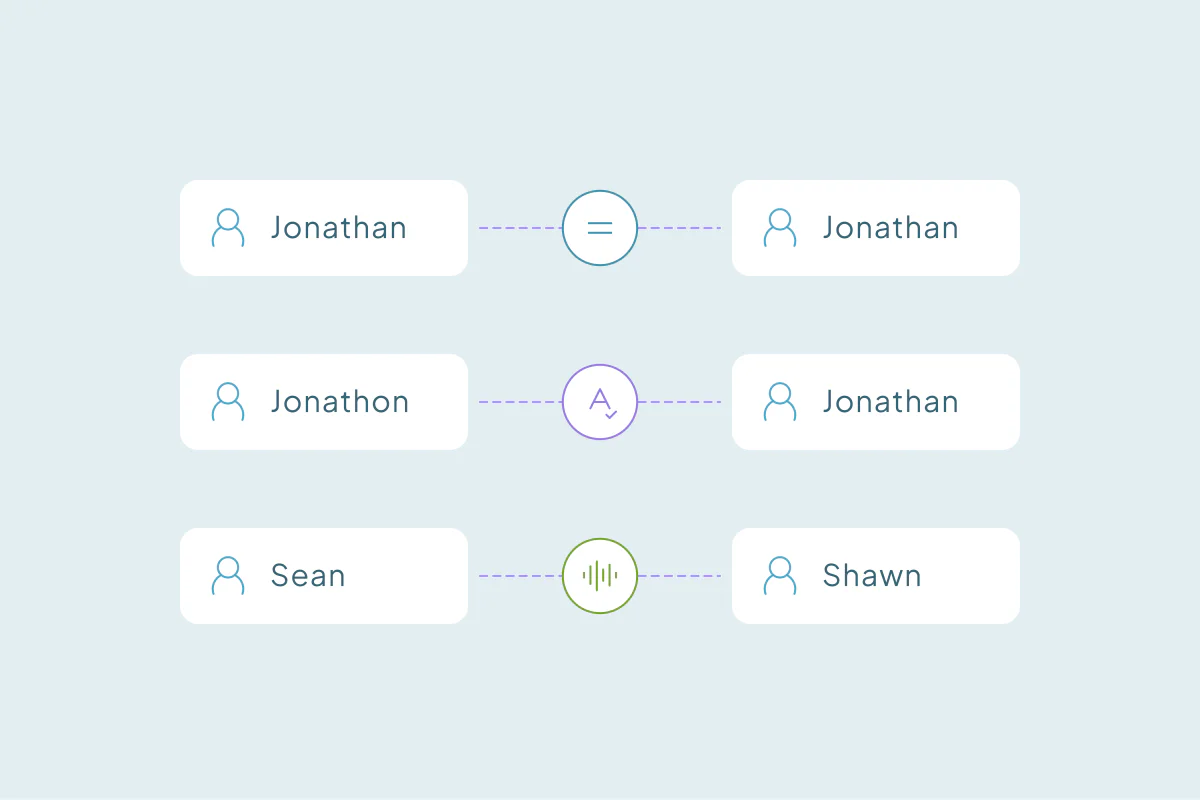
Typos and small differences: "Jonathon" and "Jonathan," "Acme Corp" and "Acme Crop," or an email with one letter swapped. Data typed by people is full of these.
What fuzzy matching gets wrong
Short values are risky. "Dan" and "Jan" are one letter apart, and so are many short company names that belong to different businesses.
Fuzzy matching usually has a threshold: how close is close enough. A low threshold catches more duplicates and more false matches. A high one is safer but misses more.
Phonetic matching
Phonetic matching compares how values sound instead of how they're spelled. It turns each name into a code based on its sounds, then compares the codes.
What phonetic matching catches
Alternate spellings of the same name: Sean and Shawn, or Smith and Smyth. Some phonetic methods also pair Catherine and Kathryn, while others don't. Pairs like these can get past fuzzy matching when the spelling differs by more than one or two letters.
What phonetic matching gets wrong
Phonetic codes are built around how names sound in one language, often English. Names from other languages may get codes that don't reflect how they're pronounced.
It also groups names that sound alike but belong to different people. Phonetic matching works best on names, combined with another field.
Word-based and domain matching
Two more methods handle cases the others miss. They're common for company records.
Word-based matching
Word-based matching compares the words in a value, whatever their order. "Northwind Traders" and "Traders Northwind" match, and so can "Northwind Traders Inc." if the tool ignores suffixes like Inc. or LLC.
Some tools also match common nicknames, like Robert and Bob, which neither fuzzy nor phonetic matching would catch.
Domain matching
Domain matching compares the core domain of an email or website. Addresses like sales@example.com and support@example.com share example.com, so both records point to one company.
Personal email domains like gmail.com break this method, since millions of unrelated people share them. They need to be left out.
Multi-field matching
Outside key fields like email or domain, a single field rarely proves two records are the same. Multi-field matching requires several fields to match before records pair up.
Combining fields
Two contacts named John Smith may be two people. Two John Smiths at the same company with the same phone number are much more likely to be one.
Each field in the combination can use its own match type: the email exact, the name phonetic, the company word-based. That's how a search becomes strict where it should be and flexible where it can be.
Combining searches
Some duplicates share an email; others share only a name and a phone. One search can't cover both, so many cleanups use several combinations side by side.
Match types at a glance
| Match type | What it catches | Example | Watch out for |
|---|---|---|---|
| Exact | Identical values | Same email, any capitalization | Formatting differences |
| Fuzzy | Typos and missing letters | Jonathon and Jonathan | Short values |
| Phonetic | Names that sound alike | Sean and Shawn | Names from other languages |
| Word-based | Same words in any order, ignoring terms like Inc. | Northwind Traders Inc. and Northwind Traders | Generic words shared by many companies |
| Domain | Same core domain | sales@ and support@ at one company | Personal email domains |
| Multi-field | Records that agree on several fields | Same name, company and phone | Fields that are often blank |
Too loose or too strict
Matching can go wrong in two directions, and many setups do both somewhere.
- Too loose: different records pair up. Two people with similar names, or two branches with one domain, land in one match, and merging it would combine them.
- Too strict: real duplicates stay apart. The same person with a typo in their name, or a phone in another format, never matches.
Matching only pairs records; merging is a separate step. Still, a false match that gets merged is harder to fix than a missed duplicate. That's why many teams start strict and loosen one field at a time.
Know what a duplicate is in your own CRM
The bigger issue usually comes before any match type: not knowing what makes a record a duplicate in your own CRM. What one team considers a duplicate, another may not.
Look at where your records overlap
Start by looking at how duplicates show up in your data. Do they share an email, a phone, a company domain? Which fields are filled in reliably, and which are often blank or wrong?
Two branches sharing one domain may be duplicates for one team and separate customers for another. The data alone can't tell you which.
Then set each field's match type
Once you know what a duplicate looks like, the matching follows. You can decide which fields to combine, and how loose or strict each one should be.
Start with the obvious duplicates, usually exact matches on key fields like email or domain. When you're certain a pair isn't a duplicate, reject it so it doesn't come back.
How Dedupely lets you match each field your way
In Dedupely, each field in a duplicate search gets its own match type, from exact to shared words or the core domain. "Similar" catches typos and minor spelling differences, and "Fuzzy" catches names that sound alike. You can combine fields and reject false matches, or let matching built with AI find complex duplicates in contacts, companies and leads.
Matching works best when you know what you're matching
Exact, fuzzy, phonetic, word-based and domain matching each catch a different kind of duplicate, and each has its own blind spots. Combining fields is what turns them into searches you can trust.
The method matters less than knowing your data. Once you know what makes a record a duplicate and where records overlap, deciding how strict each field should be gets easier.
Frequently asked questions
What is the difference between exact and fuzzy matching?
Exact matching pairs records whose values are identical, usually ignoring capitalization. Fuzzy matching pairs values that are close, like names with a typo or a missing letter. Exact matching is safer but misses small differences; fuzzy matching catches more duplicates and more false matches.
What is phonetic matching?
Phonetic matching compares how names sound instead of how they're spelled, so Sean and Shawn or Smith and Smyth match. It turns each name into a code based on its sounds. It works best on names and combined with another field, since many names sound alike.
Why use more than one field to find duplicates?
Because outside key fields like email or domain, one shared value rarely proves two records are the same. Two contacts named John Smith may be different people, but the same name, company and phone together are strong evidence. Each field can use its own match type, strict on some fields and flexible on others.
How do I avoid false matches when deduplicating?
Start strict, with exact matches on key fields like email or domain, and merge those first. Loosen one field at a time and review the results before merging. Leave personal email domains out, and reject pairs you're certain aren't duplicates so they don't come back.
Which match type should I use?
It depends on the field and on what a duplicate means for your team. Exact suits emails and IDs, fuzzy suits typed names, phonetic suits names with alternate spellings, and domain matching suits companies. Many searches combine several, each set to the strictness that field needs.




 Or sign up with Google
 Pipedrive Marketplace











