Put a spreadsheet of contacts on any phone in one file.

Free for 10 runs a day.
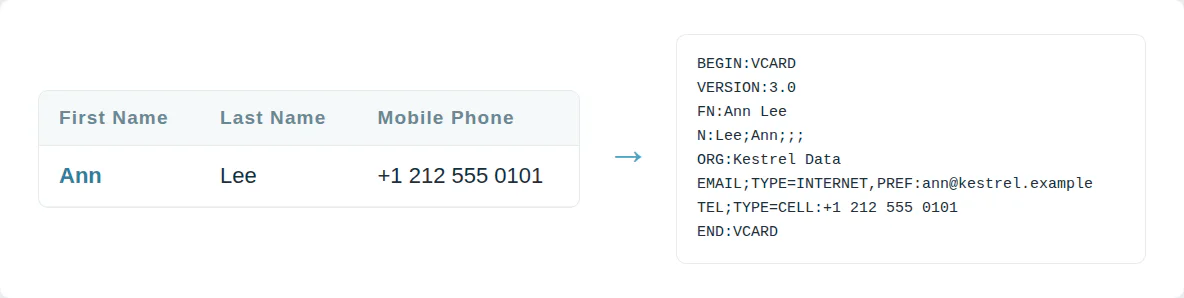
One file for every phone
Phones do not import a spreadsheet. iPhone and Android read contacts from a VCF file. Typing a list in by hand takes hours.
This converter writes each CSV row as a vCard in one VCF file.
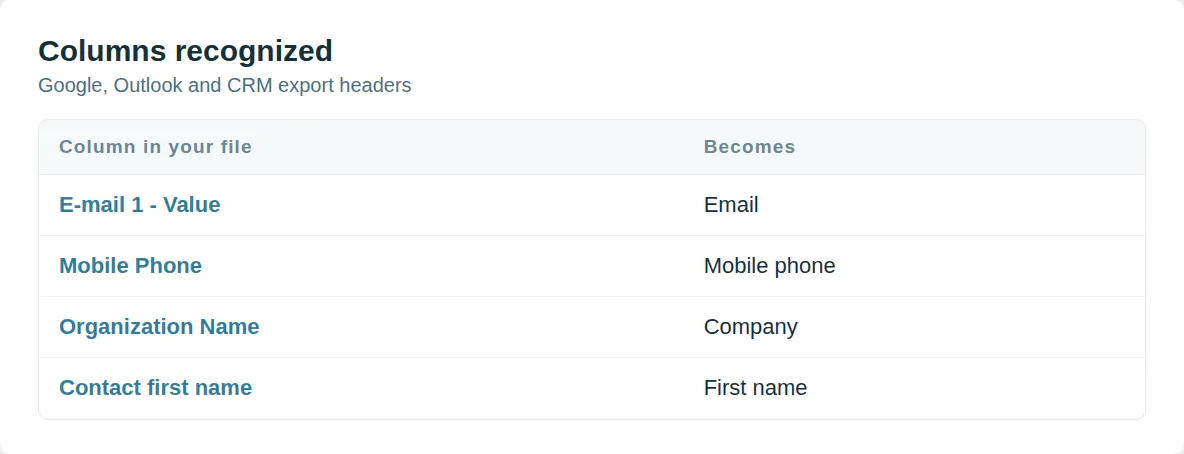
Your column names already work
Every export names its columns differently. Google writes E-mail 1 - Value. A CRM writes Email.
Common headers are matched to vCard fields with nothing to set up.
Use it from a script or an AI agent
MCP  https://dedupe.ly/tools/mcp   every free tool in one connector (this one: csv_to_vcf)

POST https://dedupe.ly/tools/api/csv-to-vcf
{ "csv": "First Name,Last Name,Mobile Phone\nAnn,Lee,+1 212 555 0101" }

Docs https://dedupe.ly/tools/api/openapi.jsonQuestions about converting CSV to VCF

Choose the CSV file or paste its rows and press Convert. One .vcf file downloads with a contact card for each row.
Open the file on the iPhone from Mail or Files and tap Add All Contacts, or import it at iCloud.com under Contacts.
Names, company, job title, emails, phones, addresses, website, birthday and notes, under the names Google, Outlook and most CRMs use in their exports.
They are skipped and counted, so the file holds only contacts a phone can show.
vCard 3.0, which iPhone, Android, Google Contacts and Outlook all read.
No. The contacts are converted in your browser and never leave your computer.
More free tools


Get started for free
20 free trial merges and as much free support as you need to get your duplicates under control.

 Or sign up with Google

Sean B
Managing Director, Legal CPD
Running CRM cleanup for clients? See the Partner Program












