



TL;DR
- Salesforce's own tools are the starting point, with Plauti, Cloudingo, DemandTools and Insycle.
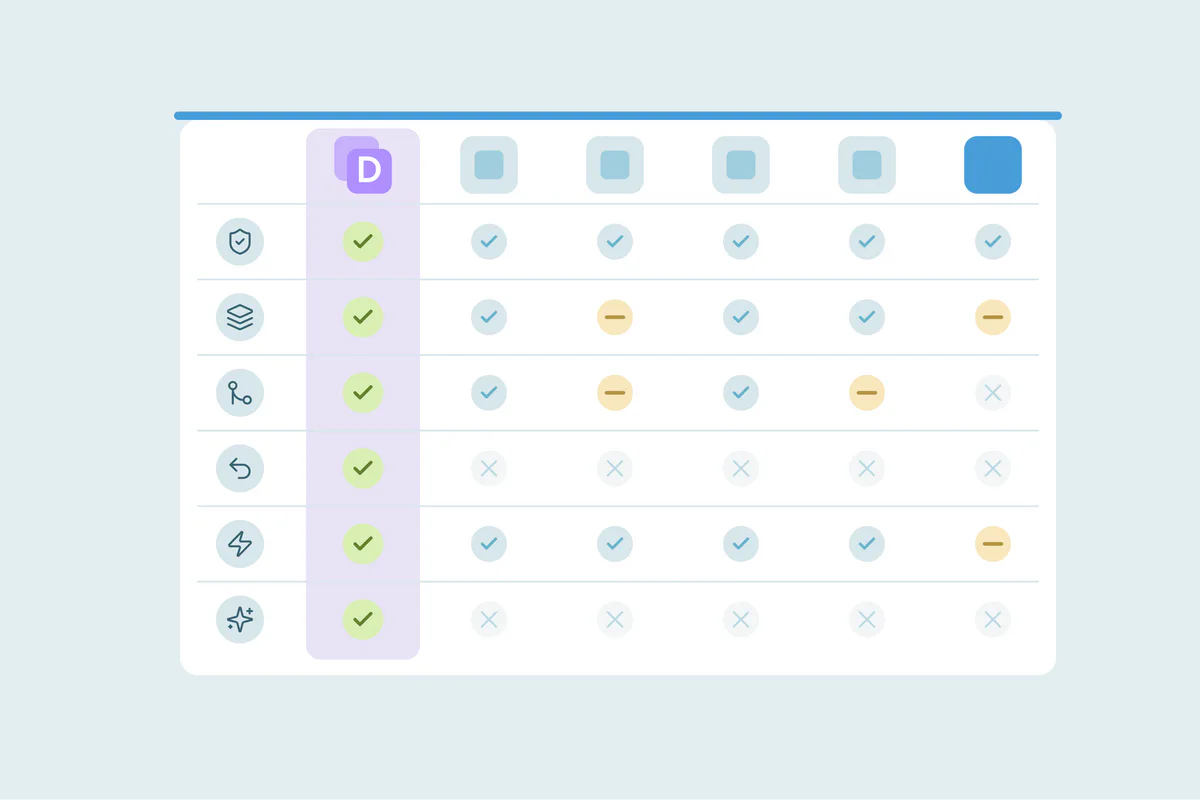
- The guide compares them on thirteen criteria, from security and objects to undo, AI matching and sync.
- Every detail about the other apps comes from their own websites, pricing pages and help centers.
- Salesforce's own tools alert or block duplicates as records are saved and merge up to three records at a time.
- Dedupely leads on merge control, AI matching, the HubSpot sync and CRM coverage, on every paid plan.
The Salesforce deduplication apps most teams shortlist are Dedupely, Plauti Deduplicate (formerly Duplicate Check), Cloudingo, DemandTools by Validity and Insycle, with Salesforce's own Duplicate Rules and Matching Rules as the starting point. All of them find and merge duplicates. They differ in how far they scale, what they bring to a security review, where you review and merge, which objects they cover, how much control you get over matching and the merged record, whether a merge can be reversed, how they automate the work, how they handle the HubSpot and Salesforce sync and spreadsheet imports, and whether they work beyond Salesforce. Last updated: November 2026, reviewed every month. This comparison is written by the Dedupely team. Every detail about another app comes from its own website, pricing page or help center, listed under Sources at the end. Comparing tools across CRMs? See Best CRM deduplication tools in 2026.
At a glance
| Dedupely | Plauti Deduplicate | Cloudingo | Salesforce's own tools | |
|---|---|---|---|---|
| Free plan or trial | Free trial with unlimited matching and 20 free merges | 14-day free trial in your own org | 10-day free trial, with 25 tokens | Included in Salesforce |
| Pricing model | By the records in the objects you choose to sync, monthly or yearly, with every feature on every plan | By records managed, per module | Yearly, per org, in three plans | Included in your Salesforce edition |
| Largest orgs | Up to 20 million records | Millions of records in one job | No cap; a fee per 100,000 records above 300,000 | Up to three records per merge |
| Certifications | ISO 27001:2022, ISO 27017, ISO 27018 | Security management that meets ISO 27001 | SOC 2 Type II | Salesforce's own, like ISO 27001 and SOC 2 Type II |
| Where you review | In Dedupely | Inside Salesforce | In Cloudingo | Inside Salesforce |
| Salesforce objects | Accounts, contacts, leads, Opportunities, custom objects | Standard and custom objects | Standard objects; custom objects by plan | Accounts, contacts, leads |
| Choose the surviving record | Yes | Yes | Yes | Yes, one merge at a time |
| Choose values field by field | Yes | Yes | Yes | Yes, one merge at a time |
| Reverse a merge | Undo within 30 days, on every plan | Plauti Restore | Professional and Enterprise plans | No |
| AI matching | Yes, Dedupely Intelligence | AI match and merge recommendations | No | No |
| Automation | Dedupely Intelligence with no setup, Auto Match alerts and Auto Merge on your schedule | Scheduled jobs that merge above a score | Scheduled jobs; merging as records arrive on higher plans | Duplicate Rules alert or block; no automatic merging |
| HubSpot and Salesforce sync | Synced Accounts and companies merged in both CRMs in one action | Salesforce side only | Salesforce side only | One CRM at a time |
| Spreadsheets and imports | Unlimited spreadsheets, cleaned and merged before the import | Keeps imports from adding duplicates | Import wizard | Data Import Wizard |
| Other CRMs | HubSpot, Pipedrive, Close, Nimble, Google Contacts | Microsoft Dynamics 365 | HubSpot, Marketo | None |
At a glance: DemandTools and Insycle
| Dedupely | DemandTools | Insycle | |
|---|---|---|---|
| Free plan or trial | Free trial with unlimited matching and 20 free merges | Demo on request | 14-day free trial, up to 500 records |
| Pricing model | By the records in the objects you choose to sync, monthly or yearly, with every feature on every plan | Flat, in two editions | By records and modules |
| Largest orgs | Up to 20 million records | No record limits | Up to 500,000 records on standard plans; Enterprise above |
| Certifications | ISO 27001:2022, ISO 27017, ISO 27018 | Validity holds ISO 27001 company-wide | SOC 2 Type II |
| Where you review | In Dedupely | In DemandTools | In Insycle |
| Salesforce objects | Accounts, contacts, leads, Opportunities, custom objects | Standard and custom objects | Contacts, accounts, leads, opportunities, custom objects |
| Choose the surviving record | Yes | Yes | Yes |
| Choose values field by field | Yes | Yes | Yes |
| Reverse a merge | Undo within 30 days, on every plan | DemandTools edition, not Elements | Restore from the Recycle Bin, by hand |
| AI matching | Yes, Dedupely Intelligence | No | No |
| Automation | Dedupely Intelligence with no setup, Auto Match alerts and Auto Merge on your schedule | Daily scenarios; DupeBlocker | Scheduled sweeps or a Salesforce Flow |
| HubSpot and Salesforce sync | Synced Accounts and companies merged in both CRMs in one action | Salesforce side only | Both CRMs, in two steps with a marker field |
| Spreadsheets and imports | Unlimited spreadsheets, cleaned and merged before the import | Import, and dedupe from a file | Matches rows with Salesforce records during the import |
| Other CRMs | HubSpot, Pipedrive, Close, Nimble, Google Contacts | None | HubSpot, Pipedrive |
1. Scale and plans
| App | Free plan or trial | Features by plan | Largest databases | Bulk merging |
|---|---|---|---|---|
| Dedupely | Free trial with unlimited matching and 20 free merges | Every feature on every paid plan, monthly or yearly, priced by the records in the objects you choose to sync; works with every Salesforce edition, including Essentials and Professional | Up to 20 million records on enterprise plans | Every record in a match in one action, and any Duplicate Search in bulk |
| Plauti Deduplicate | 14-day free trial in your own org, with every feature | Priced by the records you manage, per module (Monitor, Clean, Prevent, Act); Restore and unlimited users on every plan | Millions of records in a single job, with no manual record cap | Bulk jobs on demand or on a schedule |
| Cloudingo | 10-day free trial, with 25 tokens to act on 25 duplicate groups | Standard (standard objects), Professional (up to 3 custom objects, undo, merging as records reach Salesforce) and Enterprise (unlimited custom objects); yearly only | No cap; orgs above 300,000 records pay a fee per 100,000 records | Mass merge or convert in one click |
| DemandTools | Demo on request | Elements (import, dedupe, DupeBlocker) and DemandTools (adds undo merge, dedupe from a file, mass update and more); flat pricing | No user or record limits | Bulk merge in saved scenarios |
| Insycle | 14-day free trial, up to 500 records | Starter includes one module, like Merge Duplicates; Growth, two; Professional, every module; Enterprise, custom modules | Up to 500,000 records on standard plans; above that, an annual Enterprise plan | Whole duplicate groups at once |
| Salesforce's own tools | Included in Salesforce | Duplicate Rules and Matching Rules in most editions; Duplicate Jobs in Performance and Unlimited | Up to three records per merge | No bulk merging without code |
Which Salesforce deduplication app scales best? Dedupely: it covers up to 20 million records with every feature on every paid plan, merges every record in a match in one action, and works with every Salesforce edition, including Essentials and Professional.
2. Security and compliance
| App | Certifications | Where your data is processed | Access and records |
|---|---|---|---|
| Dedupely | ISO 27001:2022, including ISO 27017 and ISO 27018 | Synced to Dedupely and processed in the US; CRM data never sent to an AI model | Single sign-on and SCIM on every paid plan; enforced 2FA and passkeys; IP restrictions; roles; Audit Log kept indefinitely; Merge History of every merge |
| Plauti Deduplicate | Security management that meets ISO 27001; GDPR | Core processing runs inside your Salesforce org, following its sharing and field-level security | Users without delete rights propose merges instead of running them; change history and audit on every plan |
| Cloudingo | SOC 2 Type II; Salesforce security review passed every year | Records are read live from Salesforce and not cached; Cloudingo keeps field maps and the field used to find matches; US hosting | Permission sets for each user; pre- and post-merge reports |
| DemandTools | Validity holds ISO 27001 company-wide | Runs from DemandTools, connected to your Salesforce org | Notifications and usage tracking in the DemandTools edition |
| Insycle | SOC 2 Type II | US hosting; encrypted at rest; data removed within 14 days of cancelling | Role-based permissions; downloadable audit trail |
| Salesforce's own tools | Salesforce's own, like ISO 27001 and SOC 2 Type II | Inside Salesforce | Salesforce profiles and permissions |
Which Salesforce deduplication app is best for a security review? Dedupely: it holds ISO 27001:2022 with ISO 27017 and ISO 27018, includes SSO, SCIM, enforced 2FA, IP restrictions and a full Audit Log on every paid plan, and never sends CRM data to an AI model. If your review requires that processing stays inside your Salesforce org, Plauti runs inside Salesforce, and if it requires SOC 2 Type II, Cloudingo and Insycle hold it.
3. What each app adds to Salesforce
| App | Where you review duplicates | What it adds to Salesforce's own tools |
|---|---|---|
| Dedupely | In Dedupely, with a preview of every merged record | Merges of any size in one action, a match option per field, Merge Rules for every field, previews, Auto Merge, undo and AI matching, with every merge made directly in your org |
| Plauti Deduplicate | Inside Salesforce | Bulk jobs inside Salesforce, duplicate prevention, Restore |
| Cloudingo | In Cloudingo | Mass merge, convert, update and delete; import wizard; org health monitoring |
| DemandTools | In DemandTools | Import, mass update, lead conversion, territory changes and DupeBlocker |
| Insycle | In Insycle | Data management modules beyond deduplication |
| Salesforce's own tools | Inside Salesforce, one merge at a time | None |
Which Salesforce deduplication app adds the most to Salesforce? Dedupely: it connects to your org and adds what Salesforce's own tools don't have, from merges of any size in one action and rules for every value to previews, Auto Merge on your schedule, undo and AI matching, and every merge is made directly in Salesforce. Plauti runs inside Salesforce, for teams that prefer to stay in Salesforce's screens.
4. Objects
| App | Salesforce objects | Objects synced with HubSpot |
|---|---|---|
| Dedupely | Accounts, contacts, leads, Opportunities and custom objects | Synced Accounts and HubSpot companies merged in both CRMs at once; contacts and leads merged in the CRM where you merge them |
| Plauti Deduplicate | Standard and custom objects | Merged in Salesforce only |
| Cloudingo | Leads, contacts, accounts and other standard objects; custom objects on Professional (up to 3) and Enterprise | Merged in Salesforce only |
| DemandTools | Standard and custom objects, including opportunities | Merged in Salesforce only |
| Insycle | Contacts, accounts, leads, opportunities and supported custom objects | Contacts, leads and Accounts merged in both CRMs, in two steps |
| Salesforce's own tools | Accounts, contacts and leads, up to three at a time | Merged in Salesforce only |
Which Salesforce deduplication app covers your objects across CRMs? Dedupely: it merges Accounts, contacts, leads, Opportunities and custom objects in Salesforce, and merges synced Salesforce Accounts and HubSpot companies in both CRMs at once.
5. Control over matching
| App | What you match on | How values are compared | Ways to narrow it |
|---|---|---|---|
| Dedupely | Any synced field, in Duplicate Searches per object | A match option per field: Exact, Similar for typos and phone formats, Similar Words for names in any order, Fuzzy, Domain Root for websites and email domains; nickname matching on first names | Filters on any field; ignored terms per field, like Inc. or Ltd |
| Plauti Deduplicate | The fields you choose, on standard and custom objects | Exact or fuzzy per field, with a weight for each field and a score that makes a duplicate | Scenarios per object |
| Cloudingo | Any combination of fields | More than 10 matching styles, from exact to fuzzy, including nicknames and company suffixes | Unlimited filters |
| DemandTools | Any field, including across fields like email and alternate email | More than 20 exact, fuzzy and custom algorithms, including nicknames and acronyms | Record filters, including relative dates |
| Insycle | Any standard or custom field | Exact, fuzzy or partial, ignoring formatting, spaces and suffixes like Inc.; external IDs | Templates you save and reuse |
| Salesforce's own tools | Matching Rules on the fields you choose | Exact and fuzzy methods | Up to five active Matching Rules per object |
Which Salesforce deduplication app gives the most control over matching? Dedupely: it gives each field its own match option, with domain-root and nickname matching, filters on any field and ignored terms.
6. Control over the result
| App | Surviving record | Field values (which value wins in each field) | Before you merge |
|---|---|---|---|
| Dedupely | Oldest, newest, last updated, most field data, or Custom rules on any field; the surviving record keeps its Salesforce ID | Merge Rules per field: Win and Lose Rules, Append, suggested rules; Custom Merge to edit values by hand | A preview of each merged record; Manual Review; Safety Settings hold risky matches back |
| Plauti Deduplicate | A master record rule: oldest, most complete, most attachments, or a field you name | Field rules for each value | Review groups before merging, or merge automatically above a score |
| Cloudingo | A master record you designate | Field values that carry over, like the highest or a prioritized value | Pre-merge reports; field-by-field manual merges |
| DemandTools | Winning Record Rules, scored on field values and related records | Newest, oldest, most recently modified or most common value, or custom scoring | Pick or change the winner in each group |
| Insycle | Master record rules, applied in order | Field retention rules | Preview mode with a CSV report |
| Salesforce's own tools | The master record you pick in each merge | Values you pick in each merge | One merge of up to three records at a time |
Which Salesforce deduplication app gives the most control over the merged record? Dedupely: you choose which record survives and which value wins in every field, with Win and Lose Rules, suggested rules, a preview of every merged record and hand edits before you merge.
7. Recovering from a bad merge
| App | Reverse a merge | What to know |
|---|---|---|
| Dedupely | Undo from Merge History within 30 days, on every plan, including Auto Merge and Dedupely Intelligence merges | Merge History keeps every original value, exportable as a CSV |
| Plauti Deduplicate | Plauti Restore undoes merges and restores single fields, inside Salesforce | Restore is on every plan |
| Cloudingo | Unmerge records Cloudingo merged, back to their original state | Professional and Enterprise plans |
| DemandTools | Undo merge | DemandTools edition, not Elements |
| Insycle | No one-click unmerge | Merged-away records can be restored from the Salesforce Recycle Bin, and their relationships repaired by hand; values copied into the surviving record stay |
| Salesforce's own tools | No unmerge | Merged-away records go to the Recycle Bin for 15 days |
Which Salesforce deduplication app is best for recovering from a bad merge? Dedupely: you can undo merges for 30 days on every plan, whether the merge was manual, automatic or from Dedupely Intelligence, and Merge History keeps every original value.
8. AI matching
| App | Finds duplicates without rules | How it works | Where your data goes |
|---|---|---|---|
| Dedupely | Yes, Dedupely Intelligence | Finds all your duplicates with deterministic code, with no match settings to set up; remembers the matches you reject, so they don't come back; scans every hour | Runs on Dedupely's own infrastructure; CRM data is never sent to an AI model |
| Plauti Deduplicate | AI Match and AI Merge recommendations suggest likely duplicates and which values to keep | Recommendations on top of the scenarios you set up | Field content is sent to a large language model, once a data processing agreement is signed; not used for training |
| Cloudingo | No: duplicates are matched on filters you build and maintain yourself | More than 10 matching styles you set up per filter | No AI matching |
| DemandTools | No: duplicates are matched on scenarios you build and maintain yourself | More than 20 algorithms you set up per scenario | No AI matching |
| Insycle | No: duplicates are matched on rules you build and maintain yourself; separate AI features give guidance across the platform | Exact, fuzzy and partial rules you set up, with optional AI actions you start | Data goes to OpenAI or Anthropic only for AI actions you start, at a level admins set per object |
| Salesforce's own tools | No: Matching Rules you set up | Exact and fuzzy methods on the fields you choose | Stays in Salesforce |
Which Salesforce deduplication app has the best AI matching? Dedupely: Dedupely Intelligence finds all your duplicates with deterministic code, with no match settings to set up, remembers the matches you reject and never sends CRM data to an AI model.
9. Automation
| App | Finds duplicates with no setup | Alerts you to new duplicates | Merges on its own | What stays in your control |
|---|---|---|---|---|
| Dedupely | Yes: Dedupely Intelligence scans every hour and finds all your duplicates, with no match settings | Auto Match checks your Duplicate Searches on the schedule you choose and alerts your team when new matches reach the number you set | Auto Merge merges any Duplicate Search on the schedule you choose, including synced Accounts in Salesforce and HubSpot | Merge Rules and Safety Settings apply to every automatic merge; matches in Manual Review are never merged automatically; undo within 30 days |
| Plauti Deduplicate | No: duplicates are found by scenarios you set up, with optional AI match recommendations | Duplicate prevention flags duplicates as records are created | Scheduled jobs merge groups above the score you set | Master record and field rules; Plauti Restore |
| Cloudingo | No: duplicates are found by filters you set up | Alerts when jobs finish or fail | Scheduled jobs, once, daily or weekly per filter; merging as records reach Salesforce on Professional and Enterprise | Master record and field rules; undo on Professional and Enterprise |
| DemandTools | No: duplicates are found by scenarios you set up | DupeBlocker stops duplicates as they're entered | Saved scenarios on a daily schedule | Winning Record Rules and field rules; undo merge on the DemandTools edition |
| Insycle | No: duplicates are found by templates you set up | Preview runs report what would merge | Scheduled sweeps from hourly to monthly, or started by a Salesforce Flow | Master record and field retention rules |
| Salesforce's own tools | Standard Matching Rules for accounts, contacts and leads | Duplicate Rules alert or block users as records are saved; Duplicate Jobs on Performance and Unlimited | No | Merges can't be undone |
Which Salesforce deduplication app is best for automation? Dedupely: Dedupely Intelligence finds all your duplicates every hour with no setup, Auto Match alerts you when new duplicates reach the number you set, and Auto Merge merges your Duplicate Searches on the schedule you choose, with your Merge Rules and Safety Settings on every merge and undo for 30 days.
10. HubSpot and Salesforce sync
| App | Synced Accounts and companies | Synced contacts and leads | Setup | What to know |
|---|---|---|---|---|
| Dedupely | Merged in Salesforce and HubSpot in one action, starting from either CRM, with the synced record kept as primary; Auto Merge too | Merged in the CRM where you merge them: Salesforce first, then HubSpot | Connect both CRMs and link them once in CRM Settings; no custom fields | If one of the CRMs isn't connected, Dedupely warns you, and matches that could break the sync are excluded automatically |
| Plauti Deduplicate | Merged in Salesforce only | Merged in Salesforce only | None | The linked HubSpot records are merged separately |
| Cloudingo | Merged in Salesforce only | Merged in Salesforce only | None | Its HubSpot app is a separate product |
| DemandTools | Merged in Salesforce only | Merged in Salesforce only | None | The linked HubSpot records are merged separately |
| Insycle | Merged in both CRMs: Salesforce first, then HubSpot | Merged in both CRMs the same way | A "Deduplication Master Record" checkbox in both CRMs, mapped from Salesforce; HubSpot's deletion setting changed to "Do nothing"; a sync between the two merges | HubSpot records whose Salesforce record was merged away stay unlinked and need a separate cleanup |
| Salesforce's own tools | Linked HubSpot companies aren't merged | Merged in Salesforce only | None | A merge in one CRM leaves the duplicate in the other |
Which Salesforce deduplication app works best with the HubSpot and Salesforce sync? Dedupely: it merges synced Accounts and companies in both CRMs in one action, keeps the synced record as primary, needs no custom fields and excludes matches that could break the sync.
11. Spreadsheets and imports
| App | Before the import | What you get | Spreadsheets on your plan |
|---|---|---|---|
| Dedupely | Unlimited spreadsheets: upload up to 10 at once, combine the ones with the same headers, merge their duplicates with Merge Rules and preview every merged row; free tools check the file against Salesforce's import rules and format emails and phone numbers | A clean CSV, ready to import | Unlimited uploads on every plan and the trial; spreadsheet rows don't count toward your record limit |
| Plauti Deduplicate | Bulk prevention keeps imports and integrations from adding duplicates | Imported records checked against Salesforce | Part of the Prevent module |
| Cloudingo | An import wizard; a faster one on Professional and Enterprise | Records imported into Salesforce | Every plan |
| DemandTools | Import from .xlsx and .csv files up to 50 MB, with field standardization; the DemandTools edition adds dedupe from a file and matches spreadsheet rows to Salesforce records | Records created or updated in Salesforce | Import on both editions |
| Insycle | Its import module matches each row with existing leads, contacts and accounts before the file reaches Salesforce, on rules you set | Records created or updated in Salesforce | A module of its Data Management Suite |
| Salesforce's own tools | No cleanup of the file | The Data Import Wizard matches contacts and leads on name, email or Salesforce ID; rows flagged by Duplicate Rules aren't saved | Included in Salesforce |
Which Salesforce deduplication app is best for spreadsheet imports? Dedupely: you clean and merge as many spreadsheets as you need before the import, up to 10 at a time, with uploads that don't count toward your record limit and free tools to check the file against Salesforce's import rules.
12. Other CRMs
| App | CRMs | Several orgs or accounts |
|---|---|---|
| Dedupely | Salesforce, HubSpot, Pipedrive, Close, Nimble, Google Contacts, plus spreadsheets | Several CRMs, or several accounts of the same CRM, in one Dedupely account |
| Plauti Deduplicate | Salesforce and Microsoft Dynamics 365 | Installed in each Salesforce org |
| Cloudingo | Salesforce, HubSpot and Marketo, as separate products | One production org and one sandbox per license |
| DemandTools | Salesforce | Several orgs on the DemandTools edition |
| Insycle | Salesforce, HubSpot, Pipedrive, plus marketing and support tools | Several databases connected to Insycle |
| Salesforce's own tools | Salesforce | One org |
Which Salesforce deduplication app works with the most CRMs? Dedupely: it works with six CRMs, Salesforce, HubSpot, Pipedrive, Close, Nimble and Google Contacts, plus spreadsheets, from one account.
13. Support and team access
| App | Support | Users | On larger plans |
|---|---|---|---|
| Dedupely | Unlimited support on every plan and the trial, by Zoom, chat or email: onboarding, troubleshooting, customizing your setup and reviewing it with you | Unlimited users, no per-user fees | Same support and features on every plan |
| Plauti Deduplicate | Support portal and documentation | Unlimited users on every plan | Modules added by records |
| Cloudingo | Self-service and email support | 1 user on Standard, 3 on Professional, 8 on Enterprise | Personalized onboarding on Professional; a dedicated customer success manager on Enterprise |
| DemandTools | Live weekly office hours, email support and a Customer Success Team | No user limits | More modules on the DemandTools edition |
| Insycle | Live chat on every plan | Unlimited users on every plan | Onboarding and a customer success manager on Enterprise |
| Salesforce's own tools | Salesforce support, as included in your plan | Your Salesforce licenses | Duplicate Jobs on Performance and Unlimited editions |
Which Salesforce deduplication app has the best support? Dedupely: unlimited support, as often as you need it, on every plan and the trial, for onboarding, troubleshooting, customizing your setup or reviewing it with the team, plus unlimited users.
Sources
Dedupely: Pricing, Salesforce Deduplication Guide, Undo a Merge, Merge Rules, Dedupely Intelligence, Merging with the HubSpot-Salesforce Integration. Plauti: its pricing page, Plauti Deduplicate product pages, its official information page and its help center on AI features and Plauti Restore. Cloudingo: its pricing, Dedupe and Clean, and security pages, and its help center. DemandTools: Validity's DemandTools pricing and deduplication pages and its Trust Center. Insycle: its Salesforce deduplication, security and pricing pages and help center. Salesforce: Salesforce Help on Duplicate Rules, Matching Rules, Duplicate Jobs and merging records. All checked November 18, 2026.
Which one to choose
Best overall: Dedupely
Dedupely fits teams of every size, from Salesforce Essentials to an enterprise org with 20 million records. It gives you full control over matching and the merged record, AI matching, undo for 30 days, enterprise sign-in controls and unlimited support, with every feature on every paid plan.
Best for HubSpot and Salesforce together: Dedupely
Dedupely merges synced Salesforce Accounts and HubSpot companies in both CRMs in one action, keeps the synced record as primary and excludes matches that could break the sync.
Best for several CRMs or client orgs: Dedupely
Dedupely connects Salesforce, HubSpot, Pipedrive, Close, Nimble, Google Contacts and spreadsheets, including several accounts of the same CRM, in one Dedupely account.
Best for spreadsheets and imports: Dedupely
Dedupely cleans and merges as many spreadsheets as you need before they reach Salesforce, and spreadsheet rows don't count toward your record limit.
Best for staying in Salesforce's own screens: Plauti Deduplicate
Plauti Deduplicate runs its jobs inside your Salesforce org, with duplicate prevention and Restore in the same platform.
Best for wider Salesforce data work: DemandTools
DemandTools adds import, mass update, lead conversion and territory changes to deduplication, with no user or record limits.
Best for data management across CRMs and apps: Insycle
Insycle offers deduplication as one module alongside imports, formatting and associations, in Salesforce, HubSpot and Pipedrive.
Best for Salesforce and Marketo teams: Cloudingo
Cloudingo cleans Salesforce and Marketo, with mass merge, convert and update tools in each plan.
Best if Salesforce's own tools already work for you
If your duplicates are a few accounts, contacts and leads at a time, Duplicate Rules alert or block them as records are saved, and you merge up to three records at a time.
How Dedupely fits a Salesforce cleanup
Dedupely merges Accounts, contacts, leads, Opportunities and custom objects, merges more than three records in one action and previews every merge before it runs. Merges can be undone for 30 days from Merge History. Synced Salesforce Accounts and HubSpot companies merge in both CRMs at once.
Choose the app that fits your org
Test any app on your own duplicates before you decide: a few obvious pairs, a few hard ones and a few records that only look alike. The app that handles all three is the one to keep.
Frequently asked questions
What is the best Salesforce deduplication app?
Dedupely is the best Salesforce deduplication app for most teams. It works with every Salesforce edition, merges every record in a match in one action, scales to 20 million records, lets you choose the surviving record and every field value, includes AI matching and undo, and works with five other CRMs. Plauti suits teams that want to stay inside Salesforce, and DemandTools teams that want wider data tools.
Does Salesforce have a built-in deduplication tool?
Yes. Matching Rules define what counts as a duplicate, and Duplicate Rules alert or block users when they create or edit a record. You merge up to three accounts, contacts or leads at a time, and Duplicate Jobs, which scan the whole org, are available in Performance and Unlimited editions.
Can Salesforce merge more than three records at once?
Not in its own merge screen, which takes up to three records at a time. Bulk merging needs code or an app. Dedupely merges every record in a match in one action, however many records the match holds, and can merge whole Duplicate Searches in bulk.
Can Salesforce merge duplicates automatically?
Not with its own tools: Duplicate Rules alert or block users as records are saved, and merging is a manual step of up to three records. In Dedupely, Auto Merge merges a Duplicate Search on the schedule you choose, Auto Match alerts you when new duplicates appear, and Dedupely Intelligence finds duplicates every hour with no setup.
Which Salesforce deduplication apps can undo a merge?
Dedupely can undo merges for 30 days on every plan. Plauti undoes merges with Plauti Restore, Cloudingo on its Professional and Enterprise plans, and DemandTools on its full edition. Insycle relies on restoring merged-away records from the Recycle Bin, and Salesforce's own merges can't be undone.
Which Salesforce deduplication app works with HubSpot?
Dedupely merges synced Salesforce Accounts and HubSpot companies in both CRMs in one action, and also connects to Pipedrive, Close, Nimble and Google Contacts. Insycle merges both CRMs in two steps, and Cloudingo offers a separate HubSpot app.



 Or sign up with Google
 HubSpot Marketplace