



TL;DR
- Treat every merge as permanent: most CRMs can't undo one, including HubSpot and Pipedrive.
- Salesforce keeps the records that lost a merge in its Recycle Bin for 15 days.
- Google Contacts can separate merged contacts and undo contact changes from the past 30 days.
- A saved record of each merge's original values is how a wrong merge gets fixed.
- Dedupely previews each merge, keeps every merge's original values and lets you undo a merge for 30 days.
In most CRMs, you can't undo a merge, and even where you can, it's best to treat every merge as permanent. Once two records become one, most CRMs have no button that splits them back into the originals.
That's why merging feels risky to so many admins. A wrong merge can join two different people, keep the wrong owner or overwrite a value someone needed. Some CRMs give you a little room afterward, and others give you none.
In this post, you'll see what HubSpot, Salesforce, Pipedrive, Close, Nimble and Google Contacts allow after a merge. You'll also see how to recover from a merge that went wrong and how to keep it from happening in the first place.
What each CRM allows after a merge
Here's what each vendor's help pages say, as of October 2026.
HubSpot
HubSpot's help page on merging records says it's not possible to unmerge records. You can trace a merge through the "Merged [record] IDs" property, which keeps the original IDs.
By default, the merged record also gets a new Record ID, and both records are removed from their active workflows. Accounts in HubSpot's Primary ID Preservation beta keep the primary record's ID instead.
Salesforce
When you merge accounts in Salesforce, the records that aren't kept are moved to the Recycle Bin, according to its merge considerations page. Its Recycle Bin page says deleted items stay there for 15 days and can be restored during that time.
Neither page describes an unmerge. Restoring a record brings it back, so check its values and related records before you rely on it.
Pipedrive
Pipedrive's merge duplicates article says merged items can't be un-merged. Its merge flow has a Preview step before you confirm, which is the moment to check.
Close and Nimble
Neither help page on merging describes a way to undo it. In Close, one lead is kept as the winner and the other is absorbed into it. In Nimble, you choose which data remains before the merge, which is the moment to check.
Google Contacts
Google Contacts gives more room. Its help page on merging says you can separate a contact you merged. Its page on editing and deleting contacts says you can undo all changes from the past 30 days at once. Deleted contacts stay in Trash for 30 days.
Undoing changes rolls back every contact to the time you choose, so contacts added after that point won't appear.
| CRM | Can you undo a merge? | What's left to work with (as of October 2026) |
|---|---|---|
| HubSpot | No | The "Merged [record] IDs" property with the original IDs |
| Salesforce | No unmerge described | Records that weren't kept stay in the Recycle Bin for 15 days |
| Pipedrive | No | A preview before you confirm the merge |
| Close | No undo described | A merge rule that decides which lead wins |
| Nimble | No undo described | Choosing which data remains before you merge |
| Google Contacts | Yes, within limits | Separate a merged contact; undo changes from the past 30 days; Trash for 30 days |
Why a merge is hard to reverse
A merge changes more than one record. When two records become one, a few things happen at once:
- Values are overwritten. Where two records disagree, one value wins and the other is gone from the record.
- Related records move. Activities, deals and associations from both records end up on the one that's kept.
- IDs can change. In some CRMs, the merged record gets a new ID, and other systems may still point to the old one.
- Automations react. Workflows, triggers and syncs can run on the merged record.
Splitting the record later means putting every one of those back by hand. That's why the original values matter so much: they're the only full picture of what each record looked like before.
Merges made by a deduplication tool happen in your CRM too. Some tools give you a way back, but undoing a merge still means bringing records back into your CRM. Those records then need the same checks as any other change, which is why it pays to plan each merge as if it's permanent.
How to recover from a wrong merge
When a merge goes wrong and there's no undo, recovery means rebuilding the original records from saved values. The order matters.
Stop any merges still running
If a bulk merge or an automatic merge is running, stop it first. Otherwise the same mistake keeps repeating while you look into it.
Find out what was merged
List the merges from the time of the problem. For each one, you need the original records and the values that won.
Decide how to fix each merge
The fix depends on what went wrong:
- The records were duplicates, but the wrong values won. Restore the right values on the kept record. There's no need to split anything.
- The records weren't duplicates. Re-create the record that shouldn't have been merged, with its original values, and move its activities and associations back where your CRM allows it.
- A whole batch used the wrong criteria. Restore record by record, starting with your most important accounts.
Restore from your saved values
For many records, import the corrected values with the record IDs, so the CRM updates existing records instead of creating new ones. Our playbook on what to do if you merged the wrong records goes through each step.
Keep the same merge from happening again
A re-created record can match the same record on the next search. Reject that match so it stays out of future merges, and tighten the criteria that paired them.
How to avoid merges you'd want to undo
Since it's best to treat every merge as permanent, the safest fix is the one you never need. A few habits cover most of the risk.
- Preview before you merge. Check the merged record's owner, email, stage and any field that matters to your team.
- Test on sets you know, then start small. A good search finds your known duplicates and leaves known non-duplicates alone. Merge a few sets and open them in the CRM before larger batches.
- Review the unclear sets. Send matches you aren't sure about to a person instead of merging them in bulk.
- Hold back risky matches. Large groups and placeholder values, like test@test.com, often pair records that aren't duplicates.
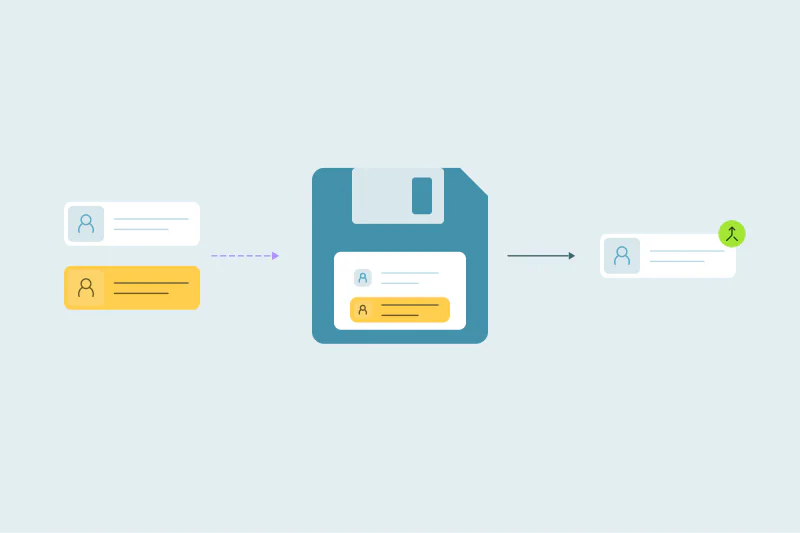
- Keep the original values. A record of every merge, or a backup before a large merge, gives you something to restore from.
Why a record of each merge matters well beyond recovery is covered in why you need a record of every merge.
How Dedupely helps you merge safely, with a way back
Merges in Dedupely happen directly in your CRM. You preview each merge, send unclear sets to review and exclude risky matches, which Dedupely holds back by default. Every merge is recorded with the original records and the winning values, and you can export them as a CSV with record IDs.
You can undo a merge for 30 days, in HubSpot, Salesforce, Pipedrive, Close, Nimble, Google Contacts and spreadsheets. The undo re-creates the merged-away records, moves their associated records back and marks them as not duplicates. Restored records get new IDs outside Salesforce, and list memberships and workflow enrollments don't come back, so treat every merge as permanent. HubSpot leads, Pipedrive products and merges made in HubSpot and Salesforce at once can't be undone.
Plan merges as if they're permanent
In most CRMs, a merge can't be taken back. Salesforce's Recycle Bin and Google Contacts' undo options give you some room, while HubSpot and Pipedrive treat merges as permanent.
Even where an undo exists, in a CRM or in a tool, it means bringing records back into your CRM and checking them again. So the safety comes before and after the merge. Preview and test before you merge, and keep the original values of every merge. If something still goes wrong, those values are what you rebuild from.
Frequently asked questions
Can you unmerge contacts in HubSpot?
No. HubSpot's help page says it's not possible to unmerge records, as of October 2026. The "Merged [record] IDs" property keeps the original IDs, so you can trace the merge. To recover, re-create the record from saved values and move its activities and associations back by hand.
Can you undo a merge in Salesforce?
Salesforce's help pages don't describe an unmerge. The records that weren't kept go to the Recycle Bin, where they can be restored for 15 days. After restoring one, check its values and related records, since activities and other related items were moved to the kept record during the merge.
Can you unmerge in Pipedrive?
No. Pipedrive's help article says merged items can't be un-merged, as of October 2026. Its merge flow has a Preview step before you confirm. That's the moment to check names, emails, owner and linked deals before the merge is final.
Can a deduplication tool undo a merge?
Some can. Since the merge happened in your CRM, undoing it means bringing the original records back into the CRM, so it's still worth treating each merge as permanent. Dedupely lets you undo a merge for 30 days, and it keeps the original values of every merge in a CSV you can export.
How do I avoid merging the wrong records?
Test your search on duplicates you already know, preview the merged record and start with a few sets before merging in bulk. Send unclear matches to a person for review. Hold back large groups and placeholder values like test@test.com, which often pair records that aren't duplicates.



 Or sign up with Google

 Salesforce AppExchange












