Dedupely Intelligence




TL;DR
- A merge usually picks each value from one of the duplicates.
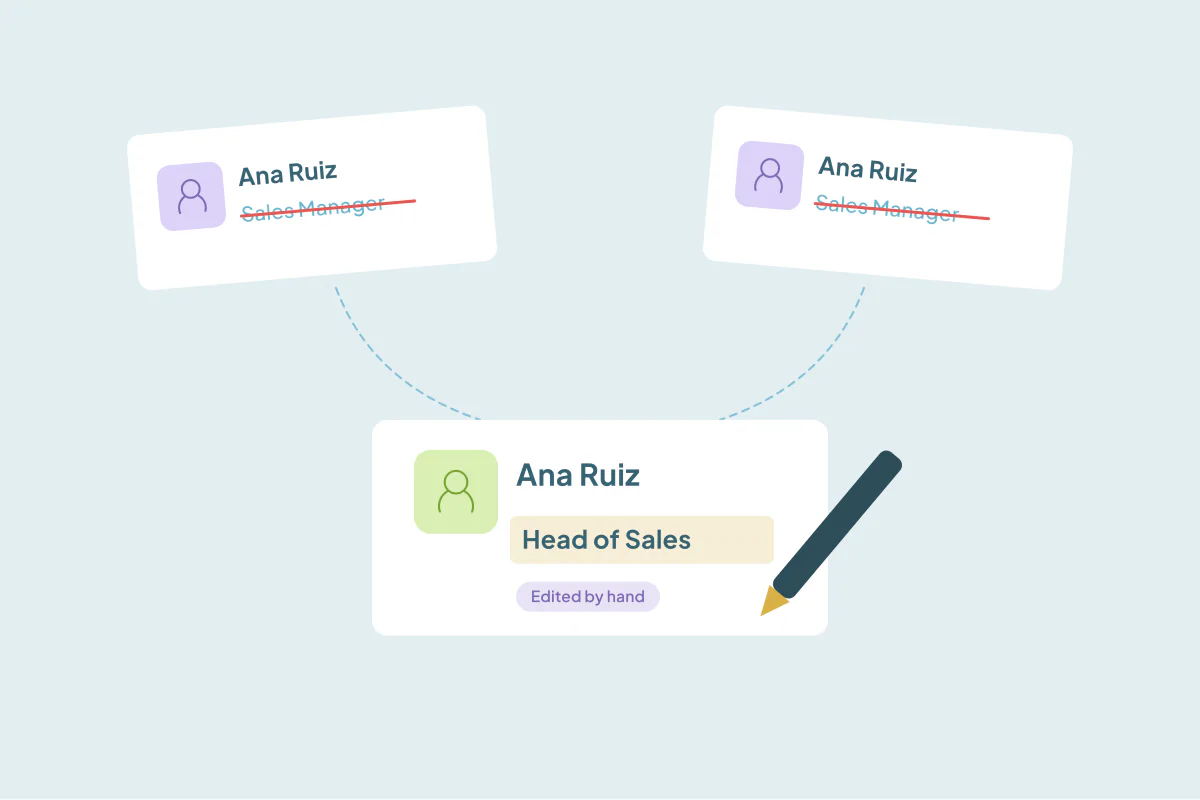
- Sometimes neither has it right: an old title on both, a typo in both, a phone with a missing digit.
- Editing the value during the merge saves a second step and leaves one clean record.
- Keep hand edits for one-off sets, and record them so the next person knows the value came from neither record.
- In Dedupely, Custom Merge lets you edit a value before merging, and Merge History marks it "Edited by hand".
When two records merge, each field normally takes its value from one of them: the newest email, the current owner, the longest company name. That works when one of the records has the right value.
Sometimes neither does. Both records show the person's old job title. Both have the company name misspelled the same way. One phone is missing a digit and the other is blank. You can merge and fix it afterwards, or you can type the right value during the merge. This post covers when to do which.
When neither duplicate has the right value
| Field | What both records say | What you know is right |
|---|---|---|
| Job title | "Sales Manager" (old) | "Head of Sales" |
| Company name | "Acme Corproation" | "Acme Corporation" |
| Phone | "555 201 334" and blank | "555 201 3344" |
| Address | Old office on both | The new office |
Picking one of the two values carries the mistake into the merged record. You'd have to remember to fix it later, and often nobody does.
Edit during the merge or after?
Edit during the merge when:
- You're merging a single set by hand anyway.
- You know the right value for sure, from the customer, a recent email or their website.
- The field matters for the next step, like the email a rep is about to use.
Fix it after, or not at all, when:
- You're merging in bulk. Hand edits don't scale, and a rule should decide.
- You're not sure what the right value is. Leave it and flag it for the owner.
- The value comes from another system that will overwrite it on its next sync.
Keep a record of hand edits
A value typed by hand didn't come from either duplicate. If someone later checks the merge, they need to know that, or the value looks like it appeared from nowhere. Make sure your tool or process records:
- That the value was edited by hand.
- Who edited it and when.
- What the original values on each record were.
How Dedupely handles hand edits
In Dedupely, Custom Merge lets you open a duplicate set, pick the winning value field by field and edit a value by hand before you preview and merge. It works in every connected CRM and in spreadsheets. For multi-value fields, you can keep values from more than one record. Merge History marks those values "Edited by hand", and its CSV export keeps the original values from every merged record. For bulk merges, Merge Rules decide each field instead, so hand edits stay for the sets that need them.
Fix it once, during the merge
When neither duplicate has the right value, picking one keeps the mistake. For one-off sets, edit the value during the merge and keep a record that it was edited by hand. For bulk merges, let rules decide and fix recurring problems at the source.
Frequently asked questions
Can I edit a field when merging duplicates?
In many tools, yes, when you merge a single set by hand. In Dedupely, Custom Merge lets you edit a value before merging, in every CRM and in spreadsheets.
Should I edit values during a bulk merge?
No. Bulk merges should follow rules. Keep hand edits for single sets where you know the right value.
How will others know a value was edited by hand?
Use a tool that records it. In Dedupely, Merge History marks those values "Edited by hand" and keeps the originals.
What if I'm not sure which value is right?
Don't guess. Merge with the best available value, or leave the set unmerged, and ask the record owner.
Why did my edited value change back after the merge?
Another system may have overwritten it on its next sync. Fix the value in the system that owns that field.




 Or sign up with Google