Comprueba qué filas HubSpot rechaza antes de subirlas.

Gratis para 10 ejecuciones al día.
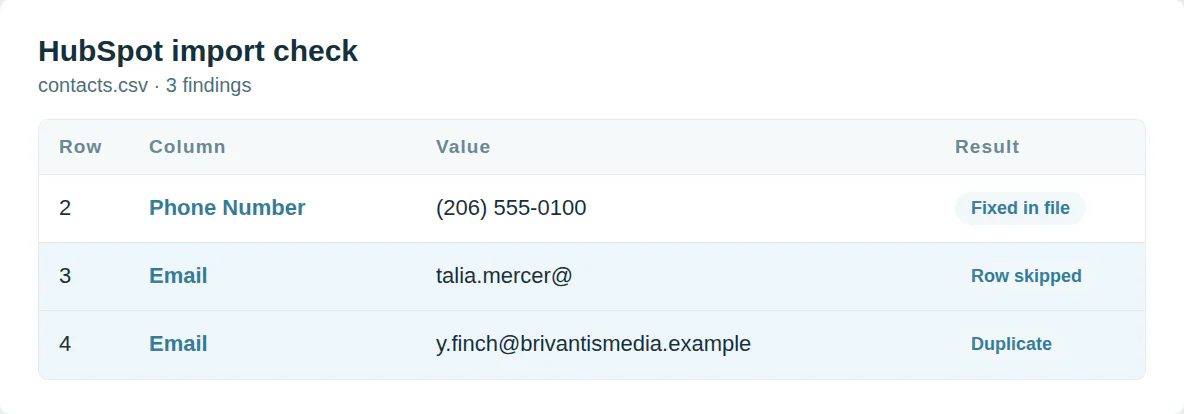
Filas que HubSpot rechaza
Un correo sin dominio falla en la validación. Una empresa sin nombre ni dominio no tiene nada en qué basarse. HubSpot omite la fila.
Este validador lee cada fila como lo hace HubSpot y corrige lo que puede.
Comienza con las columnas que HubSpot asigna
Un encabezado que HubSpot no reconoce se descarta. Un valor de lista desplegable no reconocido se importa vacío. Una fecha en orden incorrecto se lee al revés.
Las plantillas de HubSpot usan los nombres de propiedad que su importador asigna por defecto.
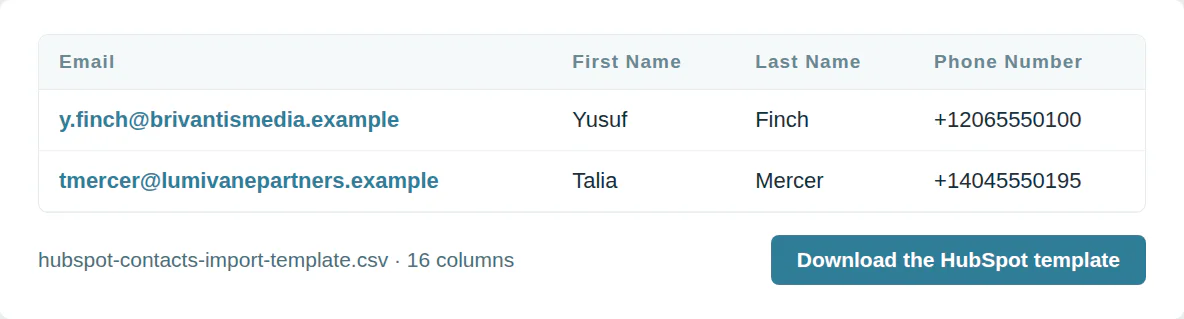
La plantilla de importación de HubSpot
Plantilla de contactos HubSpot
16 columnas, en el orden que se descarga la plantilla.
| Columna | Qué va en él | Obligatorio |
|---|---|---|
| Un correo electrónico | Coincide con registros | |
| First Name | Texto | |
| Last Name | Texto | |
| Phone Number | Signo más, código de país y número | |
| Mobile Phone Number | Signo más, código de país y número | |
| Company Name | Texto | |
| Job Title | Texto | |
| Website URL | Una dirección web | |
| Street Address | Texto | |
| City | Texto | |
| State/Region | Texto | |
| Postal Code | Texto | |
| Country/Region | Texto | |
| Lifecycle Stage | Una de las opciones del CRM | |
| Lead Status | Una de las opciones del CRM | |
| Contact Owner | El correo del usuario |
Plantilla de empresas HubSpot
14 columnas en el orden que descarga la plantilla.
| Columna | Qué va en él | Obligatorio |
|---|---|---|
| Company name | Texto | Una de estas |
| Company Domain Name | Un dominio como example.com | Una de estas |
| Phone Number | Signo más, código de país y número | |
| Type | Una de las opciones del CRM | |
| Number of Employees | Un número, sin símbolos de moneda | |
| Annual Revenue | Un número, sin símbolos de moneda | |
| Street Address | Texto | |
| City | Texto | |
| State/Region | Texto | |
| Postal Code | Texto | |
| Country/Region | Texto | |
| Lifecycle Stage | Una de las opciones del CRM | |
| Company owner | El correo del usuario | |
| LinkedIn Company Page | Una dirección web |
Úsalo desde un script o un agente de IA
MCP  https://dedupe.ly/tools/mcp   every free tool in one connector (this one: check_crm_import)

POST https://dedupe.ly/tools/api/import-checker
{ "crm": "hubspot", "csv": "..." }

Docs https://dedupe.ly/tools/api/openapi.jsonPreguntas sobre importaciones de HubSpot

Se omite una fila cuando su correo no es válido, falta un campo obligatorio, o su correo coincide con más de un contacto existente. La mayoría de otros problemas importan la fila y dejan ese campo vacío.
HubSpot importa la fila pero descarta un valor que no puede leer: una fecha en orden incorrecto, un número con letras, o un valor desplegable que no es una opción de la propiedad.
HubSpot reporta errores de las primeras 1.000 filas de un archivo. Este validador las lee todas.
Día-mes-año, mes-día-año o año-mes-día, con barras, guiones o puntos. Elige el formato en el importador. El archivo corregido usa año-mes-día.
Coincide contactos por correo y empresas por dominio. Un contacto sin correo o una empresa sin dominio se convierte en registro nuevo cada vez, y el mismo correo dos veces en un archivo importa solo una fila.
Con signo más, el código de país y el número, como +12125550123. El verificador reescribe los números así.
Más herramientas gratis


Empieza gratis
20 fusiones de prueba gratis y todo el soporte gratuito que necesite para controlar sus duplicados.

 O regístrate con Google
Laura R
Usuario de Salesforce
 Salesforce AppExchange
 ¿Limpias el CRM de tus clientes? Ver el programa de partners












