Jedes Blatt wird zu einer separaten CSV und nichts wird hochgeladen.

Kostenlos 10 Durchläufe pro Tag.
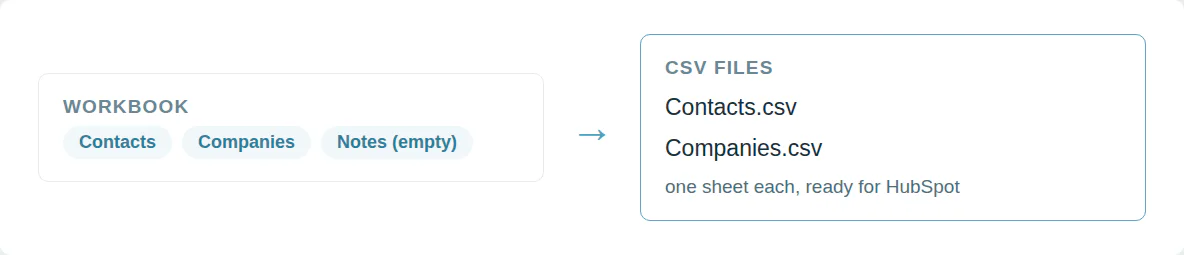
Ein Arbeitsblatt pro CSV für HubSpot
HubSpot importiert ein Blatt pro Datei. Eine Arbeitsmappe mit einer zweiten Registerkarte wird abgelehnt. Das manuelle Speichern jeder Registerkarte dauert eine Weile.
Wählen Sie ein Arbeitsblatt oder laden Sie jedes als eigene CSV herunter.
Datumsangaben und Formeln sind gut lesbar
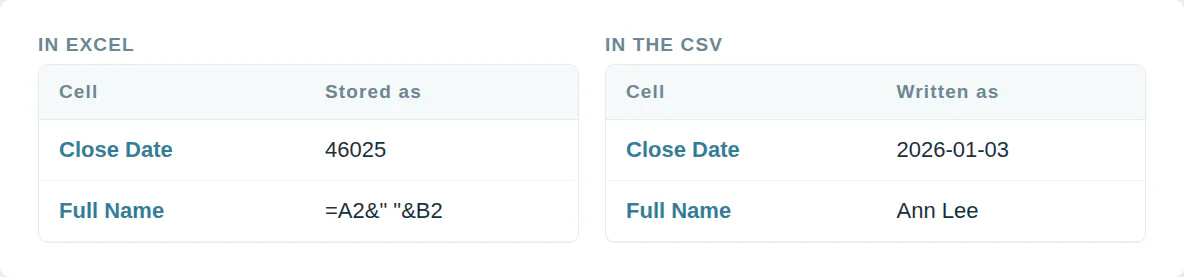
Excel speichert ein Datum als Zahl wie 46025. Eine Formelzelle enthält =A2&" "&B2. Der Import erhält den falschen Wert oder lehnt die Zeile ab.
Jede CSV formatiert Daten als 2026-01-03 und nutzt den Wert, den jede Formel anzeigt.
Aus einem Skript oder von einem KI-Agenten nutzen
MCP  https://dedupe.ly/tools/mcp   every free tool in one connector (this one: excel_to_csv)

POST https://dedupe.ly/tools/api/excel-to-csv
{ "file": "<the .xlsx as base64>", "sheet": "all" }

Docs https://dedupe.ly/tools/api/openapi.jsonFragen zur Umwandlung von Excel zu CSV

Wählen Sie die .xlsx oder .xls-Datei, wählen Sie ein Blatt und ein Trennzeichen, und klicken Sie Konvertieren. Die CSV wird sofort heruntergeladen.
Ja. Excel 97 bis 2003 .xls-Dateien konvertieren genauso wie .xlsx.
Wählen Sie ein Blatt oder alle Blätter aus und erhalten Sie je Blatt eine CSV.
HubSpot importiert ein Blatt pro Datei. Konvertieren Sie das Blatt zu CSV und importieren Sie dieses.
Der Datenimport-Assistent akzeptiert CSV. Konvertieren Sie das Blatt hier, die CSV wird als UTF-8 exportiert, die der Assistent erwartet.
Ja, ohne Byte-Order-Markierung, was sich für CRM-Importe eignet. Aktivieren Sie die Option, um eine hinzuzufügen, wenn Sie die CSV später in Excel öffnen möchten.
Eine CSV enthält nur Werte. Jede Formel exportiert ihr letztes berechnetes Ergebnis, Farben und Schriftarten werden verworfen.
Als Jahr, Monat und Tag, z. B. 2026-01-03, das jeder CRM-Import liest.
Ja. Wählen Sie Komma, Semikolon oder Tabulator.
Nein. Die Arbeitsmappe wird im Browser gelesen und verlässt niemals Ihren Computer.
Weitere kostenlose Tools


Kostenlos starten
20 kostenlose Test-Merges und so viel kostenlosen Support, wie Sie brauchen, um Ihre Duplikate in den Griff zu bekommen.

 Oder mit Google registrieren
Emily K
Mercy Housing
 HubSpot-Nutzer
 Bereinigen Sie CRM-Daten für Kunden? Zum Partnerprogramm












