Blog
CRM Organization

Why Your CRM Database Is Turning Into a Mess (And How to Fix It)

Messy CRM data is a process problem, not one bad import. What the quick fixes miss, and what keeps a database clean on its own.

September 10, 2026
#
min read
Two screens side by side: a cluttered CRM record under a frowning face, and the same record tidy under a smiling one.
Gaby Salinas
Gaby Salinas
Marketing

Table of contents

View as Markdown

Record details change naturally as people switch jobs, companies rebrand, and new marketing lists enter the system. A messy database is rarely caused by a single major failure; it inevitably happens when raw files, quick imports, and daily usage accumulate over time without a standardized backend process to consolidate records.

Why Superficial Fixes Don't Stop Data Decay

Fixing Raw Imports with AI Tools

Running AI scripts after uploading uncleaned lists attempts to format text notes into specific CRM fields. While AI can reformat text inside a single field, it cannot fix database structure. If multiple profiles already exist for the same contact, AI simply writes data to whichever profile it targets first, leaving secondary records outdated and splitting the contact’s history further.

Static CSV Exports

Exporting contact lists into spreadsheets for external outreach platforms immediately severs the connection with your core database. The moment data leaves in a static file, unsubscribes, bounces, or property updates in the secondary tool fail to sync back. This desynchronization leads to prospects receiving duplicate outreach from competing sequences while reps waste time pursuing disqualified leads.

Delegating Manual Cleanup

Assigning record edits or spreadsheet cleanup to non-admin team members or external support shifts the workload without solving system design. Because non-admins lack deep context around specific account histories and business rules, manual line-by-line edits frequently result in accidental overwrites of valid phone numbers, custom properties, or deal notes. Instead of eliminating the mess, admins end up spending hours auditing work and repairing deleted data.

Native Limitations

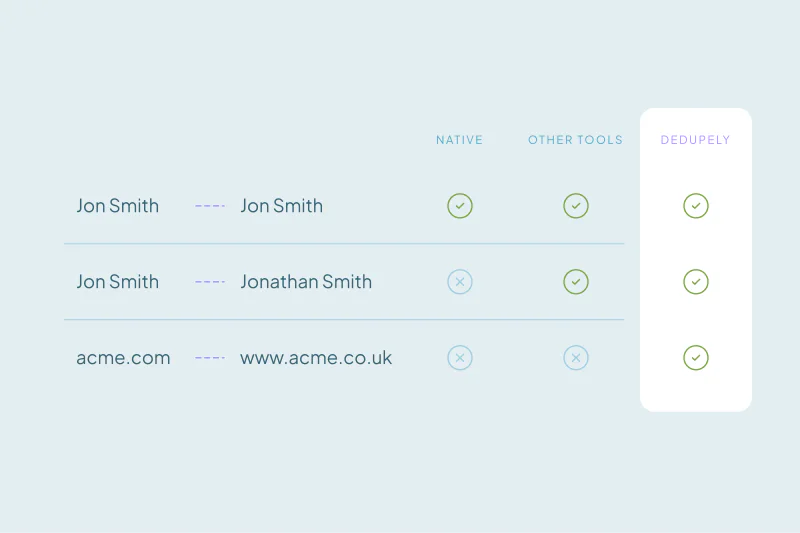
Built-in CRM features operate reactively on records after they are already live in production, offering little visibility into the true scope of duplicates across your entire database. Standard native tools restrict custom matching rules and lack the controls that dictate which field value takes priority during a merge. To make matters worse, basic built-in tools often lack essential batch controls, while more advanced cleanup capabilities remain locked behind higher subscription tiers, forcing admins to run the cleanup with restricted tools.

The Core Fix in Three Steps

Step 1: Preserving Full History

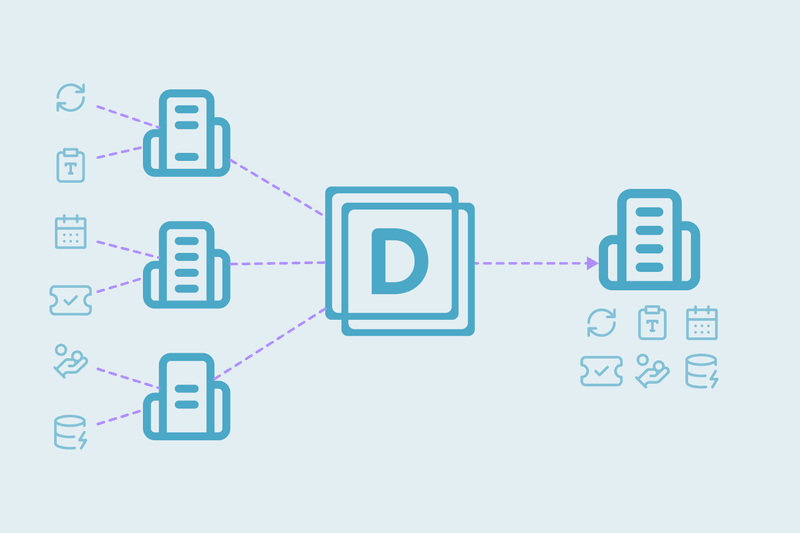
Merge fragmented records into a single main one without losing past details, like combining a phone number from an older event list with a new job title from a recent import. This keeps past activities, emails, and notes attached to one place instead of throwing valid information away. Sales reps see every past touchpoint instantly, and customer support teams avoid asking clients to repeat information.

Step 2: Cleaning Up the Database

Combine duplicates so every person and business appears only once. Connecting every contact directly to their main company profile removes clutter and keeps records organized. Sales reps find the right record on their first search, marketing avoids paying extra for duplicate contact lists, and leadership gets pipeline numbers they can trust.

Step 3: Keeping an Ongoing Process

Set up pre-import checks and background processes to catch duplicates when they enter the CRM. Checking spreadsheets, webforms, and connected tools before imports go live prevents messy data from reaching active system views. The database stays clean on its own without emergency cleanup projects, giving admins time to build better workflows while reps work with information they can trust.

The CRM Admin-Led Action Plan

  1. Clean, merge, and format incoming bulk spreadsheets in an offline environment before import so unvalidated data never touches production workflows.
  2. Identify every recurring data entry point: webforms, third-party integrations, app connectors, and API syncs, and pinpoint where duplicate entries originate.
  3. Categorize matching logic by certainty level to separate obvious matches from edge cases.
  4. Configure background automation to clean up recurring matches, while routing edge cases into an admin review queue to prevent accidental data overwrites.
  5. Run a monthly system audit to verify data health, confirm background automations are functioning, and uncover new processes or tools adopted across departments so intake rules stay aligned.

Maintaining a clean database does not require policing sales reps or spending endless hours on manual firefighting. By shifting from temporary workarounds to automated backend staging, systematic matching, and routine audits, a single admin can keep the CRM reliable, accurate, and scalable for the long term.

Auto Merge runs the rules you set on a schedule, so recurring duplicates are handled before anyone has to notice them.

Start free, connect your CRM, and see the duplicates you have before you merge anything. Start here.


Contact us

We’d be happy to help you get this set up.

Write us a message

We probably know the answer to your question already

Email copied to your clipboard!

Book a Zoom

Whether you’re getting started or getting intense.
Get in touch!

Get started for free

20 free trial merges and as much free support as you need to get your duplicates under control.

"The data in our CRM is much cleaner thanks to this App. Easy to use and relatively inexpensive."
H Chitty

H Chitty

HubSpot User

HubSpot MarketplaceHubSpot Marketplace
"I do recommend! A++ Pretty easy to use. Adequate reporting. SUPERB CUSTOMER SUCCESS!"
Alina T

Alina T

Sales Operations Specialist, FieldBee

51–100 employees
"Great tool that works as promised. Great customer support - Nestor was super helpful onboarding."

R McNaught

HubSpot User

HubSpot MarketplaceHubSpot Marketplace
"It prioritizes merging while keeping key data. Highly recommended for anyone using Pipedrive integration."
John K

John K

Head of Marketing, David J Anderson School of Management

Pipedrive MarketplacePipedrive user
"The app worked great and helped me a lot with hundreds of duplicates in Pipedrive."
Samo J

Samo J

Founder & CSO, TapHome

Pipedrive MarketplacePipedrive user
"Superior deduping logic with excellent support - highly recommend for cleaning up messy HubSpot records."
M Weppner

M Weppner

"Dedupely was incredibly easy to set up, and the support team replied almost instantly each time I reached out. In just a few

Yuliya

Pipedrive User

Pipedrive MarketplacePipedrive Marketplace
"Incredibly effective at tackling massive duplicate data cleanup - exactly what we needed."

D Wright

HubSpot User

HubSpot MarketplaceHubSpot Marketplace
"The application works great and [...] their customer support was responsive and helped me get on the right track!"

Shawnee K

Salesforce User

Salesforce AppExchangeSalesforce AppExchange
"Worked as expected and Nestor at Customer support was extremely helpful walking me through some nightmare duplicate issues."

DiBlasio S

HubSpot User

HubSpot MarketplaceHubSpot Marketplace
"I was really pleased with Dedupely. It's highly configurable and works well when used manually or for automated deduping."

Laura R

Salesforce User

Salesforce AppExchangeSalesforce AppExchange
"It couldn't have been much easier to connect to HubSpot and run my first dedupe."

Emily K

Mercy Housing

HubSpot MarketplaceHubSpot user
"It did more than I expected. Support is great!"

Paweł S

Pipedrive User

Pipedrive MarketplacePipedrive Marketplace
"Dedupely helped us to quickly de-duplicate hundreds of records, with a level of transparency that gives you confidence..."

Grattan H

Pipedrive User

Pipedrive MarketplacePipedrive Marketplace
"Our customers want to achieve great results fast. Everybody at HubSpot already knows what Dedupely can do..."
Scott B

Scott B

VP Platform Ecosystem, HubSpot

"This tool made a week long project take a few hours. Definitely a go-to for deduplication processes."

Burchard J

HubSpot User

HubSpot MarketplaceHubSpot Marketplace
"It took away the huge headache we had of merging over 27,000 duplicate contacts."
Sean B

Sean B

Managing Director, Legal CPD

"Most of all, our team has been impressed by the way the Dedupely Customer Success team consistently goes above and beyond."

Isaac J

Salesforce User

Salesforce AppExchangeSalesforce AppExchange
"Great support. They are on top of things, and answer questions very quickly."

Larry D

Pipedrive User

Pipedrive MarketplacePipedrive Marketplace
"Works really well, support is A++++++"

Andy G

Pipedrive User

Pipedrive MarketplacePipedrive Marketplace
"We had 300k records in our CRM. Despite the large amount, Dedupely was perfect. The support was especially outstanding."
Simon W

Simon W

Tillhub

~50 employees
"Worked very simply and effectively and suited my budget [...] Very happy to recommend a good app and integration."
Allan R

Allan R

Co-founder & Managing Director, Target3D

11–50 employees
"Dedupely was huge in improving the quality of my CRM database. It saved me hours of manual merging."
Marco S

Marco S

Information Systems Manager, Efecte

~200 employees
"Fantastic time saver with great filters - auto and bulk merging made so much easier!"
A Team

A Team

HubSpot User

HubSpot MarketplaceHubSpot Marketplace
"It helped us clean up a giant mess of duplicates after migrating to HubSpot from our old CRM."

J Eddie

HubSpot User

HubSpot MarketplaceHubSpot Marketplace
"Perfect solution that delivers exactly as promised. Does exactly what we need it to. Great tool."

A Grogan-Crane

HubSpot User

HubSpot MarketplaceHubSpot Marketplace
"In a matter of maybe 30 minutes [...] Dedupely automatically took care of my dupes and merge needs. So happy I found it."

Wasmer D

HubSpot User

HubSpot MarketplaceHubSpot Marketplace

Running CRM cleanup for clients? See the Partner Program

Skip to content