


How to review and merge sensitive records with Dedupely
- Choose the visible fields:
Select the key identifiers you want Dedupely to compare, such as Email, First Name, or Phone Number.
- Edit the match options per field:
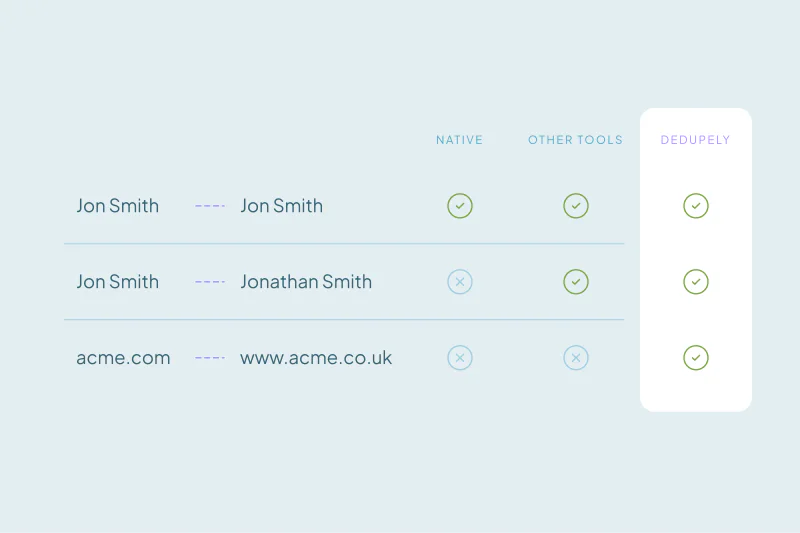
Decide how thorough or lenient the matching should be. Click the arrow under each field name to switch between Exact, Similar, Fuzzy, Similar Words, or Domain Root.
- Set Merge Rules
Open Merge Rules and choose which record and field values win. Check ownership, contact details, and fields used by your workflows.
- Review the matches
Click Scan, then open View Match Details for the sets you plan to merge. Confirm they represent the same person or company and check the winning values. Leave uncertain matches unselected.
- Test a small merge
Merge a small reviewed sample. Check the surviving records, activities, and associations in your CRM before merging more. Stop and adjust the rules if the result differs from what you expected.
- Merge the reviewed sets
Select the duplicate sets you have reviewed and click Merge. Use Select all X matches only after checking the full result set.
Key Takeaways
- High-stakes cleanups are defined by operational consequences, such as overwritten commission data, broken integration webhooks, or lost billing records, regardless of database size.
- Native CRM tools force a choice between slow manual reviews and blind background updating, while presenting the same false positives repeatedly.
- True control requires three layers: Background detection with threshold boundaries, permanent false-positive memory, and individual set previews.
- Combining automated scanning with single-set inspection allows teams to process routine records quietly while keeping complete visual control over enterprise accounts.
Defining High-Stakes Data Management
High stakes in CRM management center on operational consequences rather than total record volume. Whether an admin manages 1,000 records or 1,000,000, high stakes exist whenever an unexpected field overwrite creates immediate downstream issues, like:
- Sales Rep Trust & Commissions: Overwriting account ownership, rep assignments, or recent activity logs breaks commission tracking and creates internal conflicts between sales reps and operations teams.
- Multi-Department System Dependencies: When Sales, Support, Operations, and Logistics share a single CRM, choosing the wrong primary record breaks downstream webhooks, billing syncs, and ERP connections.
- Enterprise Revenue Risks: Multi-million-dollar account structures rely on critical custom properties (such as tax IDs, billing codes, or primary buyer contact roles) where losing a single field directly threatens active pipeline revenue.
- Administrative Reputation: For any admin, applying an unreviewed change that corrupts reporting damages their credibility across the leadership team.
Native CRM Limitations
Standard CRM deduplication tools encounter structural boundaries when handling high-stakes records because they offer zero visibility into final outcomes before saving changes.
- Two-Record Display Caps: Most native tools restrict side-by-side field inspections to two or three records at a time. When a single account accumulates dozens of duplicate entries, admins in platforms like HubSpot and Salesforce must run sequential manual passes without seeing how all records combine into a final result.
- Blind Background Merges: Standard bulk tools rely on binary settings with zero outcome visibility. Systems either force manual review of every single record set or process updates blindly, leaving zero property-level preview control in ecosystems like Pipedrive, Close, Nimble, or Google Contacts.
- Zero False-Positive Memory: Dismissing a match in native interfaces rarely saves that decision permanently; instead, they continuously rescan and present the exact same non-duplicate accounts creating review fatigue.
3-Stage Zero-Data-Loss Deduplication Framework
Resolving complex duplicate records without risking data integrity requires separating detection from execution. Establishing clear operational boundaries ensures routine background cleanups happen smoothly while reserving human review for sensitive, high-stakes accounts.
Stage 1: Individual Set Outcome Inspection
High-stakes accounts demand visual proof of the merge outcome before changing anything in the live database, which means high-stakes duplicate sets usually require line-by-line verification. This allows admins to review surviving custom properties, confirm primary record choices, and manually adjust specific winning field values on the spot. In our internal data from working with CRM teams, almost 70% specifically require visual proof that multi-select fields combine all values rather than overwriting existing data.
(In Dedupely: View Match Details for each duplicate set to preview the merge result at a field-level, and manually adjust choices before merging.)
Stage 2: Permanent Memory for False Positives
Maintaining reliable match lists requires removing repetitive alerts for valid, distinct records. When native deduplication tools continuously flag known non-duplicates, admins develop alert fatigue. Establishing a permanent exclusion process ensures that once a pair is confirmed as non-duplicate or requires isolation, the system records that boundary permanently, removing those records from future review lists forever and preventing accidental merges down the line.
(In Dedupely: Mark non-duplicates as Rejected Matches to permanently remove distinct accounts from future matching.)
Stage 3: Background Detection
CRM admins often fall into the trap of manually checking for duplicates every day or every hour. A smarter approach lets background matching run continuously to catch duplicate sets as they enter the system, without forcing you to constantly monitor the database. By setting notification boundaries, you are alerted only when a search finds a specific number of duplicate matches, allowing you to review data on your own schedule instead of spending every day on manual checks.
(In Dedupely: Configure Auto Match with custom thresholds so background searches run continuously and notify you when duplicate matches hit your specified limit.)
Automating database maintenance keeps critical account data and high-stake accounts secure. By pairing background detection and threshold alerts with permanent rejection memory and single-set previews, teams eliminate uncertainty, protect vital revenue context, and maintain complete accuracy across every record.
Background duplicate matching runs on your own thresholds in Dedupely, and Match Details shows what a merge keeps before you run it.
Start free, connect your CRM, and see the duplicates you have before you merge anything. Start here.



 Or sign up with Google
 Pipedrive Marketplace











