Un contact par ligne avec téléphone et email dans des colonnes séparées.

Gratuit pour 10 exécutions par jour.
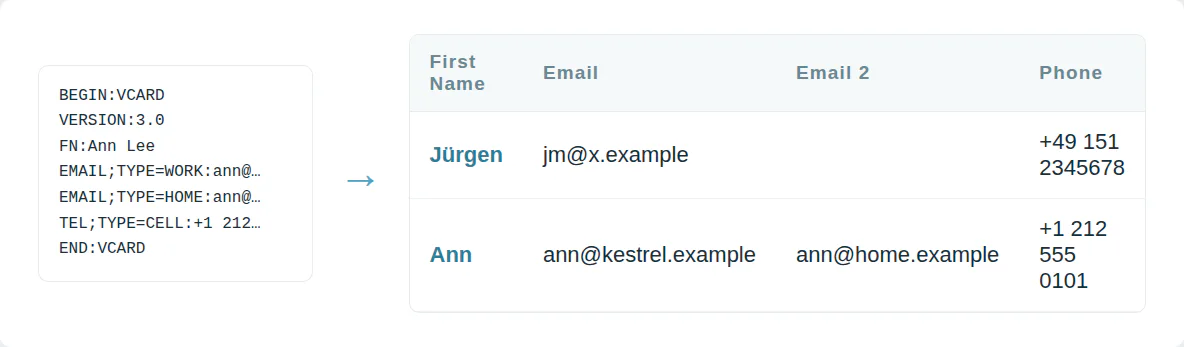
Chaque contact sur une ligne
Un fichier VCF empile chaque contact sous forme de bloc de texte. Une feuille de calcul ne peut pas le trier ou le filtrer. Un import CRM veut des colonnes.
Ce convertisseur transforme chaque vCard en une ligne CSV.
Accents d'anciens téléphones décodés
Les anciens téléphones sauvegardent les noms accentués sous forme de codes =C3=BC. Un import brut affiche Müller comme M=C3=BCller. Chaque contact accentué est concerné.
Chaque version vCard de 2.1 à 4.0 est décodée en texte brut.

Utilisez-le depuis un script ou un agent IA
MCP  https://dedupe.ly/tools/mcp   every free tool in one connector (this one: vcf_to_csv)

POST https://dedupe.ly/tools/api/vcf-to-csv
{ "vcf": "BEGIN:VCARD\nVERSION:3.0\nFN:Ann Lee\nEND:VCARD", "shape": "generic" }

Docs https://dedupe.ly/tools/api/openapi.jsonQuestions sur la conversion de VCF en CSV

Sélectionnez le fichier .vcf ou collez le texte vCard et appuyez sur Convertir. Le CSV se télécharge avec une ligne par contact.
Sur iCloud.com, ouvrez Contacts, sélectionnez les contacts, puis choisissez Exporter vCard. Sur l'iPhone, vous pouvez partager une liste de contacts sous forme d'un seul .vcf.
Oui. Un fichier .vcf contenant des centaines ou des milliers de contacts devient un seul CSV avec une ligne par contact.
Chacun a sa propre colonne, avec une deuxième colonne indiquant son type, comme Mobile ou Professionnel.
Oui. Choisissez l'import Google Contacts et les en-têtes correspondent aux attentes de Google.
vCard 2.1, 3.0 et 4.0, y compris les noms quoted-printable des anciens téléphones.
Non. Les contacts sont convertis dans votre navigateur et ne quittent jamais votre ordinateur.
Plus d’outils gratuits


Commencez gratuitement
20 fusions gratuites en essai et autant d’assistance gratuite que nécessaire pour maîtriser vos doublons.

 Ou inscrivez-vous avec Google
DiBlasio S
Utilisateur HubSpot
 HubSpot Marketplace
 Vous nettoyez des CRM pour vos clients ? Voir le programme partenaires












