One row per contact with each phone and email in its own column.

Free for 10 runs a day.
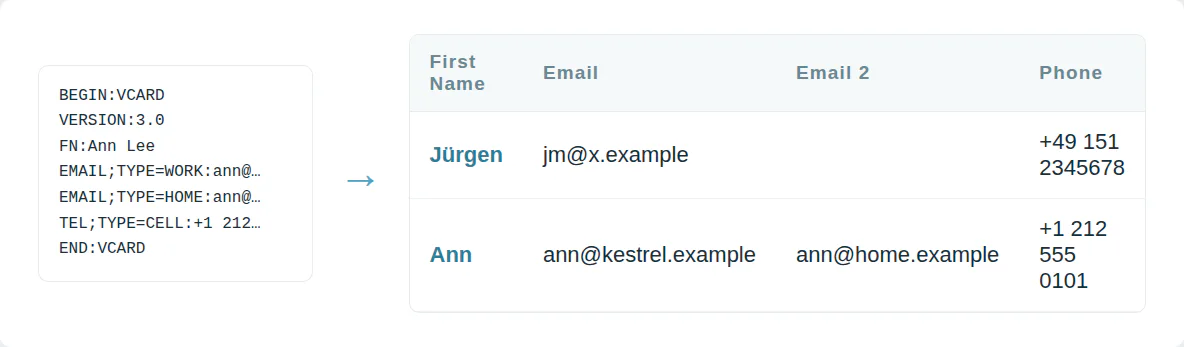
Every contact on one row
A VCF file stacks each contact as a block of text. A spreadsheet cannot sort or filter it. A CRM import wants columns.
This converter turns each vCard into one CSV row.
Accents from older phones decoded
Older phones save accented names as =C3=BC codes. A raw import shows Müller as M=C3=BCller. Every accented contact is affected.
Every vCard version from 2.1 to 4.0 is decoded to plain text.

Use it from a script or an AI agent
MCP  https://dedupe.ly/tools/mcp   every free tool in one connector (this one: vcf_to_csv)

POST https://dedupe.ly/tools/api/vcf-to-csv
{ "vcf": "BEGIN:VCARD\nVERSION:3.0\nFN:Ann Lee\nEND:VCARD", "shape": "generic" }

Docs https://dedupe.ly/tools/api/openapi.jsonQuestions about converting VCF to CSV

Choose the .vcf file or paste the vCard text and press Convert. The CSV downloads with one row per contact.
On iCloud.com open Contacts, select the contacts, then choose Export vCard. On the iPhone itself you can share a contact list as a single .vcf.
Yes. A .vcf with hundreds or thousands of contacts becomes one CSV with one row each.
Each one gets its own column, with a second column naming its type, such as Mobile or Work.
Yes. Pick Google Contacts import under column names and the headers match what Google expects.
vCard 2.1, 3.0 and 4.0, including quoted-printable names from older phones.
No. The contacts are converted in your browser and never leave your computer.
More free tools


Get started for free
20 free trial merges and as much free support as you need to get your duplicates under control.

 Or sign up with Google
DiBlasio S
HubSpot User
 HubSpot Marketplace
 Running CRM cleanup for clients? See the Partner Program











